


















Can AI Adjust Your Photo Lighting? Relight Says Yes
Jan 12, 2026
Alysa Gavilan
Alysa Gavilan has spent years exploring photography through photojournalism and street scenes. She enjoys working with both film and mirrorless cameras, and her fascination with the craft has grown over the decades. Inspired by Vivian Maier, she is drawn to capturing everyday moments that often go unnoticed.
Share:
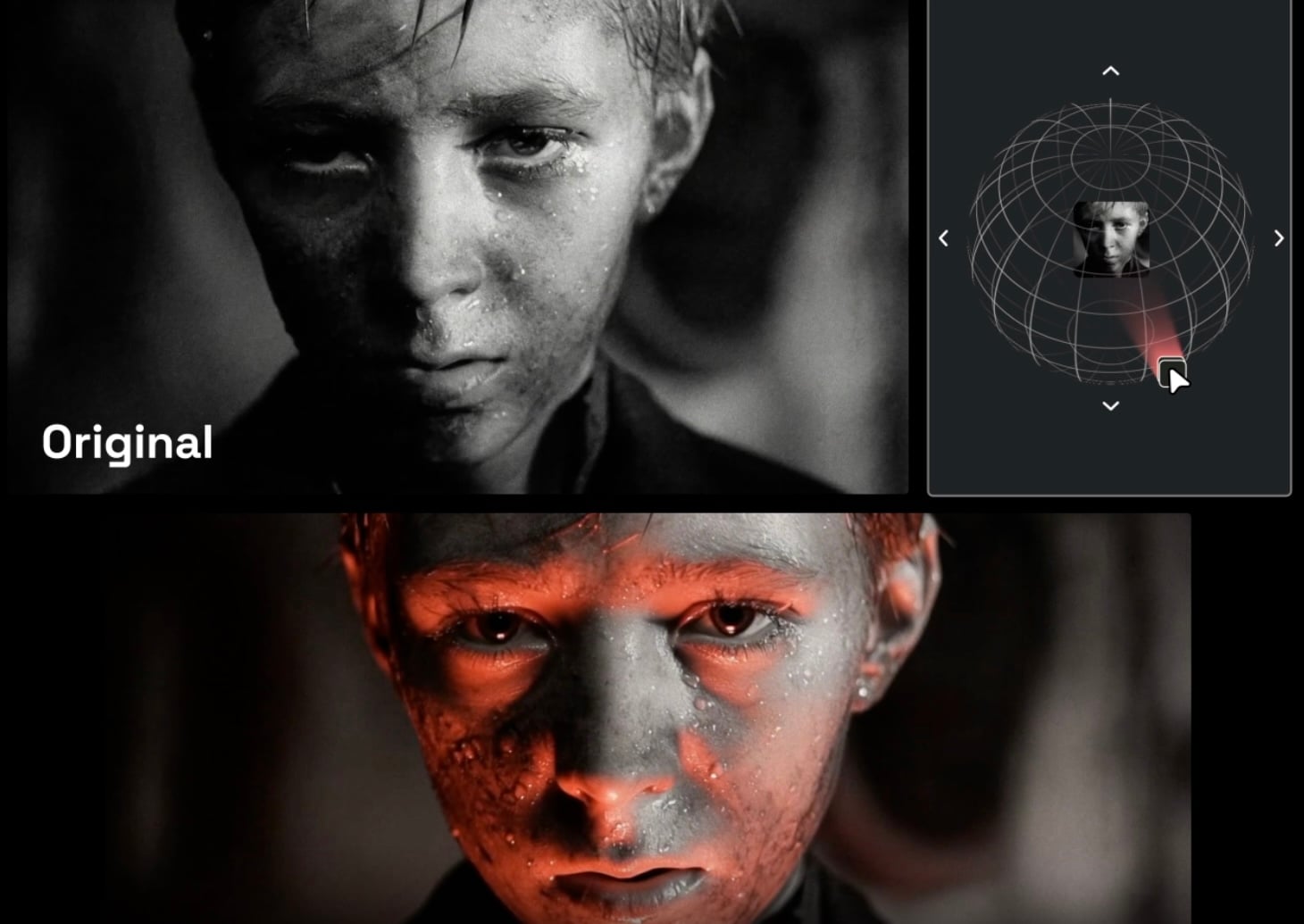
Lighting is one of the most important elements in photography, yet achieving professional results often requires a studio full of equipment or hours of careful post-processing. In 2026, AI is changing that with Relight.
This new tool on the Higgsfield platform allows you to manipulate lighting in your images with unprecedented precision. By leveraging advanced AI and depth-mapping technology, Relight reconstructs how light interacts with your subject, giving you control over angle, intensity, and color.
For photographers and creators, it opens new possibilities without the complexity of traditional studio setups.
How Relight Works
Relight goes far beyond simple brightness adjustments. It understands the three-dimensional geometry of your photo, allowing you to move the light source as if it were in a real studio.
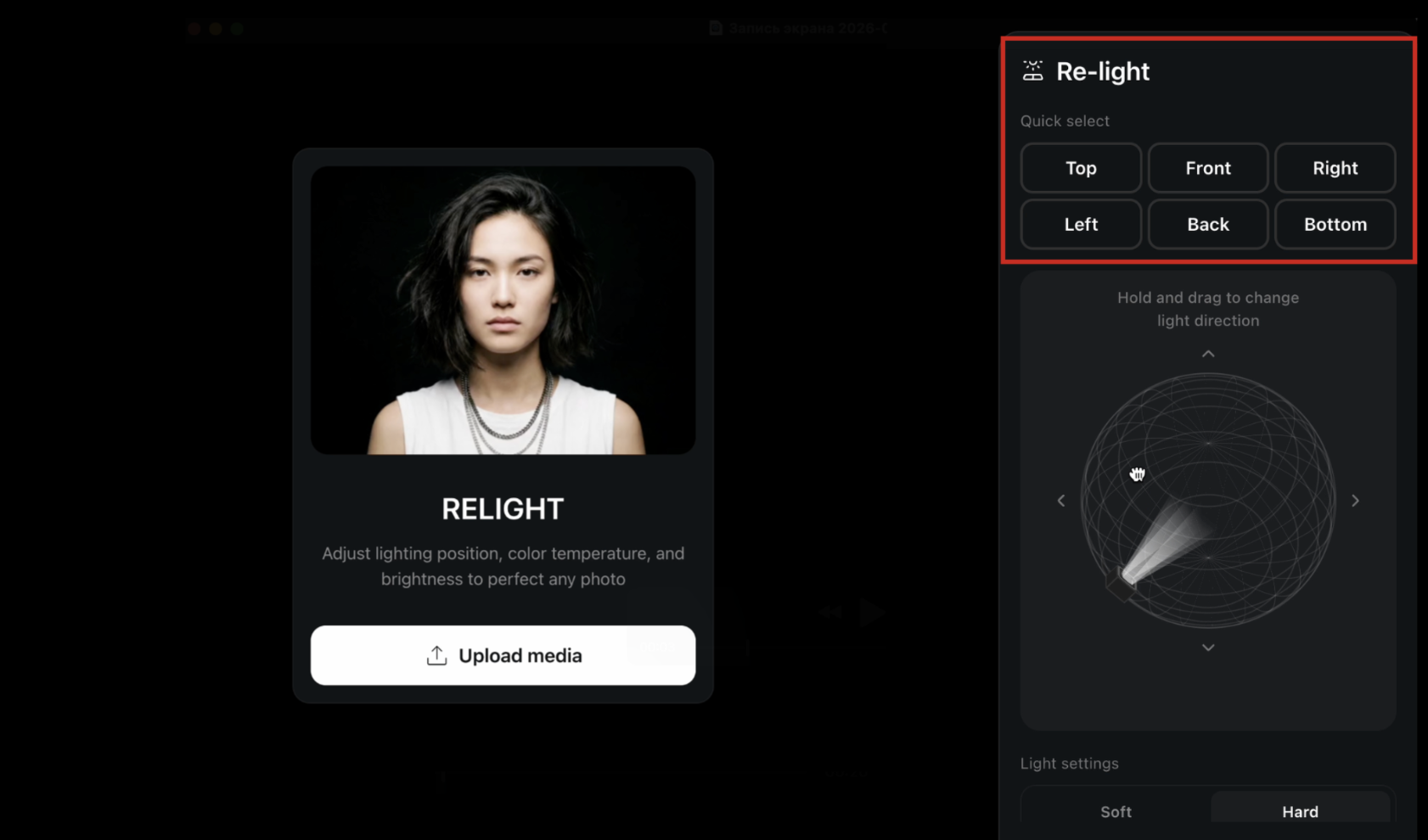
You can rotate, tilt, and position lights using the interactive 3D light pad, adjusting shadows and highlights in real time. This gives you control over subtle details that can make the difference between a flat-looking image and one that has depth, dimension, and professional polish.
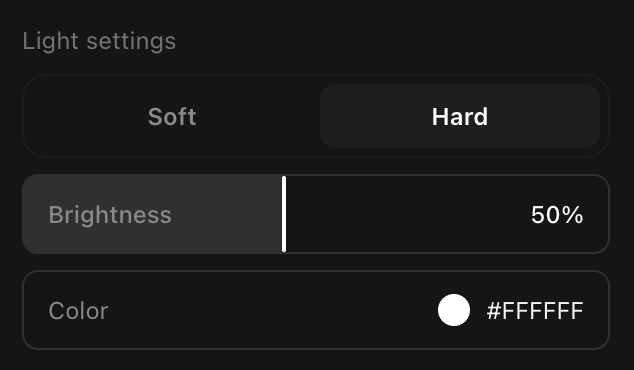
The tool also provides fine control over light quality. Soft lighting wraps gently around the subject, smoothing textures and creating gradual shadow transitions, similar to a softbox or window light.
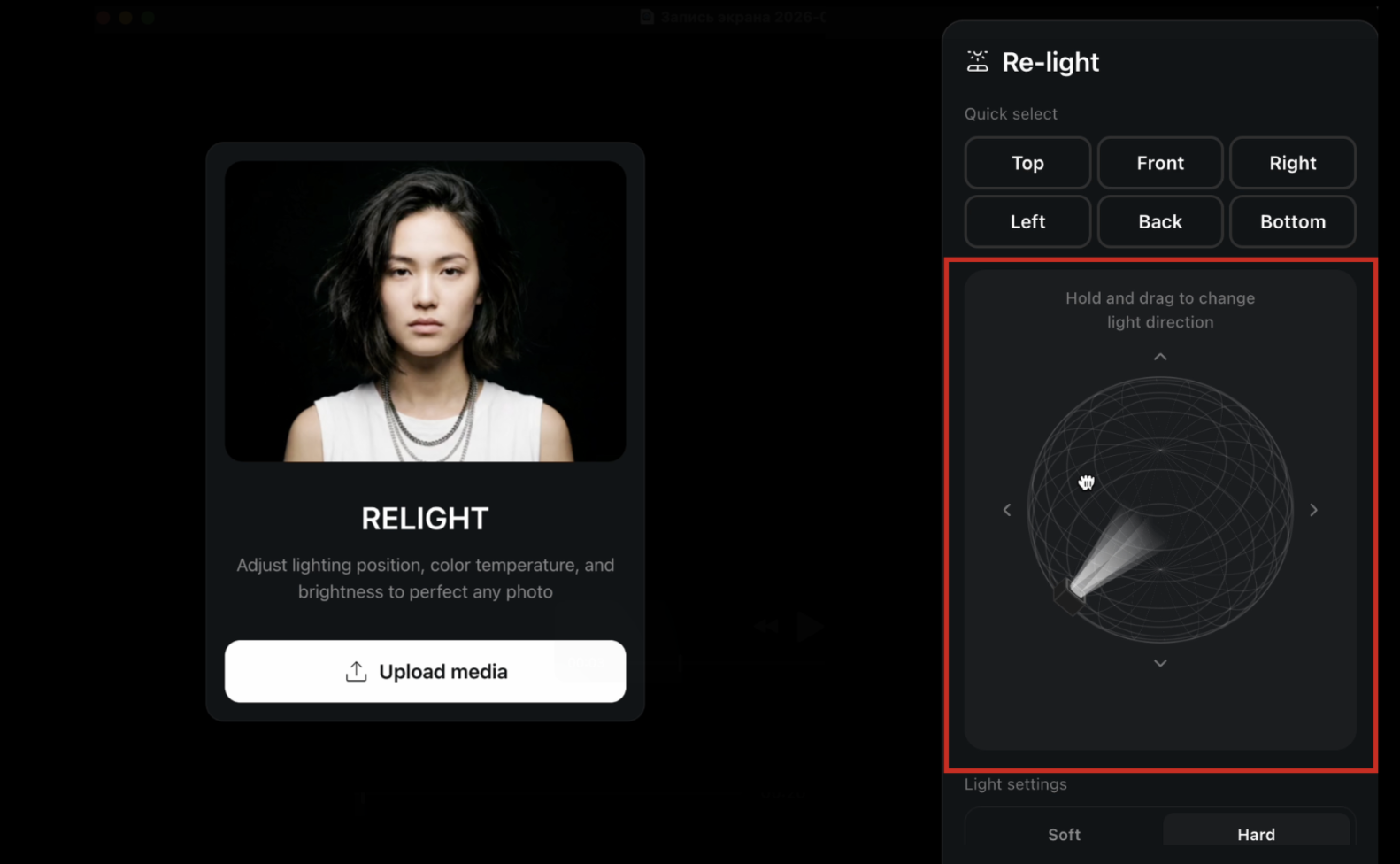
Hard lighting simulates a small, intense source, producing sharp shadows and high contrast that is ideal for dramatic or cinematic effects. By combining these settings with adjustable brightness and color, you can create virtually any lighting scenario, from natural daylight to bold colored effects like neon pink or moody blue.
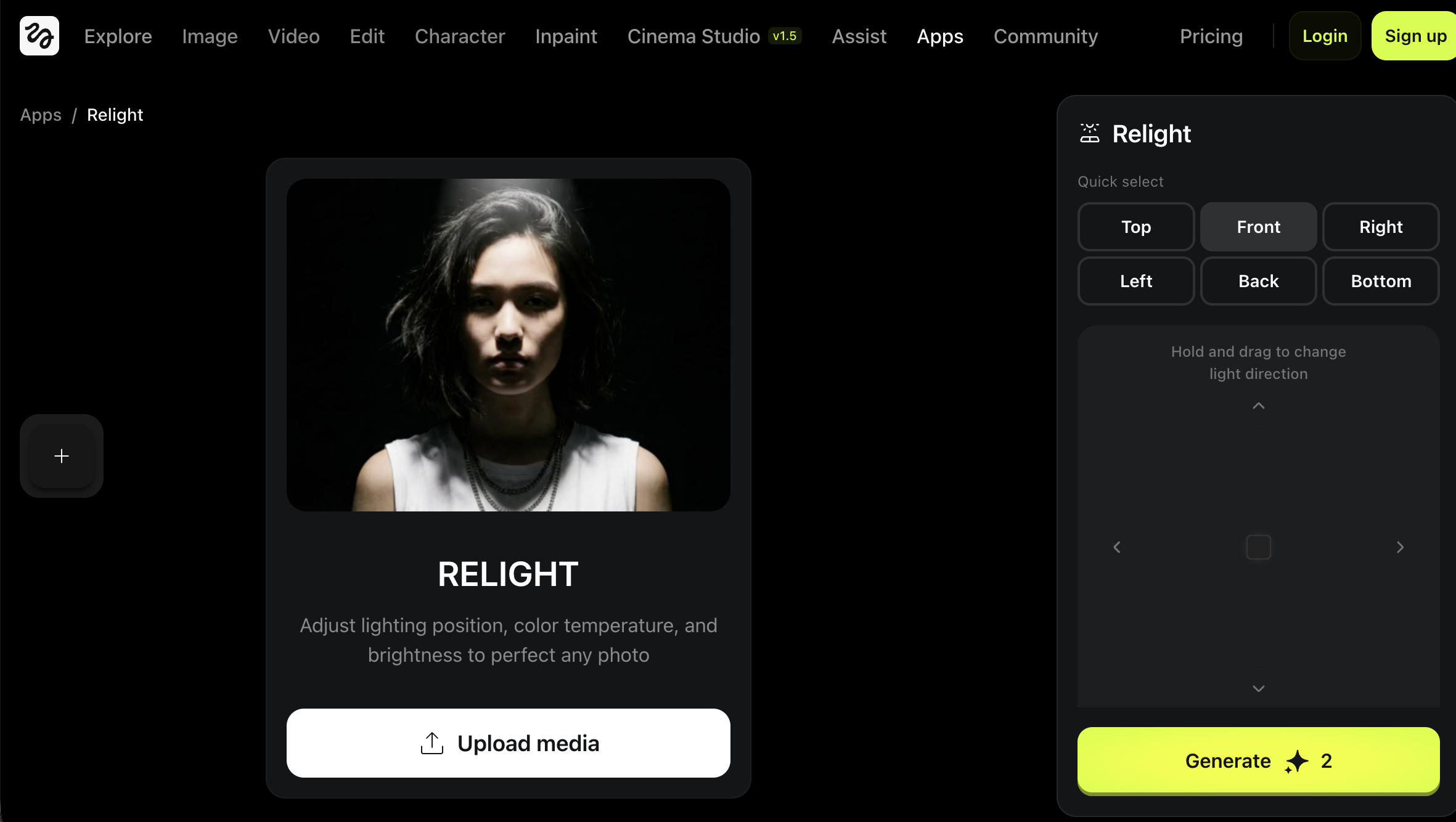
Relight also includes rapid presets for top, front, left, right, back, and bottom lighting, making it easy to set a starting point. From there, the interactive pad allows you to manually fine-tune the angle and position for more advanced results.
Brightness sliders and color inputs give you granular control over intensity and temperature, allowing you to recreate subtle environmental cues such as the warm glow of a sunset or the cool tone of indoor fluorescent light.
Practical Applications
Relight is versatile and can be applied to a wide range of photography and videography scenarios.
Portraits are an obvious use case. If you have ever snapped a selfie or portrait with the sun behind you, you know how difficult it can be to balance exposure. Relight can reposition the lighting to illuminate your subject’s face without washing out the background, making it possible to rescue images that would otherwise be unusable. By adjusting the angle, softness, and color of the light, you can enhance facial features, reduce shadows under the eyes, and highlight the natural contours of the face.
Product photography is another area where Relight shines. Flat lighting can make even the most expensive product look dull and unappealing. Using Relight, you can add side or top lighting to create texture and depth, giving products a sense of dimension that makes them pop off the screen.

This is particularly useful for e-commerce and catalog work, where the goal is to make the viewer feel as if they can almost touch the item. Subtle adjustments to shadows and highlights can convey materials and surfaces more accurately, enhancing the overall quality of the image.
For creative and artistic work, Relight opens entirely new possibilities. You can experiment with dramatic or unconventional lighting setups that would be difficult to achieve in a physical studio. By moving the light around, you can cast bold shadows or highlights that convey mood, tension, or energy. Changing the color of the light allows you to create cyberpunk, noir, or other cinematic looks without needing gels or colored bulbs.
This level of control encourages experimentation and can help you develop a distinctive visual style that sets your work apart. Even subtle adjustments can change the perceived time of day or add a cinematic flair to a simple composition, giving your portfolio or social media feed a professional edge.
Precision and Workflow
One of Relight’s most valuable features is its ability to streamline workflow while providing professional-level control. Instead of spending hours testing lights in a studio or attempting difficult post-processing, you can make precise adjustments directly on your image.
The Quick Select Grid allows for instant positioning of standard lighting directions, giving you a head start. The interactive light pad provides real-time feedback as you move the light, helping you dial in off-axis lighting for classic techniques like Rembrandt or butterfly lighting.
Soft and hard lighting modes allow you to define the texture of your light, while granular brightness sliders and color inputs offer precise control over intensity and temperature. This combination of tools provides both speed and accuracy, whether you are making minor adjustments or completely redefining the lighting in a scene.
The result is a more professional-looking image without the guesswork or extensive post-production hours traditionally required.

Avoiding the Need for AI Relighting
Although Relight is powerful, proper planning during the shoot can reduce or even eliminate the need for post-production relighting.
Understanding natural light is the first step. Paying attention to the direction, quality, and intensity of sunlight or ambient light can help you position your subject in flattering ways. Avoiding harsh backlighting or placing your subject near soft, diffused sources can save you significant editing time.
Reflectors and diffusers are simple tools that can make a huge difference in in-camera lighting. Reflectors bounce light into shadowed areas, while diffusers soften harsh sunlight, creating more even illumination. Even inexpensive solutions can reduce reliance on AI adjustments later.
If you work in a studio or controlled environment, managing your lights from the outset can prevent the need for major post-processing. A few key light sources strategically placed can achieve the desired mood, with minimal adjustments required later.
Planning your composition and exposure with care also helps. Taking test shots and making incremental adjustments can identify potential lighting problems before they become significant issues in post-production.
By combining careful pre-production practices with tools like Relight, you can ensure that your images achieve their intended look efficiently. AI-driven tools should be a supplement rather than a crutch, giving you flexibility while reinforcing good shooting habits.
See more from DIYPhotography.net on Google
Add DIYPhotography.net as a trusted source. This makes
our stories more likely to appear in your Google Search results.
 Add as a preferred source on Google

Alysa Gavilan
Alysa Gavilan has spent years exploring photography through photojournalism and street scenes. She enjoys working with both film and mirrorless cameras, and her fascination with the craft has grown over the decades. Inspired by Vivian Maier, she is drawn to capturing everyday moments that often go unnoticed.
Related Posts
 Photographer Projects A ‘Marry Me’ Slide During A Photoshoot. She Sees The LCD And Says Yes!
 The iPhone 8, 8 Plus & X let you relight your subject in post and shoots 4K 60fps video
 DaVinci Resolve 18.5 lets you relight subjects in the edit
 Can cheap ND filters be good? The K&F Concept SN25T1 filter kit says yes
Join the Discussion
DIYP Comment Policy
Be nice, be on-topic, no personal information or flames.