




























How to Photograph the Northern Lights with a Phone: A Complete Guide
Nov 13, 2025
Soumyadeep Mukherjee
Soumyadeep Mukherjee is an award-winning astrophotographer from India. He has a doctorate degree in Linguistics. His work extends to the sub-genres of nightscape, deep sky, solar, lunar and optical phenomenon photography. He is also a photography educator and has conducted numerous workshops. His works have appeared in over 40 books & magazines including Astronomy, BBC Sky at Night, Sky & Telescope among others, and in various websites including National Geographic, NASA, Forbes. He was the first Indian to win “Astronomy Photographer of the Year” award in a major category.
Share:
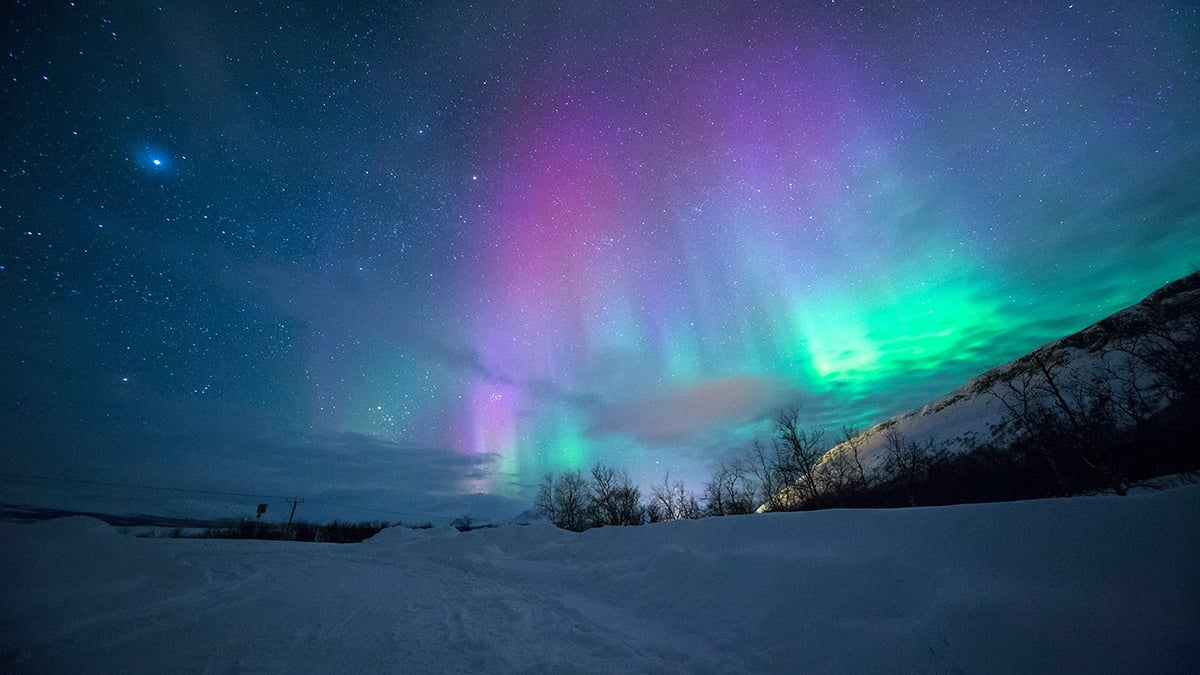
The Northern Lights feel unreal when they appear. They move across the sky in soft waves. They glow in green, pink, and sometimes even red. Many people assume they need expensive cameras to capture this moment. That is no longer true. Modern phones can record aurora scenes with surprising quality. You just need the right approach, the right settings, and a little patience. This guide explains how to photograph the aurora with a phone in a simple way.
Understanding the light
Auroras form when charged particles from the Sun interact with Earth’s magnetic field. NASA explains that these particles hit oxygen and nitrogen in the upper atmosphere, which makes the gases glow. The result is a natural light show that appears mostly near the poles, though strong geomagnetic storms can push the lights farther south.
This natural process directly affects how you shoot the aurora. The light is faint compared to city lights, but still bright enough that a phone can capture it with a long exposure. The movement is slow, so you have time to frame and adjust. The visibility changes fast, and that is why planning matters.
Aurora forecasts help you know when to expect activity. Space-weather agencies track solar storms and provide online maps that show where auroras might appear. A quick check on the official NOAA Space Weather Prediction Center website can help you decide whether it is worth heading out. If the activity level rises, your chances improve.

Find the right location
The place you choose affects your photo more than your settings. Phones handle low light well today, but they still struggle when the sky is washed out. To avoid that, move away from city lights. Even a small town can add a glow to the horizon that weakens the aurora.
Try to find an open area with a clear view of the northern sky (if you are in the Northern Hemisphere). A lake, a field, or a small hill usually works. The more sky you can see, the better your chances of catching strong movement.
Clouds are the biggest obstacle. No setting can fix that. Check the cloud forecast before you leave. Clear skies make everything easier. Aurora activity often rises and falls without warning. Some nights start slow and turn dramatic later. Others peak early and fade. Staying patient helps.

Prepare your phone
You don’t need special gear, but you do need stability. Even the best phone will blur an image if it moves during the exposure. A small tripod is enough. If you do not have one, place the phone against a rock, a bag, or even the hood of a car. The goal is simple: keep the phone fixed while it captures light.
Cold temperatures drain batteries quickly. Bring a fully charged phone and a power bank. Keep the phone in a warm pocket when you are not shooting. Clean the camera lens. A fingerprint on the lens can ruin the sharpness of a long exposure. Turn off the flash and turn off any filters. You want a clean, natural file. Also, silence notifications and turn on airplane mode if you want extra stability. Some phones dim or vibrate slightly when notifications arrive, which can affect the results.
Many newer phones include dedicated night modes. Apple uses Night Mode on recent iPhones. Google uses Night Sight on Pixel phones. Samsung has similar features. These modes extend exposure time and combine multiple frames for better results. Check your phone’s support page before the trip. Knowing how the mode behaves will help you avoid mistakes.

Use the right settings
Once you reach your location and set the phone on a stable surface, open the camera app and let your eyes adjust to the darkness. The aurora often looks weaker to the eye than it will appear in the photo. Phones amplify faint light very well.
Night mode/Pro mode
Activate your phone’s night mode if it does not turn on automatically. On an iPhone, the small night-mode icon appears when the phone detects low light, and you can adjust the exposure duration by tapping it. On Pixel phones, Night Sight handles the exposure internally, though some models allow manual adjustments in the pro settings.
Shutter speed and ISO
Try exposures of around a few seconds to start. Five to ten seconds is a common range for faint auroras. If the aurora brightens, reduce the exposure slightly. If the curtains move fast, shorter exposures help preserve shape. If the aurora stays still, longer exposures make the colors stronger. Adjust the ISO accordingly.
Focus
Lock your focus before you shoot. Tap a distant light or a bright star and hold until the focus locks. This prevents the camera from shifting focus during the exposure. Lock the exposure if your phone allows it. If your phone allows, adjust the focus manually.
Mode
Shoot in RAW format when possible. Many phones now allow RAW capture in their advanced settings. RAW files preserve more detail and color, which helps you edit later without losing quality.
Delay and timer
Trigger the shot with a timer. A two- or three-second timer prevents blur from the tap. If you have a Bluetooth remote, use it. Even small vibrations can soften the stars.

Process your photos
Once you finish shooting, review your images. Night-mode photos often look brighter on the phone than they do in real life. That is normal. Open your files in an editor like Lightroom or Photoshop (or other editors) and adjust as needed.
Set the white balance first. Aurora colors shift between green, pink, and red depending on altitude and atmospheric composition. Try to match what you saw. Increase contrast carefully. If you used RAW, you can lift shadows without damaging the quality. Reduce noise gently. Strong noise reduction can smear stars and create an artificial look.
Also, avoid over-saturation. Aurora displays are vivid, but phones already enhance color during processing. Small adjustments look better than dramatic ones. A natural edit usually feels stronger and more believable.

Photographing auroras with a phone is simple when you plan well. The steps are straightforward. Find dark skies. Keep the phone stable. Use night mode. Adjust exposure. Lock focus. Frame the scene. Edit gently. However, the most important part is to enjoy the moment. The lights may last a few minutes or a few hours. They may appear as faint bands or strong curtains. They may surprise you with sudden bursts of color. A phone helps you record the memory, but your eyes give you the real experience.
Clear skies!
See more from DIYPhotography.net on Google
Add DIYPhotography.net as a trusted source. This makes
our stories more likely to appear in your Google Search results.
 Add as a preferred source on Google

Soumyadeep Mukherjee
Soumyadeep Mukherjee is an award-winning astrophotographer from India. He has a doctorate degree in Linguistics. His work extends to the sub-genres of nightscape, deep sky, solar, lunar and optical phenomenon photography. He is also a photography educator and has conducted numerous workshops. His works have appeared in over 40 books & magazines including Astronomy, BBC Sky at Night, Sky & Telescope among others, and in various websites including National Geographic, NASA, Forbes. He was the first Indian to win “Astronomy Photographer of the Year” award in a major category.


Join the Discussion
DIYP Comment Policy
Be nice, be on-topic, no personal information or flames.