





















Adobe Rolls Out AI-Powered Video Editing Updates for Premiere and After Effects
Jan 21, 2026
Alysa Gavilan
Alysa Gavilan has spent years exploring photography through photojournalism and street scenes. She enjoys working with both film and mirrorless cameras, and her fascination with the craft has grown over the decades. Inspired by Vivian Maier, she is drawn to capturing everyday moments that often go unnoticed.
Share:
Adobe has released a new round of AI-driven updates to its video editing tools, and the focus this time is on speed, precision, and reducing friction in everyday workflows. With fresh updates to Premiere Pro and After Effects, Adobe is leaning further into AI to handle some of the most time-consuming tasks in post-production.
For editors and motion designers, these changes aim to make masking, tracking, and early-stage planning faster and more intuitive without taking creative control out of your hands. Rather than flashy automation, the updates focus on practical improvements that you are likely to notice during real projects, especially when working with moving subjects, layered effects, or tight deadlines.

Smarter Masking with AI-Powered Object Mask
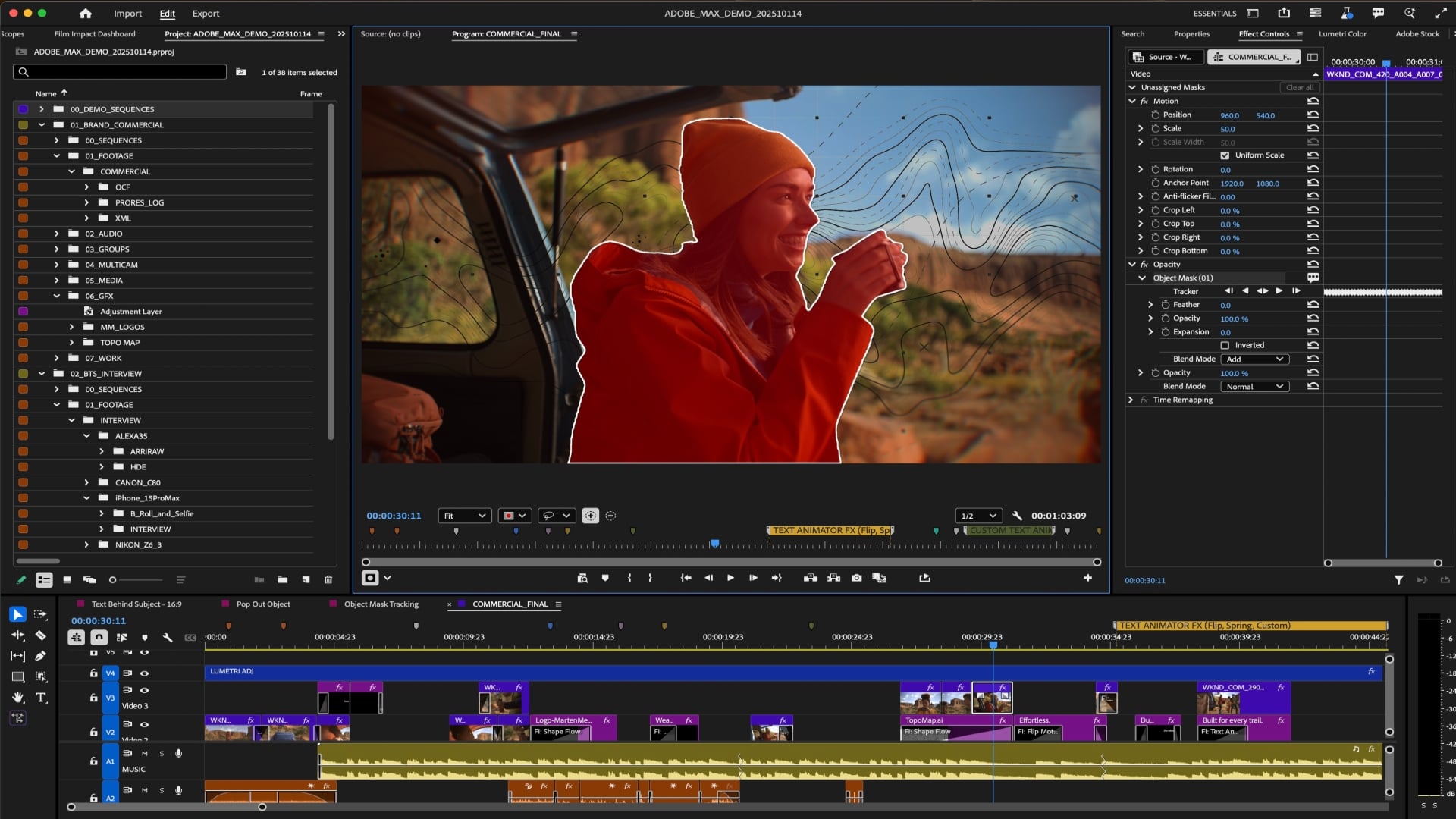
One of the most significant updates is the introduction of AI-powered Object Mask in Premiere Pro. Masking moving subjects has long been a pain point for editors, often requiring manual adjustments frame by frame.
Adobe’s new approach uses AI to identify and track people or objects with a simple hover and click.
As you move your cursor across a frame, visual overlays highlight selectable subjects. Once selected, the mask tracks movement automatically, even through complex motion. You can preview the mask using different colored overlays or a black-and-white alpha view, making it easier to spot problem areas before committing.
For editors, this means less time drawing and refining masks and more time focusing on creative decisions. Tasks like isolating a subject for color correction, blurring a background, or relighting a scene can now happen in seconds rather than minutes.

Faster and More Flexible Shape Masks
Alongside Object Mask, Adobe has redesigned its traditional Shape Masks. Ellipse, Rectangle, and Pen masks now track significantly faster, with Adobe claiming performance improvements of up to 20 times compared to previous versions.
The redesign goes beyond speed. Masks can now be created directly from the toolbar, resized and rotated directly in the program monitor, and refined using smoother Bezier curves. Bi-directional tracking allows you to track forward and backward from a chosen frame, which is useful when the best reference frame is not at the beginning of a clip.

For you as an editor, this makes mask-based effects feel less like a technical chore and more like a flexible creative tool. Even small refinements, such as feathering or expansion adjustments, are quicker to apply and preview.
Live Tracking Previews and Easier Fixes
A notable quality-of-life improvement is the addition of live tracking previews. Instead of waiting for tracking to finish and then reviewing the results, you can now watch the mask track in real time. This makes it easier to spot drift or inaccuracies early.
Adobe has also introduced a new frame-based track editing mode. Rather than adjusting dozens of individual keyframes, you can correct a mask on a few frames and let Premiere merge those changes with the existing track.
For anyone who has spent hours fine-tuning masks, this alone could save a significant amount of time.

Firefly Boards Enter the Editing Workflow
Another update connects Adobe’s AI tools across different stages of production. Firefly Boards, an AI-focused ideation and collaboration space, can now import directly into Premiere Pro.
In practical terms, this allows you to move from early visual planning into editing without recreating assets. You can generate or collect visual references, rough storyboards, or placeholder shots during pre-production, then bring them into Premiere to guide editing decisions.
If you realize a shot is missing or a concept needs testing, Firefly Boards can help visualize alternatives before you commit to a reshoot or major edit.
This integration is less about automation and more about continuity, helping teams stay aligned from concept to final cut.
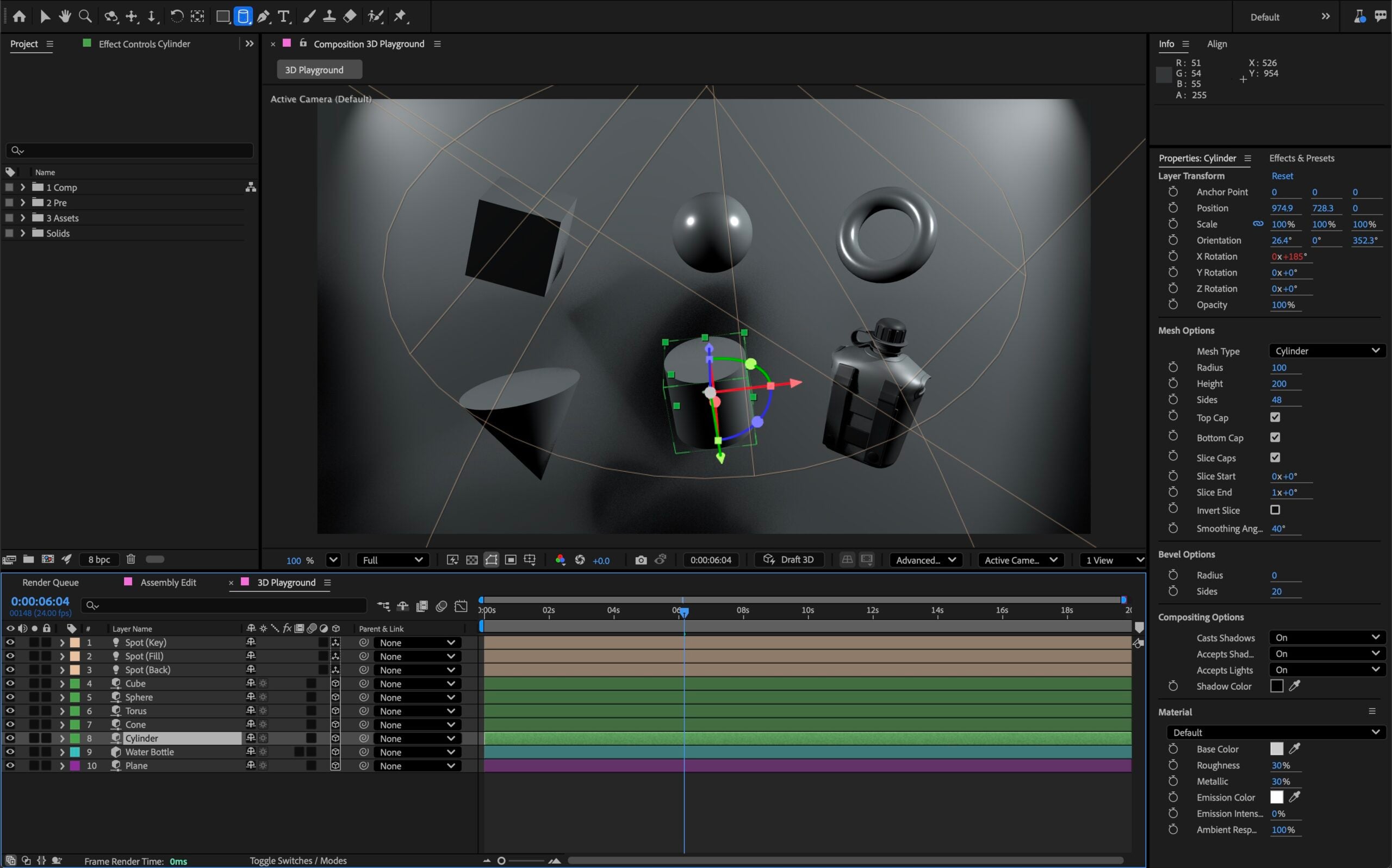
After Effects Gains Speed and Motion Design Improvements
After Effects also receives a set of updates aimed at motion designers. Performance improvements make building and previewing animations faster, while new motion design tools offer more control over effects and compositing.
Masking improvements carry over here as well, allowing designers to isolate elements, relight subjects, or apply color effects more efficiently.
With masks becoming faster and more accurate, they serve as building blocks rather than obstacles, especially when combined with the growing library of effects and transitions available across Adobe’s tools.
AI That Stays On Your Device
Adobe emphasizes that its new AI features run entirely on-device and are not trained using customer content.
For professionals concerned about data privacy or cloud dependency, this detail matters. You get the benefits of AI-assisted editing without sending your footage off to external servers.
This approach also helps maintain responsiveness, since tools like Object Mask need to feel instant to be useful in real editing sessions.
Adobe’s latest updates suggest that AI in video editing is settling into a supporting role, quietly improving the workflow rather than trying to take it over. For many creators, that may be exactly what they want.
[Images via Adobe]
See more from DIYPhotography.net on Google
Add DIYPhotography.net as a trusted source. This makes
our stories more likely to appear in your Google Search results.
 Add as a preferred source on Google

Alysa Gavilan
Alysa Gavilan has spent years exploring photography through photojournalism and street scenes. She enjoys working with both film and mirrorless cameras, and her fascination with the craft has grown over the decades. Inspired by Vivian Maier, she is drawn to capturing everyday moments that often go unnoticed.
Related Posts
 Adobe adds AI-powered updates to Premiere Pro, After Effects, and Frame.io to streamline video editing workflows
 Adobe is bringing Generative AI to video with Premiere Pro and After Effects
 Adobe integrates Firefly AI-powered video to Premiere Pro
 Adobe Firefly Quick Cut: AI-Powered First Cuts Revolutionize Video Editing
Join the Discussion
DIYP Comment Policy
Be nice, be on-topic, no personal information or flames.