


























Panasonic Releases Major LUMIX S Series Firmware Update With Key Upgrades
Dec 4, 2025
Alysa Gavilan
Alysa Gavilan has spent years exploring photography through photojournalism and street scenes. She enjoys working with both film and mirrorless cameras, and her fascination with the craft has grown over the decades. Inspired by Vivian Maier, she is drawn to capturing everyday moments that often go unnoticed.
Share:
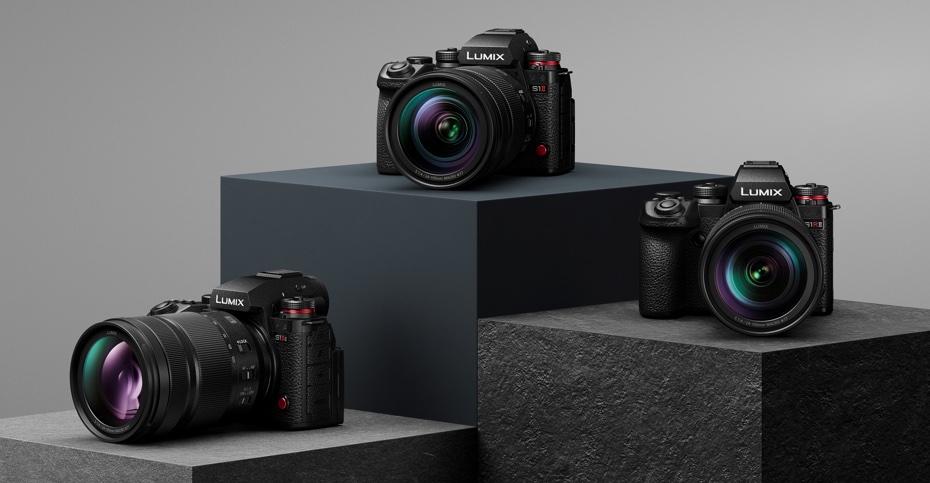
Panasonic rolled out a substantial firmware refresh for its LUMIX S Series cameras, and the changes focus on usability, control, and the day-to-day experience you get in real shooting conditions.
The LUMIX S1RII, S1II, and S1IIE recently received new versions of their firmware, alongside an update for the LUMIX Flow mobile app.
According to Panasonic, these updates reflect feedback from the LUMIX community, and the goal is to refine thermal behavior, simplify hybrid workflows, and offer creators more control over recording formats and camera handling.
Thermal Control and Recording Stability
One of the most important improvements involves heat management inside the LUMIX S Series bodies. Panasonic has redesigned the thermal control algorithm that manages internal temperature during recording.
The company says this contributes to longer and more consistent recording times, particularly in situations where external conditions can shorten a camera’s endurance.
If you shoot performances, sports, events, or documentary content, you know how frustrating it can be to plan a sequence only to watch the timer stop because the internal temperature climbed too quickly.
Panasonic’s approach aims to make temperature behavior more predictable, and that alone may help some creators feel more confident during extended takes.
New SH Burst Shooting Option
Still photographers will see another quality-of-life adjustment with the addition of a new lower-speed option for SH burst shooting. This applies to both the S1RII and S1II models and includes pre-burst functionality.
The update gives you more freedom to choose a speed that matches the movement in your scene without overwhelming your buffer or memory cards. For photographers who want to capture action without pushing the camera to its fastest possible frame rates, this option adds welcome flexibility.
Autofocus Behavior and Recognition Changes
Panasonic has also updated several aspects of autofocus behavior. You can now choose to display recognition frames only for the main subject. Eye recognition can show a rectangular AF frame upon detection, which gives you a more precise visual guide. Tracking AF has also been refined through algorithm improvements.
These changes may feel small when read in a list, but they can shift your daily shooting experience, especially if you rely on continuous AF to stick to a moving subject. Clearer visual feedback can help you react faster, and more stable tracking tends to reduce the number of missed frames in both stills and video.
MP4 Lite Recording and Additional Video Tools
Video creators gain an important new format with MP4 Lite. This low-bitrate recording option allows 3.8K at 29.97 or 25.00 frames per second at 50 Mbps. It can serve as a format for quick turnarounds, faster uploads, or when you need smaller files during long sessions.
Compatibility updates extend to the S-R100500 lens and both Panasonic teleconverters. Support for these combinations has been enhanced across the LUMIX S Series bodies receiving the new firmware update.
Panasonic also added a new indicator for shooters who rely on Constant Preview. If that preview effect is set to off, you will see an icon on the shooting screen, which helps you avoid metering or exposure surprises. The ability to set ISO Auto from the displayed ISO setting menu has been added as well.

A bug affecting live view quality during false color use has also been corrected. In addition, a 1.6 times anamorphic desqueeze display option has been included, which will appeal to filmmakers who need accurate monitoring. You can also see the base ISO when Dual Native ISO is set to Auto, giving you more clarity during exposure decisions.
Other refinements include faster processing for focus stacking, plus a new menu option that keeps live view quality consistent in both standby and active recording modes on the S1II. The sub video record button no longer comes with default settings in photo or playback modes, which may help you avoid accidental activation.
Improvements to the LUMIX Flow App
The LUMIX Flow app is receiving its own Version 1.4 update, released alongside the camera firmware. The app now supports LUT view assist, allowing you to preview a conversion directly in the live view feed on your phone. The option can be toggled on or off as needed, and the addition helps you evaluate color and tone before you record.
Frame marker displays in the app have also been brought into alignment with what you see on the camera itself. This helps when your phone becomes a monitoring tool for interviews, solo shooting, or remote operation. Autofocus frame displays have also been refined to offer more accurate recognition information, which may give you more confidence when using the app as a remote shooting interface.
Panasonic says these changes reflect user feedback, and the continuous update approach has become a defining part of the LUMIX ecosystem.
For hybrid creators who rely on consistent firmware improvements, this cycle provides a sense of stability as the camera bodies age. For photographers and videographers who use the S Series every day, many of these refinements may feel small on paper, but they can save time and frustration once delivered in real workflows.
See more from DIYPhotography.net on Google
Add DIYPhotography.net as a trusted source. This makes
our stories more likely to appear in your Google Search results.
 Add as a preferred source on Google

Alysa Gavilan
Alysa Gavilan has spent years exploring photography through photojournalism and street scenes. She enjoys working with both film and mirrorless cameras, and her fascination with the craft has grown over the decades. Inspired by Vivian Maier, she is drawn to capturing everyday moments that often go unnoticed.




Join the Discussion
DIYP Comment Policy
Be nice, be on-topic, no personal information or flames.