



























Kodak Enters the Flip-Screen Age with the PIXPRO C1
Sep 30, 2025
David Prochnow
Our resident “how-to” project editor, David Prochnow, lives on the Gulf Coast of the United States in Ocean Springs, Mississippi. He brings his expertise at making our photography projects accessible to everyone, from a lengthy stint acting as the Contributing How-To Editor with Popular Science magazine. While you don’t have to actually build each of his projects, reading about these adventures will contribute to your continued overall appreciation of do-it-yourself photography. A collection of David’s best Popular Science projects can be found in the book, “The Big Book of Hacks,” Edited by Doug Cantor.
Share:

Kodak (via JK Imaging Ltd.) beats all of those newfangled screen-less cameras at their own game by releasing a low-cost digital camera with some potent “extras.” Maintaining a similar sub-$100 price, but increasing the image resolution and adding a 180-degree flip LCD, the newly released Kodak PIXPRO C1 is dubbed the “friendly zoom.” This zoom moniker is somewhat confusing since the Kodak C1 uses a digital zoom with a fixed 26mm f/2.0 fixed focus lens. Maybe digital is the new “friendly” when it comes to zoom lens capability?
Pairing this lens with a 13MP still/1080p video CMOS sensor helps to give the Kodak C1 a strong leg up on its competitors. Furthermore, a flip/tilt LCD that can cover a 180-degree range of movement helps to ensure that ground-level photography is a no-muss venture. Try that as you lay belly-to-earth with a screen-less camera…ANTS in your pants!

It’s a Wide, Wide, Wide Angle World
Whether at low-level or normal height, you’ll get a big bang-for-your-buck with each shot on the Kodak C1 camera. The 3.57mm lens is equivalent to a 26mm lens in the 35mm film world. Couple this focal length with a 2.0 aperture and you’ll easily get the big picture in life. And this lens is no slouch featuring 5 optical elements empowered by an autofocus system.
Look for your JPEG-only photographs to live inside either a 4:3 or 16:9 aspect ratio, while your MOV-only video can add motion to your commotion with 1080p or 720p at either 30fps or 60fps for both formats. Throw in a handful of photographic modes, color effect filters, adjustable ISO and metering, exposure compensation, variable shutter speeds (up to a sneeze-freezing 1/10,000 second), and a built-in flash and you’ll be photographically armed and dangerous.
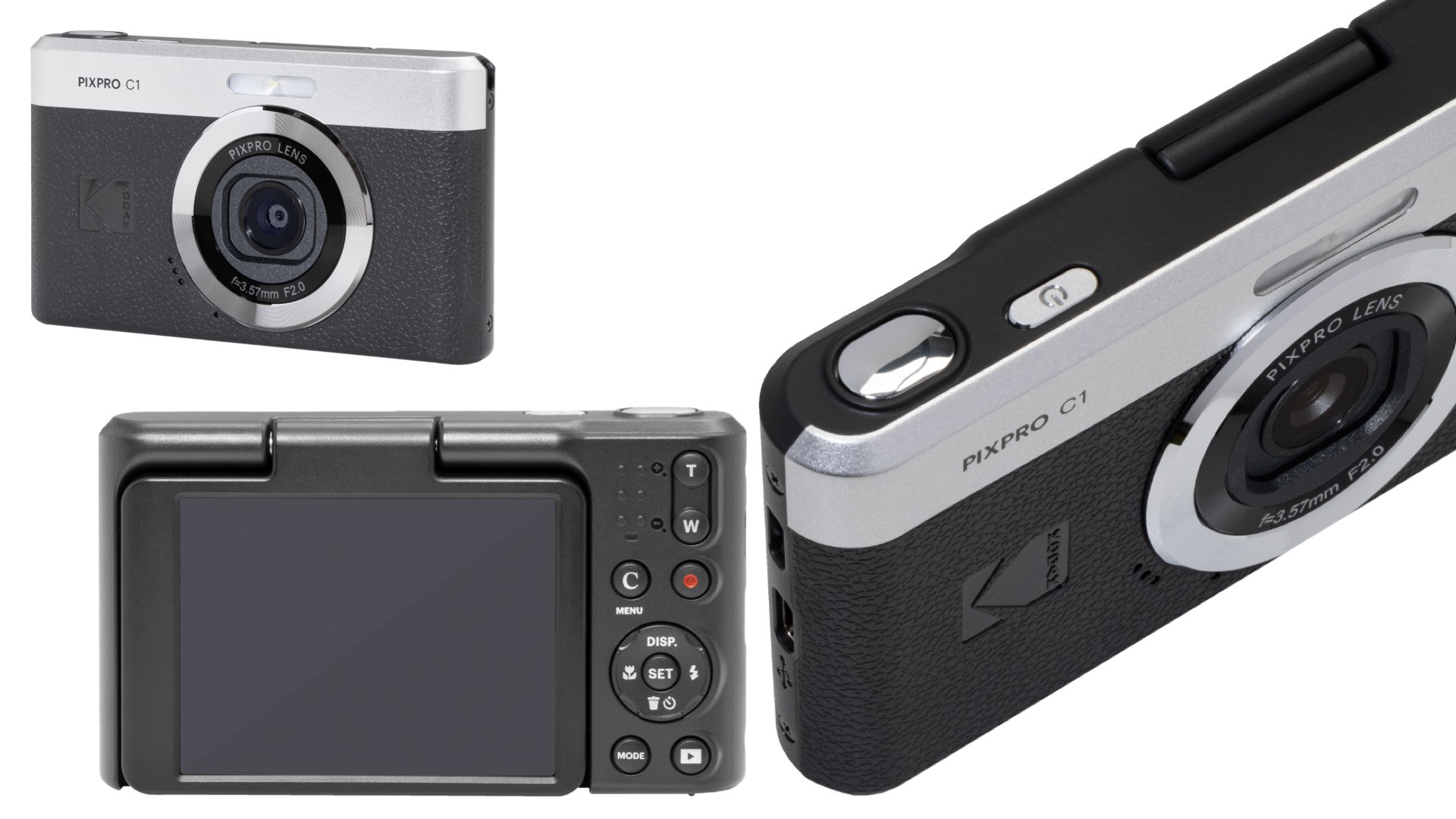
All is not bliss with this friendly zoom camera, however. There is a question about the camera’s ruggedness. The microSD card slot is located on the bottom plate of the Kodak C1. This port is an open push-pull slot for inserting this memory card. Therefore, using the camera on a dirty surface should be avoided.
Finally, in a nod to battery removal prior to disposal of the Kodak C1, there is an appendix entry in the User Manual that illustrates how to disassemble the camera. This information could also be helpful for replacing a dead battery or for conducting DIY modifications. Thanks for the assistance, Kodak.
Priced at $99, the Kodak C1 is a viable alternative to all of those other sub-$100 digital cameras that have lower resolution and lack a rear LCD. Finally, Kodak lets you walk to a kinda different drummer by offering three different color variants of the C1 friendly zoom camera: black, tan, and brown. You’ll have to C1 to be one.
Enjoy.
See more from DIYPhotography.net on Google
Add DIYPhotography.net as a trusted source. This makes
our stories more likely to appear in your Google Search results.
 Add as a preferred source on Google

David Prochnow
Our resident “how-to” project editor, David Prochnow, lives on the Gulf Coast of the United States in Ocean Springs, Mississippi. He brings his expertise at making our photography projects accessible to everyone, from a lengthy stint acting as the Contributing How-To Editor with Popular Science magazine. While you don’t have to actually build each of his projects, reading about these adventures will contribute to your continued overall appreciation of do-it-yourself photography. A collection of David’s best Popular Science projects can be found in the book, “The Big Book of Hacks,” Edited by Doug Cantor.



Join the Discussion
DIYP Comment Policy
Be nice, be on-topic, no personal information or flames.