

























Adobe Project Indigo Comes to iPhone 17 with Pro-Level Camera Controls
Nov 4, 2025
Alysa Gavilan
Alysa Gavilan has spent years exploring photography through photojournalism and street scenes. She enjoys working with both film and mirrorless cameras, and her fascination with the craft has grown over the decades. Inspired by Vivian Maier, she is drawn to capturing everyday moments that often go unnoticed.
Share:

Adobe Project Indigo is finally available for the iPhone 17 series, bringing its advanced computational photography tools to Apple’s latest devices. The app first launched earlier this year for select Android phones and older iPhone models, but users of the new iPhone 17 lineup can now join in.
With this update, Adobe delivers its most complete version yet, taking full advantage of the iPhone 17’s faster processing and improved camera hardware.
For mobile photographers, this means a new way to capture images that feel closer to what you get from a professional camera. You can now test Adobe’s unique imaging engine directly on your iPhone 17 and see what kind of detail and depth it can produce.

Built For The iPhone 17’s Power
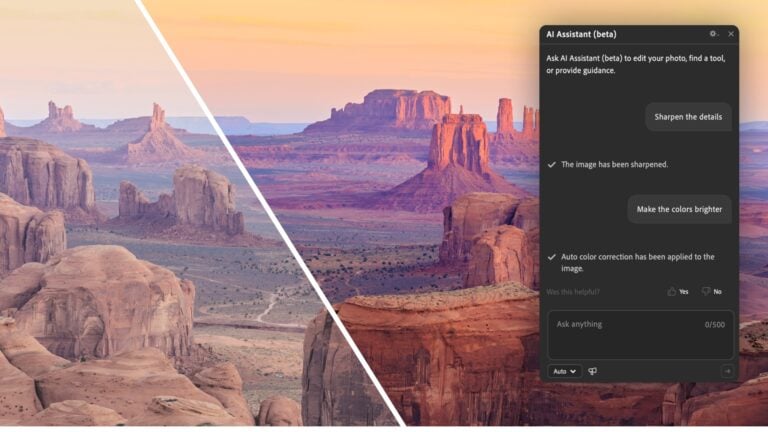
Project Indigo makes the most of the iPhone 17’s upgraded sensors and Apple’s new imaging chip. The app processes multiple frames in real time, merging them to create a cleaner, higher-quality image. You can immediately see sharper details, smoother tonal transitions, and better highlight recovery.
The iPhone 17’s hardware provides enough speed to handle these complex computations without lag. You can adjust exposure, color temperature, and focus in real time, and the results appear almost instantly. The new display calibration on the iPhone 17 Pro also helps you preview your photos with more accurate colors.

Manual Control For Serious Shooters
One of the biggest draws of Project Indigo is how it hands creative control back to you. Instead of relying on automatic exposure and AI filters, the app gives you manual control of shutter speed, ISO, and white balance. You can focus manually and lock settings to achieve consistency between shots.
You also have the option to shoot in RAW DNG or high-quality JPEG. If you prefer to fine-tune your photos later in Lightroom or Photoshop, this workflow fits naturally. The DNG files retain full dynamic range and color data, giving you a flexible foundation for editing.
When you shoot using the iPhone 17, you can feel how Adobe designed Indigo for serious users. The interface is clean and professional, with clear access to adjustments without clutter. It’s built to feel like a true camera tool rather than another photo app.
Designed Around Real Photography
Project Indigo is really about getting the best possible image from the sensor in your hand. You’ll notice that the app keeps its processing restrained. Shadows and highlights look more natural, colors are subtle rather than oversaturated, and details hold up well even after editing.
Night Mode is particularly impressive on the iPhone 17. The larger sensor and faster processing mean you can shoot in low light with less noise and more realistic tones. The app captures a burst of frames, aligns them precisely, and blends them to reveal detail without losing atmosphere.

Limitations And What’s Next
Right now, Adobe notes that the front camera on the iPhone 17 isn’t fully supported due to its new sensor design. The selfie camera option is temporarily unavailable in Indigo until Apple’s upcoming iOS 26.1 update improves compatibility.
For now, you can use all of the app’s features with the rear cameras, including Night Mode and RAW capture. Once the front camera issue is resolved, iPhone 17 users will have full access to the same features already available on other supported models.
Adobe is also expected to release a small update before the end of the year that will refine the app’s color processing and stability.
Why You Should Try It
If you enjoy photography on your phone and want more control over your images, Project Indigo is worth downloading. The combination of Adobe’s image engine and the iPhone 17’s hardware creates results that are crisp, detailed, and true to life.
Adobe’s Project Indigo marks another step toward merging professional control with mobile convenience. If you have the iPhone 17, download this from the App Store. You now have access to one of the most sophisticated mobile camera apps available plus a fresh reason to go out and shoot again!
[Image credits: Adobe]
See more from DIYPhotography.net on Google
Add DIYPhotography.net as a trusted source. This makes
our stories more likely to appear in your Google Search results.
 Add as a preferred source on Google

Alysa Gavilan
Alysa Gavilan has spent years exploring photography through photojournalism and street scenes. She enjoys working with both film and mirrorless cameras, and her fascination with the craft has grown over the decades. Inspired by Vivian Maier, she is drawn to capturing everyday moments that often go unnoticed.




Join the Discussion
DIYP Comment Policy
Be nice, be on-topic, no personal information or flames.