




















Kodak PIXPRO C1: the Artist’s Camera
Jul 1, 2026
David Prochnow
Our resident “how-to” project editor, David Prochnow, lives on the Gulf Coast of the United States in Ocean Springs, Mississippi. He brings his expertise at making our photography projects accessible to everyone, from a lengthy stint acting as the Contributing How-To Editor with Popular Science magazine. While you don’t have to actually build each of his projects, reading about these adventures will contribute to your continued overall appreciation of do-it-yourself photography. A collection of David’s best Popular Science projects can be found in the book, “The Big Book of Hacks,” Edited by Doug Cantor.
Share:

Are you an artist? Perhaps an artist with a camera or, maybe, even a photography artist? Then you’re all too familiar with the dearth of digital cameras that are viable for artistic use.
An artist doesn’t want to be encumbered with HDR, WiFi Networks, Drive Mode, and a myriad arcane settings that populate today’s digital cameras. They want to capture the image created in the mind’s eye without any digital fuss or pixel fluff.
In fact, this disdain for digital cameras is manifested in many artists gravitating towards film cameras. Equipped with a 35mm camera, an artist is only challenged by shutter speed and aperture for achieving the goal of subjective imagery.

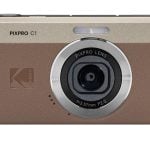
Well, not so fast, there may be a contender for enabling artists to enter the digital age. The Kodak PIXPRO C1 is a tiny, all plastic, fixed lens powerhouse that is chockfull of artistry goodness. Yes, there are a couple of gotchas that could stymie the beginning digital artist, but the sum of the Kodak C1 benefits delivers a masterstroke of artistic grandeur.
A Blank Canvas Awaiting Your Vision
Priced at $99.99, the Kodak C1 is pocketable for easy carrying and streamlined for rapid point-and-shoot photographic scenarios nabbing 13MP exposures. Featuring a 5-element 3.57mm f/2 lens that delivers a roughly 26mm 35mm camera lens equivalent field of view, the Kodak C1 uses autofocus to adjust the lens from roughly 60cm to infinity.

Oh, and if a small, closeup object, catches your eye, an on-demand macrophotography button enables an 8cm autofocus option. Similarly, an on-board, internal electronic flash can be user-enabled for shedding light on fill flash or forced flash events.
Accurately seeing your subject is vital for achieving your photographic vision. A flip-up-action 180-degree LCD screen ensures that composition is not compromised and delivers a unique perspective for self-portrait photography.

All of these technical specifications are wonderful, but the true artistic value of the Kodak Pixapro C1 becomes apparent inside the optional menu (C button) and exposure menu (Set button) settings. Once you’ve enabled Program AE (automatic exposure) (Mode button), pressing the C button displays a vast artistic palette for controlling the photographs that you can create.

Leading these selections is Color Effect. Options including vivid, colored pencil, sketch, negative, and several partial color choices opening a vast offering of photographic possibilities.

Furthermore, metering and aspect ratio entries enable a modest degree of user control that can help to fine-tune an image, but not bury the artist within an extensive network of menus.

There is, however, one final menu system that is useful for the artist. Pressing the Set button launches the two-option exposure menu. Both Exposure Compensation (EV -2 to +2) and ISO (100 to 1600) can be modified with this menu.
Please Hold Those Settings
While the Kodak Pixapro C1 does deliver a viable artist-friendly digital camera experience, there are three big compromises that might spell disaster for the discriminating photographer. You be the judge whether these gotchas are showstoppers, or not:
1. Settings are not retained. Once you’ve selected your perfect Color Effect, metering choice and ISO setting, the Kodak C1 will promptly forget these settings EVERY time the camera is powered OFF. Maddeningly, some settings like Aspect Ratio are retained during power cycling. Why aren’t ALL settings retained Kodak?

Pro Tip: One shortcut that is not documented by Kodak is the ability to rapidly set all options on the C button menu. Simply scroll to your desired Color Effect and DON’T press the Set button. Rather, scroll down to your other desired options, highlighting each one then scrolling to the next option. Finally, when all options are properly highlighted, press the Set button. Grumble – arrggh!
Important Notice: Kodak has released a firmware update that eliminates this settings retention problem. This Firmware 1.03 update is available to download and will enable you to keep your settings during camera power cycles. This demonstrates the manufacturer’s willingness to listen to user requests. Thank you, Kodak.
2. Finicky flip LCD. Attempting to use the flip LCD screen as a waist-level viewfinder will not work correctly. As soon as the panel reaches the 90-degree point, the display inverts 180-degrees. A compromise angle can be used, however. At roughly 60-degrees, the LCD remains in the correct orientation and the display is useable as a passable waist-level viewfinder. Ugh!
3. Power save pain. In an effort to save the camera’s battery strength, Kodak has provided three worthless “Power Saving” settings: Auto, Normal, and Best. None of these options puts the camera into indefinite sleep, though. All three eventually turn the camera OFF. Rats!

If you can cast a blind eye towards these performance issues (there are only two issues now, see above for camera firmware update), the Kodak PIXPRO C1 is a powerful digital camera for the artist. Like a sketchbook and pencil always ready at your inspirational demand, the Kodak C1 is the true artist’s camera instilled with features to help capture your mind’s vision.
Enjoy.
See more from DIYPhotography.net on Google
Add DIYPhotography.net as a trusted source. This makes
our stories more likely to appear in your Google Search results.
 Add as a preferred source on Google

David Prochnow
Our resident “how-to” project editor, David Prochnow, lives on the Gulf Coast of the United States in Ocean Springs, Mississippi. He brings his expertise at making our photography projects accessible to everyone, from a lengthy stint acting as the Contributing How-To Editor with Popular Science magazine. While you don’t have to actually build each of his projects, reading about these adventures will contribute to your continued overall appreciation of do-it-yourself photography. A collection of David’s best Popular Science projects can be found in the book, “The Big Book of Hacks,” Edited by Doug Cantor.


Join the Discussion
DIYP Comment Policy
Be nice, be on-topic, no personal information or flames.