



















Using Transparencies For Delicate Shaped Bokeh Shapes
Mar 28, 2011
Udi Tirosh
Udi Tirosh is an entrepreneur, photography inventor, journalist, educator, and writer based in Israel. With over 25 years of experience in the photo-video industry, Udi has built and sold several photography-related brands. Udi has a double degree in mass media communications and computer science.
Share:
 When it comes to Shaped Bokeh, it is all about the shape of the hole where the light goes through. Heart-shaped hole creates heart-shaped bokeh, stars-shaped hole creates stars-shaped bokeh, and so on…
If you want your bokeh to be a little more elaborate you have to be pretty darn good with an exacto knife. So crude shapes are fine, but what if you wanted to do something more delicate, like writing a word. I mean, even Dr. Shepherd can only get that precise with an X-acto knife. (lady readers in the audience?).
Videographers Jimmy Wong and Laurasaurus Rex (Lore), came up with a prety clever way to create delicate bokeh shapes. They used Transparencies (and kinda replicated my bokeh masters kit in the process – all for a good cause).
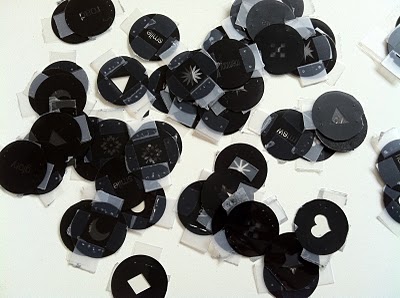
Jimmy and Lore made a Photoshop template of the needed “holes” and printed them at the local Kinkos. Was it nice looking, not that much. Did it do the job? judge the clip for yourself: (hint. IT ROCKS!).
read the full tutorial over at Lore’s blog.
See more from DIYPhotography.net on Google
Add DIYPhotography.net as a trusted source. This makes
our stories more likely to appear in your Google Search results.
 Add as a preferred source on Google

Udi Tirosh
Udi Tirosh is an entrepreneur, photography inventor, journalist, educator, and writer based in Israel. With over 25 years of experience in the photo-video industry, Udi has built and sold several photography-related brands. Udi has a double degree in mass media communications and computer science.


Join the Discussion
DIYP Comment Policy
Be nice, be on-topic, no personal information or flames.
2 responses to “Using Transparencies For Delicate Shaped Bokeh Shapes”
Freaking… Brilliant. I saw the clip about the cinematographers doing this with glass plates and vinyl stickers (I think?), but I never thought about just using printed transparencies instead… So much simpler, I love it!
Awesome!