






















How to quickly fix red skin in Photoshop
Feb 9, 2017
Dunja Đuđić Kalinin
Dunja Djudjic is a multi-talented artist based in Novi Sad, Serbia. With 15 years of experience as a photographer, she specializes in capturing the beauty of nature, travel, concerts, and fine art. In addition to her photography, Dunja also expresses her creativity through writing, embroidery, and jewelry making.
Share:

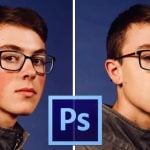
It’s still winter here in the Northern Hemisphere. So, if you shoot portraits outdoors, your models may look a bit like Rudolph the Red Nosed Reindeer. This tutorial by Mathieu Stern will show you how to fix red skin in Photoshop in a very quick and easy way.
When you open your image in Photoshop, first make a duplicate of the layer and add a Hue/Saturation Layer.
Select the Reds in Hue/Saturation layer. Raise the saturation level so you can see what you’re working with.

Then, change the hue to a different color. In the tutorial, Mathieu moves the slider to the left, which makes the reds appear blueish.

Next, use the lowest slider on the Hue/Saturation panel to refine the selection. This will select only the red areas you want to correct. In this case, these are the reds on the nose.

Now move the Saturation slider back to make the image properly saturated. Move the Hue slider as well, so you get the normal color of the skin back.

The redness from the nose is now gone. However, in this case, the red from the lips is toned down as well. If something like this happens in your photo, reverse the layer mask on the Hue/Saturation layer. You can do it by pressing Ctrl + I (Cmd + I on Mac). This brings back the red to the face. Now you can use the brush, and paint back the previously made modifications to the nose only.
And that’s it. Enjoy your outdoor winter shoots, and enjoy the retouching!
[How to Fix RED SKIN quickly – Photoshop Tutorial |Mathieu Stern]
See more from DIYPhotography.net on Google
Add DIYPhotography.net as a trusted source. This makes
our stories more likely to appear in your Google Search results.
 Add as a preferred source on Google
Filed Under:
Tagged With:

Dunja Đuđić Kalinin
Dunja Djudjic is a multi-talented artist based in Novi Sad, Serbia. With 15 years of experience as a photographer, she specializes in capturing the beauty of nature, travel, concerts, and fine art. In addition to her photography, Dunja also expresses her creativity through writing, embroidery, and jewelry making.



Join the Discussion
DIYP Comment Policy
Be nice, be on-topic, no personal information or flames.
3 responses to “How to quickly fix red skin in Photoshop”
Whan
“Enjoy the retouching”. No. Never. I’d much rather be outdoors with a camera, than indoors on a computer.
Yes, always. I love doing both.