


























An Intriguing International Instax Affair: Printing Fujifilm X Half Photographs on a Leica Sofort 2
Sep 18, 2025
David Prochnow
Our resident “how-to” project editor, David Prochnow, lives on the Gulf Coast of the United States in Ocean Springs, Mississippi. He brings his expertise at making our photography projects accessible to everyone, from a lengthy stint acting as the Contributing How-To Editor with Popular Science magazine. While you don’t have to actually build each of his projects, reading about these adventures will contribute to your continued overall appreciation of do-it-yourself photography. A collection of David’s best Popular Science projects can be found in the book, “The Big Book of Hacks,” Edited by Doug Cantor.
Share:

You don’t have to use a Fujifilm instax mini Link 3 printer for printing your Fujifilm X half photographs. In fact, it’s an easy two-step process for enabling your Leica Sofort 2 to be your goto portable instax printer of choice for X half photographs. All it takes is an international negotiation.
You will need an ambassador for mediating this international negotiation, however. This ambassador is your smartphone. Either an Android or iOS smartphone is all that is needed. Using your smartphone, you must download two apps from your device’s respective online app store. The X half app and the Leica FOTOS app should be installed and wirelessly connected to your X half camera and Leica Sofort 2 camera, respectively.

These two apps will share your smartphone’s photo/image gallery which will act as the gateway for moving an X half photograph to the Leica Sofort 2 for printing. Luckily, the X half photographs are oriented in a “half-frame” portrait mode that is ideally configured for Sofort 2 instax prints.
Do the Two-Step to Print a Half Frame
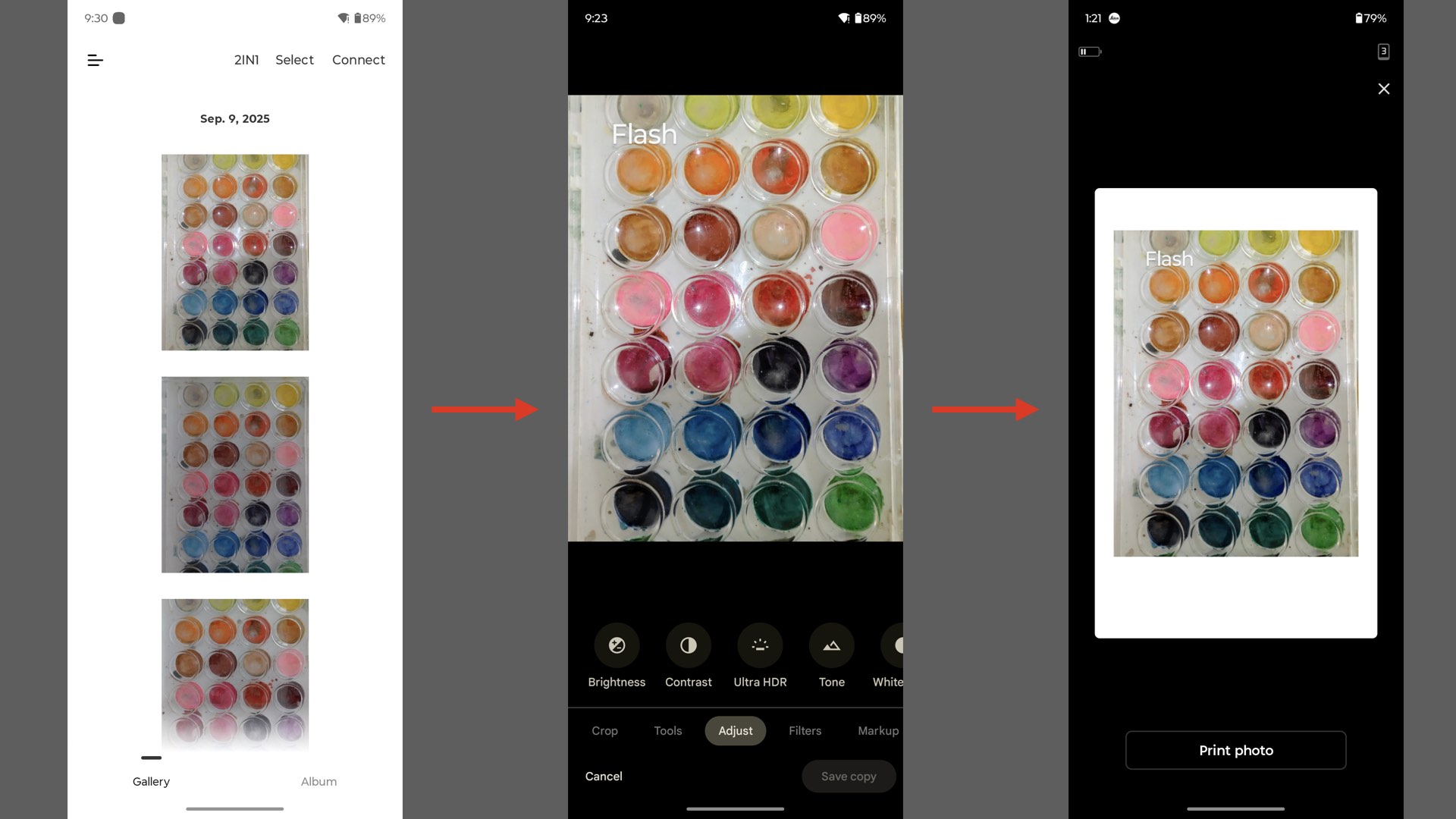
Using a properly equipped Fujifilm X half camera make a sample photograph for testing your newfound diplomatic ties to your German better half. Transfer this photo to your smartphone via the already linked X half app. This transferred photograph will appear in your smartphone’s photo/image gallery.
Flipping command over to the previously connected Leica FOTOS app, select the newly transferred X half photograph and print it on the Sofort 2. Congratulations, you are now an acting member of these “united nations.” Before you start printing a blizzard of instax prints, there’s one more tiny amendment to this photographic treaty.
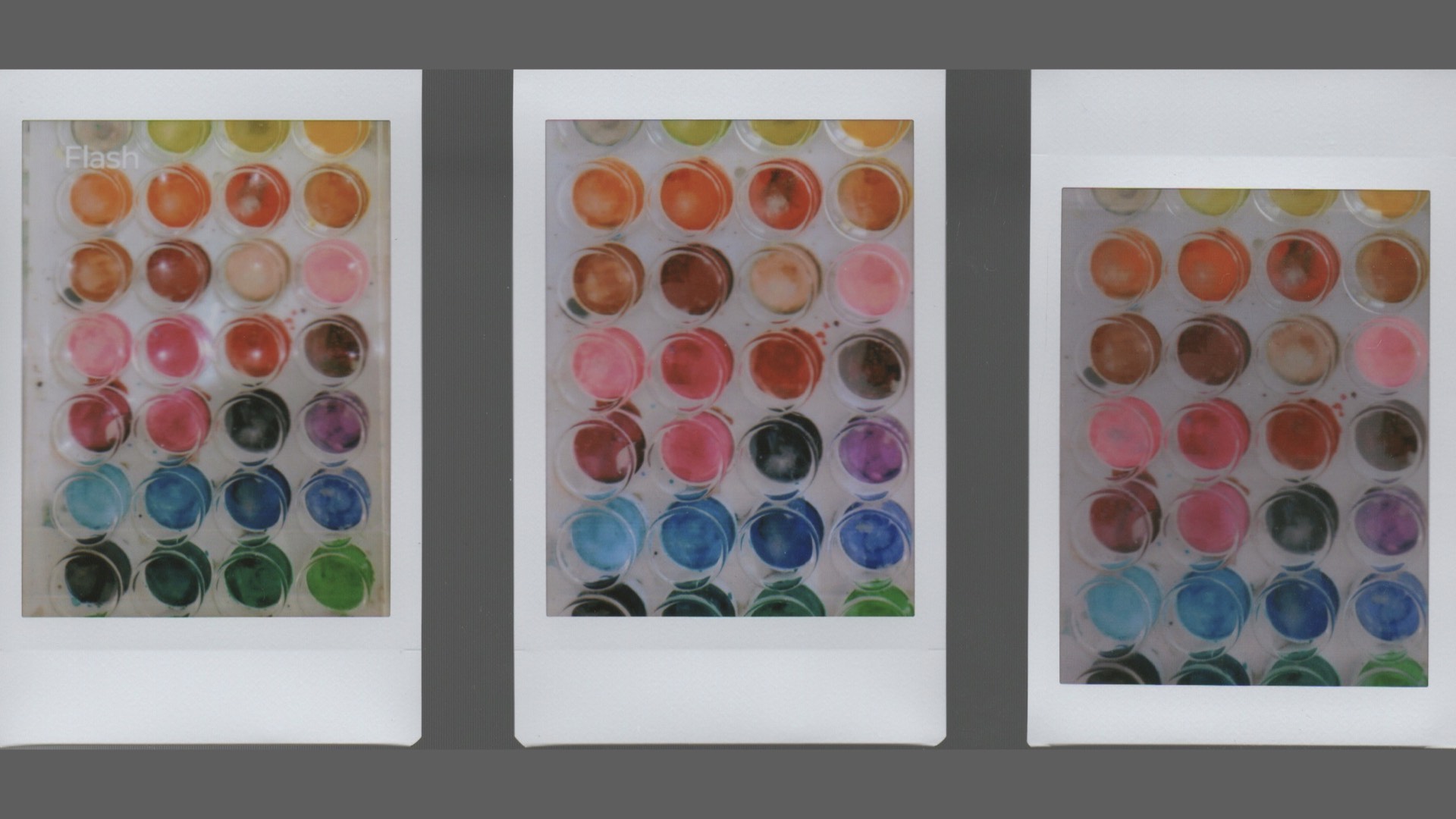
If you’d like to edit your X half photograph prior to printing, for example adding some text for labeling a print, you must perform this action on your smartphone before using the Leica FOTOS app. Select the desired photo in your device’s gallery, perform your edit, and save the edited final image. This newly edited photograph can now be selected with the Leica FOTOS app for printing.
Two differing cameras working together for the good of photographic harmony. An international affair with a mutual benefit. If you already own both an X half and a Sofort 2, imagine the convenience of not having to lug an extra printer around with you on a photographic session. A new world order of photographic détente.
Enjoy.
See more from DIYPhotography.net on Google
Add DIYPhotography.net as a trusted source. This makes
our stories more likely to appear in your Google Search results.
 Add as a preferred source on Google
Filed Under:
Tagged With:

David Prochnow
Our resident “how-to” project editor, David Prochnow, lives on the Gulf Coast of the United States in Ocean Springs, Mississippi. He brings his expertise at making our photography projects accessible to everyone, from a lengthy stint acting as the Contributing How-To Editor with Popular Science magazine. While you don’t have to actually build each of his projects, reading about these adventures will contribute to your continued overall appreciation of do-it-yourself photography. A collection of David’s best Popular Science projects can be found in the book, “The Big Book of Hacks,” Edited by Doug Cantor.
Related Posts
 Half-and-Half: The Cream of the Current Half-Frame Camera Crop Go Head-to-Head
 Fujifilm finally releases a follow-up to its most advanced analog Instax mini camera – Fujifilm Instax Mini 99
 Pentax 17 vs. Alfie Cameras TYCH: a frame half full or a frame half empty?
 Instax is Dead! Long Live the 4Pass Printing Camera
Join the Discussion
DIYP Comment Policy
Be nice, be on-topic, no personal information or flames.