


























If you use Photoshop on high res displays, this is the first thing you should do
Oct 25, 2024
Pratik Naik

John Aldred is a photographer with over 25 years of experience in the portrait and commercial worlds. He is based in Scotland and has been an early adopter – and occasional beta tester – of almost every digital imaging technology in that time. As well as his creative visual work, John uses 3D printing, electronics and programming to create his own photography and filmmaking tools and consults for a number of brands across the industry.
Share:

Is your brush cursor blending into the image on your screen?
In Photoshop, if you’re using a 4K screen, MacBook Pro, or a similar high-resolution display, you might notice that the brush outline blends into the pixels, making it hard to see. Thankfully, you can adjust how bold your brush cursor outline is!
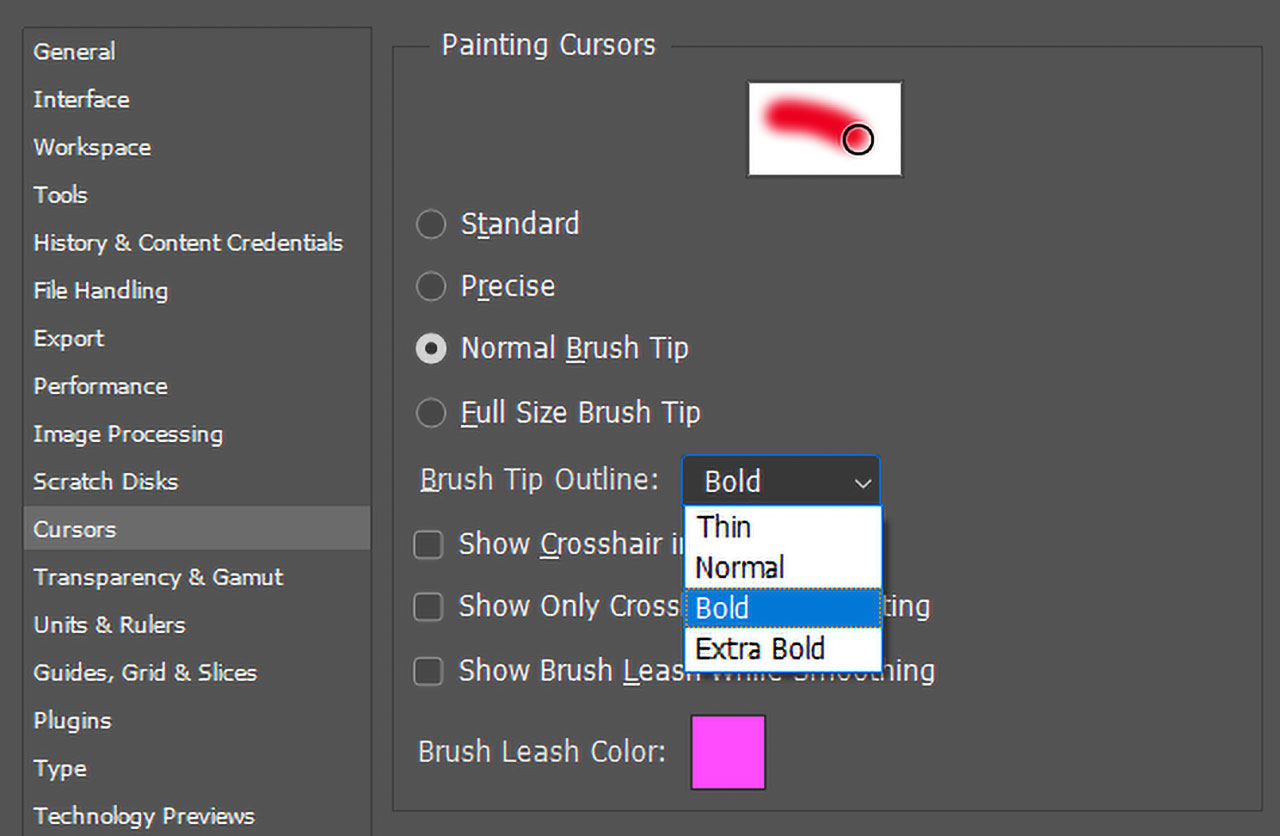
Simply go to Preferences > Cursors, and under “Brush Tip Outline,” change it to Extra Bold. This makes a huge difference, especially when dodging and burning.
The issue often occurs when working with areas that are around 50% gray, where the cursor can blend in with the image.
This used to not happen since resolutions weren’t as pixel-dense in the past, but a few updates ago, Adobe added this option, and it’s something I took for granted.
I hope this helps at least one person that didn’t know about this.
Enjoy.
See more from DIYPhotography.net on Google
Add DIYPhotography.net as a trusted source. This makes
our stories more likely to appear in your Google Search results.
 Add as a preferred source on Google

About Pratik Naik
Pratik Naik is a high-end retoucher, photographer, and retouching teacher under his Solstice Retouch brand. He also runs the successful Retouchist Blog. You can catch Pratik on social media on Instagram and Facebook.
We love it when our readers get in touch with us to share their stories. This article was contributed to DIYP by a member of our community. If you would like to contribute an article, please contact us here.



Join the Discussion
DIYP Comment Policy
Be nice, be on-topic, no personal information or flames.