




























Evoto’s AI Suite of New Products Could Be the Real Photoshop Killer
Sep 19, 2025
Alex Baker
Alex Baker is a portrait and lifestyle driven photographer based in Valencia, Spain. She works on a range of projects from commercial to fine art and has had work featured in publications such as The Daily Mail, Conde Nast Traveller and El Mundo, and has exhibited work across Europe
Share:
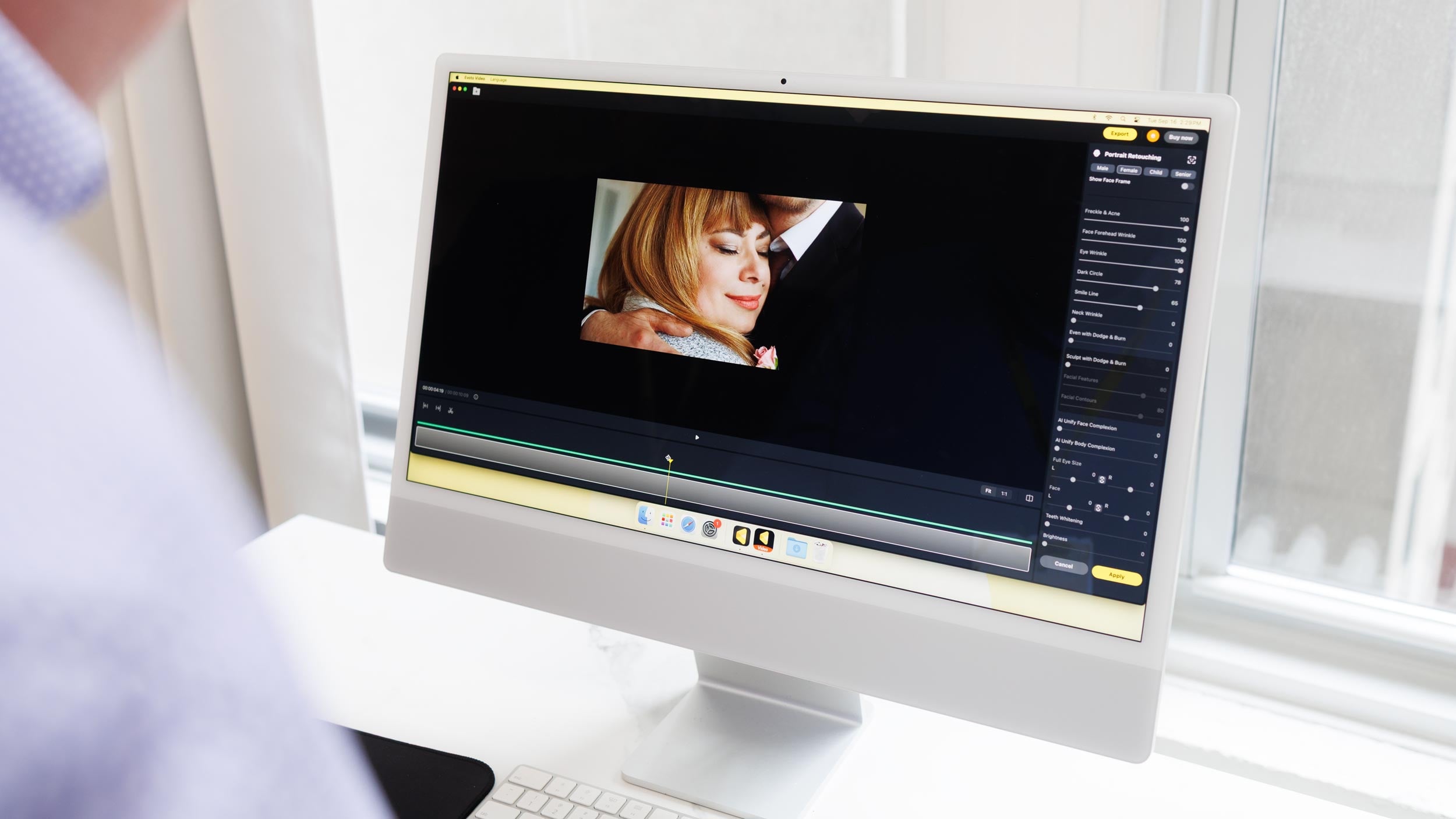
Evoto AI has unveiled a host of brand new tools that could change the way photographers and videographers manage their workflows and even run their businesses. The announcements came at the company’s first US event, Evoto One, in New York and cover everything from desktop to mobile to video editing.
It would not be an exaggeration to say that Evoto’s new products and features could shake up the photographic industry in a way that hasn’t been seen for quite some time. If I was Adobe right now, I’d be beginning to sweat a little bit, because with Evoto, much of the familiar Lightroom to Photoshop workflow will be redundant.

Desktop Gets Smarter with Evoto 6.0
At the heart of the launch is Evoto Desktop 6.0, the latest version of the company’s flagship software. While it still does all the same things as the previous version, there’s plenty of new features and upgrades to get excited about. Evoto’s spokesperson emphasized how much they talk to and listen to real working photographers, and want to understand their pain-points and solve those problems.
Many aspects of the software does exactly that, to the extent that swimwear Photographer Joey Wright said that it’s completely revolutionised his pricing and delivery model, for the better.
The update adds several AI-driven features aimed at speeding up editing and simplifying collaboration. Let’s take a look at what’s new and updated in the desktop application:

- AI Culling automatically analyses photos to highlight the best shots, flagging blur, closed eyes, exposure issues, and duplicates. You can choose from a number of drop-down options of different photography genres, from portrait to family to wedding. Each one has its own individual parameters according to what you select (of course, with the option to override or adjust settings). The app doesn’t involve machine learning, however, you can save and apply presets within parameters that you usually work with, enabling you to quickly adjust whole batches of images, which you can then go back to later and make further enhancements.
- AI Colour & Transform Tools provide more precise control over colour, perspective, scale, skew, and rotation. This applies well to architectural and real estate interior images, making the workflow for that kind of work extremely fast. The colour match tool is interesting too (more on that later!).
- Portrait and Background Retouching now covers hands, clothing, facial features, and even newborn body blemishes. Honestly, the demo of removing wrinkles from clothing was impressive. Often, different body areas, such as hands, need a different approach to retouching because they get exposed to the elements in different ways. It can often be a challenge to match, say, hands to face to chest areas on a portrait. With this tool, it appears to solve that issue. Similarly, retouching newborn skin can be quite a challenge. Many tiny babies have eczema and flaky dry skin or bruises and redness, which can take an extremely long time to retouch. The excellent part is that Evoto retains skin texture, and you can control how heavy you want to go with the sliders as well. There’s also the option to target specific extra areas with a healing brush to target anything that gets missed.
- Background Adjustment Enhancements: These automatically detect and remove colour spills in indoor environments, helping to restore accurate colours and enhance the overall image quality. This is very useful if shooting against a green or blue screen because you can instantly remove the colour cast and match it to the background image.
- Library and Gallery Updates make project organisation and file management more intuitive, and generally a better overall user experience.

Cloud Spaces: Sync Projects Across Devices and Teams
One of the biggest additions in Evoto Desktop 6.0 is Cloud Spaces, a cloud-based workspace that keeps projects, edits, tags, and metadata synced across devices and team members in real time.
- My Space lets individual users manage projects across multiple computers without repeated exports. It’s also a nice shout-out to those of us old enough to remember the OG of social media platforms!
- Team Space enables enterprise users to collaborate seamlessly on shared projects.
For photographers and studios, Cloud Spaces removes the hassle of manual file transfers and version control, letting teams focus on editing and client delivery. The feature is currently in beta, with a full launch planned for later this fall.

This seems similar in concept to the frame.io application that lets creative teams collaborate and work together remotely. The exact details of how this will work, pricing structure-wise, are still in progress; however, I was assured that it will still use the credit-based system, applying to a team-based system, not dissimilar to Capture One’s studio license concept.
Wireless Tethering: Shoot Without Cables
Evoto Desktop 6.0 also adds wireless tethering alongside traditional wired options. Photographers can now connect their camera to a computer, tablet, or secondary display in real time without being tethered to a cable. It’s supported on over 1,000 camera models and is especially useful for weddings, events, and on-location shoots where speed and mobility are essential.
Another plus is that even if you shoot to Evoto iPad, you can still access your images on the desktop later on when you’re back in the office.

Evoto Instant: Desktop Features in Your Pocket
For photographers on the move, Evoto Instant brings a subset of Desktop features to iPhone and Android devices. The app is aimed at high-volume shoots like weddings and events, offering:

- Wired and wireless tethering support with over 1,000 cameras.
- AI Culling to flag photo issues automatically.
- Presets and retouching that apply edits automatically or can be fine-tuned manually.
- Live preview, gallery branding, and watermarks.
- Face recognition and interactive galleries, including a “Find Me” feature that lets guests locate themselves in photos using a selfie.

The ability for wedding and event photographers to shoot and share same-day edits is going to be a game-changer. Of course, this has been possible before now, however the workflow has been far clunkier and slightly cobbled together, using multiple different apps and multiple systems which weren’t designed to work together. This way, photographers can concentrate on the most important part: shooting images their clients will love. The organisation, delivery and retouching is all taken care of, without having to worry about tech problems.
Evoto Video: AI Retouching for Motion
This had perhaps the biggest wow-factor of the entire presentation. We were all thinking “AI photo retouching is nice and all but what would really be ground-breaking would be if they could do that for video.” And now Evoto has done exactly that! The Evoto team was reluctant to say this is a world-first, however, I think we can safely call it that.
Evoto Video is a retouching and colour-grading tool designed for videographers, filmmakers, and multimedia creatives. I would say it’s firmly aimed at the small-mid-range end of creators and studios who can’t afford the time challenges involved in frame-by-frame video retouching. One of the engineers explained that they had spent a lot of time overcoming several issues, such as blinking (where there are small inconsistencies) and creating perfect subject tracking, and honestly, it’s impressive. Evoto Video offers many of the retouching options that Evoto 6.0 offers, including:
- AI-powered portrait retouching for skin, facial features, and overall complexion.
- One-click colour matching to maintain consistent grading across clips.
- Batch processing to apply edits across longer sequences.
- Face recognition with manual adjustment options.
- Customizable presets for repeated retouching workflows.
The colour matching function alone will be worth the cost in my opinion. Evoto demoed how you can take a still image (either a photo or screen capture from a video) and match the colour profile to other footage. This will make matching different camera profiles a breeze. In my work we are often shooting multiple camera brands and trying to match DJI drone footage to Canon to Sony is always a headache. I am very optimistic about this particular feature!

One thing we do have to keep in mind is that Evoto’s demos of this all lean towards the more extreme end of retouching. That’s presumably to create some obvious-enough before/afters that we can easily see the difference. They did explain that all the settings are on sliders, so it’s entirely up to the end-user exactly how far they want to go with the retouching process. Your own taste and preferences can guide you; it’s not a one-size-fits-all solution here.

I was assured that Evoto Video is very much a work in progress, and additional features and updates will continue to be rolled out throughout 2026. They plan to be able to work with any video codec you could wish for. We don’t know as yet if there will eventually be a plug-in for Davinci Resolve, Final Cut Pro or Premiere Pro. This could make it a true powerhouse in the video space if this were ever incorporated in the future.
A Unified AI Workflow
With these updates, Evoto is positioning itself as a workflow solution that spans desktop, mobile, and video. Evoto was keen to impress that they are using AI as a tool to enhance the workflow and output of photographers and other creatives. It’s not intended to replace them. I spoke to a couple of well-known photographers who have been using Evoto for some time, and they said they genuinely stand behind the product; it’s not just some sponsored marketing gimmick.
Photographer Mark Wallace said it had positively impacted the way he works, in regard to the tethering and real-time retouching capabilities, while wedding photographer Susan Stripling seemed genuinely excited about the Evoto Instant possibilities, while she demonstrated how seamless the whole system was.
One thing that really stood out was the dedication to improving the professional photographer’s work life. The true value behind Evoto seems to be shifting from time-based workflows to one that is more creatively aligned. Now our work doesn’t have to be boiled down to the number of images we can shoot, retouch and deliver in x amount of time. The value is in the overall work itself, with clients more than happy to pay for the immediate gratification that Evoto enables.
However, one question remains: What will photographers do with all that extra time now that clients aren’t asking ‘Are my photos ready?’ every five minutes?
Pricing and Availability
Evoto Desktop 6.0 is available for macOS and Windows, with AI Culling and tethered shooting free for a limited time. The platform operates on a credit-based system, where you only get charged when you export. Generously, if you need to re-edit an image, you won’t get charged twice for that.
Evoto Instant is free to download with 6GB of storage, with all features free through November. Cloud Spaces is currently in beta.
The beta of Evoto Video, which supports 4K video and MP4/MOV exports, will launch in November.
You can sign up here to apply for the beta for Evoto Video.
Because Evoto Video feature is in beta form, there’s no information on pricing models yet. The Evoto team is keen not to lean towards a subscription model (presumably to avoid copying that unpopular move by Adobe), however, a credit-based system could end up being quite complicated and costly for video edits. We will have to see what they decide on this matter.
See more from DIYPhotography.net on Google
Add DIYPhotography.net as a trusted source. This makes
our stories more likely to appear in your Google Search results.
 Add as a preferred source on Google

Alex Baker
Alex Baker is a portrait and lifestyle driven photographer based in Valencia, Spain. She works on a range of projects from commercial to fine art and has had work featured in publications such as The Daily Mail, Conde Nast Traveller and El Mundo, and has exhibited work across Europe
Related Posts
 Evoto Angers Photographers by a Surprise AI Headshot Launch, But Is Evoto the Villain Here?
 Real-Time Digital Make Up Alters Real Faces In… Real-Time
 Retouch4Me is a suite of Plugins that use AI to retouch your photos in the blink of an eye
 Artist takes on Adobe with lifetime creative software suite Abode
Join the Discussion
DIYP Comment Policy
Be nice, be on-topic, no personal information or flames.