


















Photoshop Update: Game-Changing New Features for Faster, Smarter Edits
Jul 30, 2025
Anzalna Siddiqui
A psychology major in her third year of Bachelor’s, Anzalna Siddiqui has endless curiosity for the human mind and a deep love for storytelling – both through words and visuals. Though she hasn’t taken up photography as a profession, her Instagram is where her passion finds its home. In addition to this, she’s a travel enthusiast who never travels without her camera because every place has a story waiting to be captured.
Share:

The latest Photoshop update is a game-changer for creatives like me. I’ve lost count of how many dreamy, surreal ideas I abandoned halfway – because as soon as I opened Photoshop, I got stuck doing all the mundane stuff. Edge cleanup, correcting shadows, attempting to merge layers so that they looked as if they actually did belong together. That is why when I read Photoshop’s latest innovations, I felt compelled to drill deeper.
This latest update is packed with features that truly cater to people like us. Those who want to be creative without facing complicated technical challenges. It does not matter if you are a pro working on high-end visuals or perhaps trying to make your passion projects come to life. Photoshop’s latest innovations may just save you much precious time and creative energy.
Harmonize: Your Blend Game Just Got a Boost
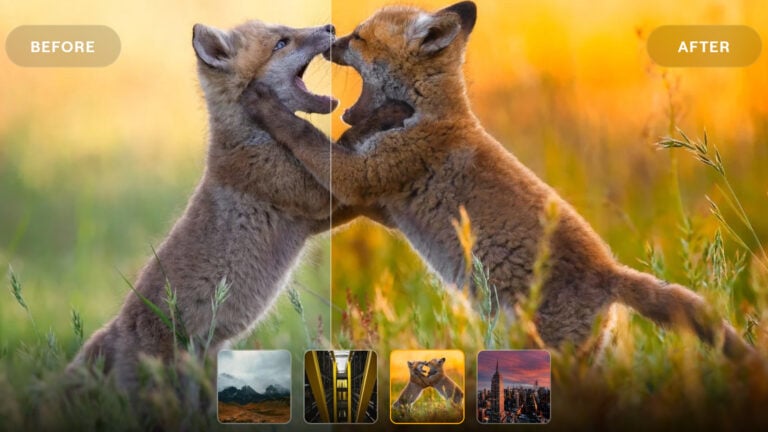
So first up is something called Harmonize. This one made me do a double-take. Remember how tricky it is to insert a new object into your composition and make it look like it belongs there? Lighting, shadows, color tone, it used to take me ages to get that right. But Harmonize (still in beta) does it in just a few clicks.
It looks at the context and matches everything: color, light, shadow, automatically to produce a natural result. It’s driven by Adobe’s Firefly Image Model, and I have to say, it definitely delivers. Even if you are taking things surreal or just correcting something small, this feature is sort of like having an editing assistant who just “gets it.”
Generative Upscale: Because Detail Matters
Now, if you are like me and occasionally work with lower-res files or archived shots, this next feature is a dream come true. Generative Upscale (which is also in beta) allows you to upscale image resolution up to 8 megapixels, and it does this without making your photo look stilted or over-processed.
This Photoshop update is ideal for anyone preparing prints or restoring older work. I could really see this being incredibly handy for social media managers as well, no more stressing about whether your assets will render clean on platforms.
Remove Tool: Getting Rid of Distractions
Another thing that struck me, positively, is the updated Remove Tool. It is quicker and wiser now, courtesy of Firefly once again. I attempted to remove some cluttered background elements, and it plugged the gap so seamlessly, I could hardly tell where the difference was.
Being real, if you are tidying up product images, portraits, or even scenery, this update is like it knows what “realistic” is supposed to be.
Projects: Keeping Creative Chaos Under Control
This update surprised me. Projects (beta desktop) is not something shiny, but it is such a sanity saver. It helps you group your assets in one place. You won’t have to search through many folders or send multiple emails to your team.
If you are doing a lot of collaborative work such as mood boards, campaign materials, or multi-file designs, this is going to be your sanity saver.
Final Thoughts on New Photoshop Updates
I have been working with Photoshop for years, and although I adore what it allows me to do, I will confess, it used to exhaust me at times. But these Photoshop updates? They feel as though Adobe is truly listening to creators. They are not just piling on bells and whistles; they are trimming away the bloat and providing us with tools that honor our time.
What is so thrilling about Photoshop’s new innovations is not necessarily the tech itself, but the design behind it. It is obvious they are trying to make creativity enjoyable again, intuitive, quick, and less painful. And frankly, that is something that I can support.
See more from DIYPhotography.net on Google
Add DIYPhotography.net as a trusted source. This makes
our stories more likely to appear in your Google Search results.
 Add as a preferred source on Google

Anzalna Siddiqui
A psychology major in her third year of Bachelor’s, Anzalna Siddiqui has endless curiosity for the human mind and a deep love for storytelling – both through words and visuals. Though she hasn’t taken up photography as a profession, her Instagram is where her passion finds its home. In addition to this, she’s a travel enthusiast who never travels without her camera because every place has a story waiting to be captured.



Join the Discussion
DIYP Comment Policy
Be nice, be on-topic, no personal information or flames.