
















Instagram Lets Strangers Turn Your Photos Into AI Slop – Here’s How to Turn It Off
Jul 10, 2026
Dunja Đuđić Kalinin
Dunja Djudjic is a multi-talented artist based in Novi Sad, Serbia. With 15 years of experience as a photographer, she specializes in capturing the beauty of nature, travel, concerts, and fine art. In addition to her photography, Dunja also expresses her creativity through writing, embroidery, and jewelry making.
Share:

Meta just rolled out poetically named “Muse Image,” its new AI image generator. No biggie, right? Yes, biggie: anyone can tag your public Instagram account in a prompt and use your photos to generate AI content! It’s all fair game, apparently, unless you go dig through your settings and turn it off yourself. So, let me tell you how to turn it off and why you absolutely must do it.
[Related Reading: Google Trains AI on Your Search Uploads by Default – and Opt-Out Only Half Works]
How to Opt Out
Let’s start with the most important part, how to turn this off. If your Instagram account is public, here’s what to do:
- Open the Instagram app and tap your profile.
- Tap the three lines in the top-right corner.
- Scroll down to Sharing and Reuse. (For me, it was tough to spot it, so I just typed it in the Search bar at the top.)
- Find Allow People to Use Your Content on Instagram and With AI Features on Meta.
- Turn off the toggle for both Posts and Reels – they’re separate toggles!
- Keep scrolling. Depending on your app version, you may also see a third toggle for your original audio. Turn that off too.
Important: this rollout isn’t consistent yet. Some people are only seeing the Posts and Reels toggles, others are also getting one for audio (for example, I had this one on both my arts & crafts profiles). So, don’t stop scrolling the second you see two switches, check the whole Sharing and Reuse section to make sure you’re not missing one.
Unsurprisingly, the “on” and “off” options look very similar in Dark Mode. Make sure that the little dot on the toggle is on the left and is lighter gray. I took a screenshot on Light Mode, but you get the point.
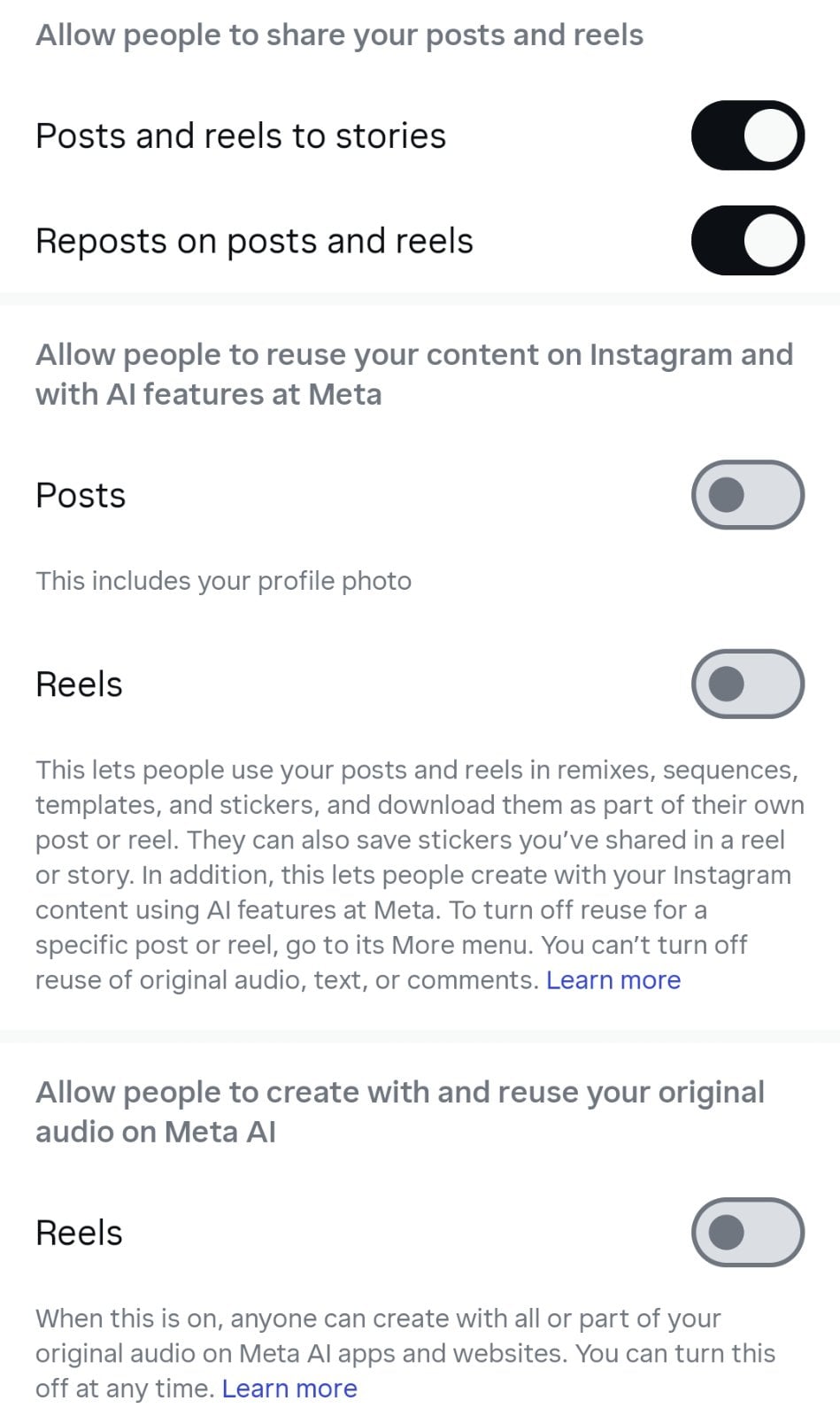
It’s also worth noting that, if your account is private, you’re good. This still doesn’t affect private accounts and the Sharing and Reuse option won’t even show up for you. Still, knowing Meta, it’s worth keeping an eye on things even if your account is behind a curtain for strangers.
[Related Reading: Meta is using your selfies to create AI ads of you targeting…. You]
How Does “Muse Image” Even Work?
It all happens inside the Meta AI app (or meta.ai) when someone is writing a prompt. They type an @-mention of a public Instagram username as part of that prompt. Then, Muse Image pulls that account’s public photos in as reference material for whatever it’s generating. So the “tag” is really just a way of pointing the AI at your public photos, not a notification-style tag like you’d get in a comment. In fact, you won’t get a comment, a notification, anything.
What Can “Muse Image” Use, and What Can It Generate?
As you can conclude from the settings, the feature can pull your posts, Reels, and on some app versions, original audio from your account. So this isn’t just a static-image problem, your video clips and your voice are potentially fair game too, depending on how your version of the app has rolled this out.
From what I’ve learned, the feature can mainly generate images (for now). Tagging your username lets someone use Meta AI to pull your public photos into a new generation, and that includes putting your actual face into edited or composited images. It’s your likeness, repurposed, without you knowing.
Meta has already previewed Muse Video, because of course it has. It’s built on the same tech, with native audio support included. It’s not fully public yet, but it’s coming soon to creators and Meta AI.
On the “plus” side, Meta will slap an invisible Content Seal watermark on anything Muse Image generates. It’s supposed to survive cropping, compression, and screenshots, and it offers a public tool to check if an image carries it. Nice in theory. In reality, we’ve seen that AI-watermark removers do work, and that people actually rarely check whether something is AI-generated. Also, this doesn’t change the fact that nobody asked you first.
Why I’m Terrified
I want to sit with this for a second, as this has kept me up last night: this feature was on by default, for every public account, including the accounts of children.
Think about how many parents post their kids constantly. Birthdays, first days of school, beach trips, every milestone, documented and shared publicly. Not to mention accounts that revolve around children in the first place. None of those parents opted into having their children’s faces fed into an AI remix tool. They didn’t get a heads-up and no one asked them.
And you won’t even know it happened. There’s no notification when someone uses your content. No log you can check or retroactive cleanup if something was generated before you found this setting. You just have to hope you caught it in time, or that nobody’s tagged you yet.
It’s bad enough for adults. For kids who can’t consent to any of this and whose parents may have no idea the setting exists, it’s even worse.
Lastly, can we talk about the name for a second? Muse Image. As if this is some elegant muse is gently inspiring your art. Like it’s not a tool that lets some random folks generate AI slop using your face without your permission and consent. Muse. Sure. Screw you, Instagram, honestly.
Anyway, go turn the toggle off. Then maybe share this information with friends and family to check theirs too, especially anyone posting photos of their kids. This one’s worth the thirty seconds you’d otherwise spend scrolling.
[via Digitalna Higijena]
See more from DIYPhotography.net on Google
Add DIYPhotography.net as a trusted source. This makes
our stories more likely to appear in your Google Search results.
 Add as a preferred source on Google

Dunja Đuđić Kalinin
Dunja Djudjic is a multi-talented artist based in Novi Sad, Serbia. With 15 years of experience as a photographer, she specializes in capturing the beauty of nature, travel, concerts, and fine art. In addition to her photography, Dunja also expresses her creativity through writing, embroidery, and jewelry making.


Join the Discussion
DIYP Comment Policy
Be nice, be on-topic, no personal information or flames.