
















DxO FilmPack 8: Revolutionary Film Emulation with Time Warp and Photoshop Integration
Sep 23, 2025
Darlene Lleno
Darlene Lleno brings a unique perspective to DIY Photography as someone who grew up surrounded by camera gear but chose words over lenses. With five years of writing experience, she specializes in photography content that’s both technically informed and genuinely passionate. Growing up with a photographer twin brother meant camera talk was everyday conversation in her household. While he mastered capturing moments, Darlene discovered she preferred being the subject and the storyteller behind the scenes. As a travel enthusiast and mother of two, she understands the importance of preserving life’s precious moments. When not exploring new destinations or writing for DIY Photography, you’ll find her reading or tending to her garden. Her approach to photography writing is refreshingly authentic, she may not be behind the camera, but she knows exactly what it takes to help others capture the shots that matter most.
Share:

DxO FilmPack 8 brings real film looks to digital photos. This new version adds two major features that photographers have been asking for. You get Time Warp Mode for exploring photo history and direct Photoshop access without switching apps.
Most film emulation software just adds simple color filters. DxO takes a different approach. They measure actual film stocks in their lab to create accurate emulations. This means you get real film character instead of fake digital effects.
The software launches September 30, 2025. It includes major improvements that fix common workflow problems. Photographers can now work faster while getting better results.
Read more: DxO FilmPack 8: Revolutionary Film Emulation with Time Warp and Photoshop IntegrationWhat Makes DxO FilmPack 8 Stand Out
DxO FilmPack 8 works differently than other film software. The company uses science instead of guessing to recreate film looks.
Most competitors create film effects by eyeballing how old photos look. DxO actually tests real film rolls in their laboratory. They measure how each film stock responds to different lights and colors. Then they build software that copies these exact reactions.
Real Film Science Creates Better Results
DxO FilmPack 8 uses lab data from actual film testing. The software recreates the chemical processes that happen when you shoot and develop film. This scientific method produces results that feel natural instead of fake.
Each film emulation captures specific details like grain patterns and color shifts. The software even knows how different films react to various lighting conditions. Professional photographers get consistent results that match their film experience.
You won’t find generic color filters here. Every film emulation comes from careful study of real film stocks. This attention to detail shows in the final results.
153 Authentic Film Options Available
DxO FilmPack 8 includes 153 different film emulations. The collection covers color negative, black and white, and slide films. You can find discontinued classics and modern favorites in one place.
Version 8 adds 15 new films developed through the same lab process. Popular additions include CineStill 800T for night photography and Harman Phoenix 200 for vibrant colors.
The collection also includes specialty options. You get Kodak TMAX Pro 3200 for extreme low light situations. Various Lomography stocks add creative character to digital images.
Time Warp Mode Changes How You Edit Photos
Time Warp Mode represents the biggest innovation in DxO FilmPack 8. This feature lets you explore 200 years of photo history while editing your images.
The mode builds on the existing Time Machine archive. Time Machine shows historic photos with information about cameras and films used. Time Warp takes this further with interactive tools that transform your photos.
You get two main tools that work together. The Time Travel slider moves through different eras. The Ageify slider adds vintage character to your images.
Time Travel Slider Takes Photos Through History
The Time Travel slider lets you apply looks from different time periods. You can start with early photography from the 1820s. Then move forward through classic 35mm films from the late 1900s.
Each timeline position applies authentic characteristics from that era. You get proper film grain, color shifts, and aging effects. The slider covers major periods in photo development history.
This creates a natural way to add historical elements to modern photos. You can experiment with different eras to find the perfect look. The tool also teaches you about photography history while you work.
Ageify Slider Adds Realistic Vintage Character
The Ageify slider progressively ages your images using real film characteristics. This goes beyond simple filters by copying how film actually deteriorates over time.
You control how much aging gets applied to each photo. Light settings add subtle vintage character. Heavy settings create looks that simulate decades of storage damage.
The effect combines realistic grain with color shifts and physical wear. All effects come from studying how historical film samples actually aged. This research creates authentic vintage looks instead of digital approximations.
Full Photoshop Integration Improves Workflow
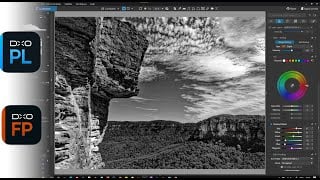
DxO FilmPack 8 now works directly inside Adobe Photoshop. All 153 film emulations appear as an integrated palette within Photoshop. You don’t need to switch between different apps anymore.
This integration solves one of the biggest complaints about plugin workflows. Many photographers hate stopping their work to switch applications. The new system keeps you in Photoshop while accessing all DxO features.
You can apply film looks to individual layers or complete images. The system maintains full feature access within the familiar Photoshop interface. Professional photographers save time during complex editing sessions.
Works with Popular Photo Software
DxO FilmPack 8 integrates with three major photo editing platforms. You get compatibility with DxO PhotoLab, Adobe Lightroom Classic, and now Photoshop. This versatility fits virtually any workflow setup.
The Photoshop integration maintains all features and controls. You work within the familiar interface while accessing scientific film emulations. Professional users benefit from reduced app switching and faster processing.
New Films and Updated Library
The expanded film library includes carefully chosen additions. DxO selected films that reflect current trends while maintaining their scientific standards.
Version 8 adds modern films that analog photographers actually use. Each new emulation goes through the same rigorous lab testing process. You get authentic results instead of digital approximations.
Modern Film Stocks Join the Collection
CineStill 800T brings distinctive cinema-inspired characteristics to digital workflows. This film originally came from Kodak motion picture stock. It provides excellent low-light performance with unique color properties.
Harman Phoenix 200 represents one of the newest analog films available. This vibrant color negative offers distinctive grain and color that appeals to experimental photographers. The film gives unique aesthetic character to any image.
Kodak TMAX Pro 3200 emulation serves photographers who need extreme low-light capability. This black and white film pushes available light boundaries while keeping fine grain structure. You maintain detail in challenging conditions.
Black and White Options Expanded
Lady Grey B&W 120 ISO 400 provides sophisticated monochrome results. The film offers balanced contrast and pleasing tonal gradation. This medium format emulation works particularly well for portrait photography where smooth skin tones matter.
The collection includes various other black and white films. Each emulation captures specific grain patterns and tonal curves. These characteristics made certain films popular among professional photographers.
Scanned Film Tool Helps Hybrid Workflows
DxO FilmPack 8 includes a dedicated tool for working with scanned film. This addresses photographers who combine film shooting with digital processing. The hybrid workflow grows more popular each year.
Many photographers shoot film but scan negatives for digital editing. The process often creates color and contrast problems. The new tool fixes these issues automatically.
Fixes Common Scanning Problems
The optimization tool handles color and black and white negative inversion. One click corrects tonal values to produce proper positive images. More than 10 tone curve presets address specific scanning issues.
These presets target problems like color shifts from aging film. They also fix density variations from inconsistent development. Scanner limitations often cause contrast issues that the presets correct automatically.
The tool helps restore scanned film to its intended appearance. You maintain authentic character while fixing technical problems. This supports photographers who want enhanced rather than just corrected scans.
Works with Main Film Features
The scanning tool integrates with other FilmPack features. You can first correct scanning issues then apply creative treatments. This workflow helps photographers enhance film scans beyond simple correction.
The system supports photographers who shoot film but want digital flexibility. You get the best of both analog capture and digital processing.
Enhanced Time Machine and Historical Content
Time Machine gets major improvements in version 8. DxO added 19 new historical images with their corresponding film emulations. These additions expand the visual timeline and provide fresh insights.
Each new entry includes detailed information about photographic techniques. You learn about equipment and film stocks used for historically important images. This educational component helps connect technical choices with aesthetic results.
Broader Historical Coverage
The archive now covers more photographic genres and time periods. You can explore early documentary photography through modern fine art applications. The expanded coverage shows how film characteristics influenced artistic expression.
Users can see how different film stocks shaped photography throughout history. This context helps modern photographers make informed choices about film characteristics for their projects.
New Themed Browsing System
A new webview browsing mode organizes the archive through themes. The first theme focuses on portrait photography. This organization makes it easier to find film looks that match your subject matter.
The themed system will expand over time. More targeted ways to explore the archive are coming. This helps photographers find relevant historical references for current projects.
Digital Camera Profiles Added
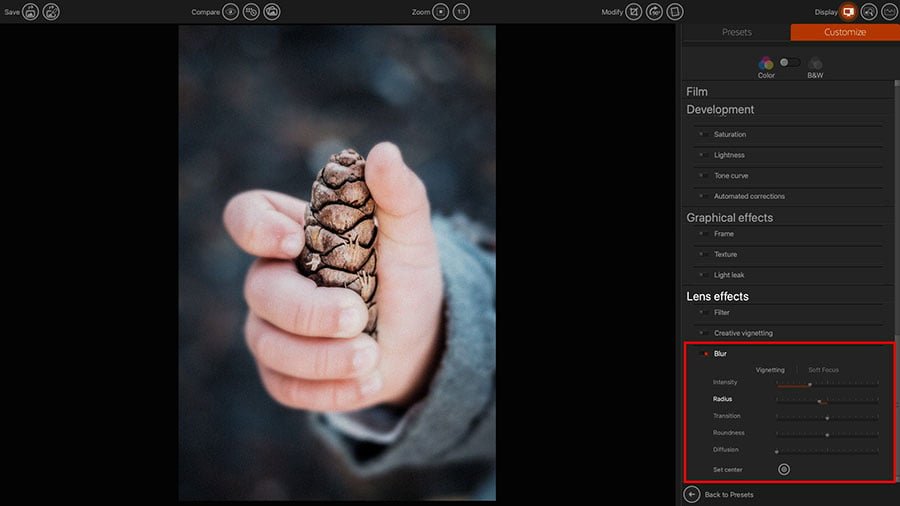
DxO FilmPack 8 stays focused on analog emulation but adds some digital options. Four new profiles capture popular Fujifilm and Sony color characteristics. These profiles work alongside traditional film emulations.
The digital profiles capture subtle tones and contrast curves from specific camera manufacturers. These work well for photographers who appreciate certain digital processing characteristics. The profiles provide additional creative options within the FilmPack interface.
Modern Digital Aesthetics Available
The digital camera profiles bring refined color science into the FilmPack system. Some photographers work in mixed analog and digital workflows. These profiles acknowledge that appreciation for digital camera processing exists.
The profiles maintain software emphasis on authentic reproduction. They provide access to digital characteristics within the familiar FilmPack interface. This gives photographers more creative flexibility.
Technical Improvements and Performance
All creative effects get updated to high resolution in version 8. This includes textures, frames, light leaks, and overlay effects. The updates maintain quality when applied to modern high resolution cameras.
Behind the scenes improvements reduce rendering times. The software responds faster during complex editing sessions. These optimizations become noticeable when working with large files or multiple effects.
Works with Modern High Resolution Cameras
High resolution updates ensure overlays maintain clarity with large files. Even subtle effects stay sharp when applied to 50+ megapixel images. This preserves image quality for both digital and print output.
The effects keep their authentic character while providing technical quality for professional use. This balance between creative authenticity and technical excellence shows throughout FilmPack 8.
Better Performance on Current Hardware
Processing efficiency improvements reduce wait times during editing. The software maintains backward compatibility with previous project files. Users get faster processing without sacrificing quality or authenticity.
The optimization work shows most clearly when working with multiple effects simultaneously. Complex edits complete faster while maintaining the same high quality results.
Pricing and Availability Details
DxO FilmPack 8 launches September 30, 2025 with competitive pricing. New users pay $149.99 USD for a complete license. Upgrade pricing from FilmPack 7 costs $89.99 USD.
New customers can save an additional 15% by using the discount code “DIY15” at checkout. This limited-time offer brings the price down to $127.49 USD for new users and $76.49 USD for upgrades from FilmPack 7.
The software uses a perpetual license instead of subscriptions. You buy it once and use it forever without ongoing payments. This pricing model appeals to photographers who want to avoid monthly software costs.
Bundle Options Save Money
Bundle packages combine DxO FilmPack 8 with other DxO products. The FilmPack 8 and PhotoLab bundle costs $309.99 USD. This represents significant savings compared to buying products separately.
Additional bundle options include DxO ViewPoint for geometric corrections. The three product bundle provides comprehensive photo processing tools at reduced cost.
Free Trial Available
A 30-day trial lets photographers test all features before buying. The trial includes full functionality without watermarks or restrictions. This provides adequate time to test compatibility with existing workflows.
You can experiment with Time Warp features and test Photoshop integration during the trial. The evaluation period helps ensure the software meets your specific workflow needs before purchase.
How It Compares to Alternatives
DxO FilmPack 8 stands apart through scientific accuracy and unique features. Most competitors use visual approximation instead of laboratory measurement. This difference shows in the final results.
Many film plugins rely on guessing how film should look. DxO’s lab-based approach produces authentic results that match real film experience. This methodology becomes important for professional applications where consistency matters.
Innovation Sets It Apart
Time Warp Mode offers features you can’t find elsewhere. The historical context and interactive timeline provide educational value with practical creative tools. No other software offers this combination.
Full Photoshop integration addresses real workflow concerns. Many professionals need seamless software interaction. This technical innovation improves productivity while maintaining creative flexibility.
Professional Uses and Applications
DxO FilmPack 8 serves various professional photography needs. Authentic film aesthetics add value to commercial and artistic projects. The software’s scientific foundation ensures reliable results.
Wedding photographers benefit from consistent, pleasing results across different lighting. The scientific approach ensures reliable color and skin tone rendering that clients expect.
Commercial and Editorial Work
Commercial photographers can achieve authentic film looks without film processing costs. The comprehensive library covers most client requests for specific film characteristics. You get professional results without logistical challenges.
Editorial photographers benefit from Time Machine context for period-appropriate aesthetics. The educational components help ensure accurate historical representation in published work.
Fine Art Applications
Fine art photographers can explore authentic film characteristics instead of digital approximations. Time Warp features provide creative possibilities for conceptual projects with historical themes.
The software supports experimental approaches while maintaining technical quality. This combination serves serious artistic applications that require both creativity and technical excellence.
What DxO FilmPack 8 Means for Photographers
DxO continues developing FilmPack based on user feedback and film analysis advances. Future updates will likely expand the film library while improving performance. New creative tools are also planned.
User requests influence which new films get priority. The software stays relevant to current photography trends while preserving classic film characteristics. This balance serves both modern and traditional photographers.
Technology Integration Continues
Digital photography technology keeps evolving. DxO FilmPack adapts to support new camera formats and workflow requirements. The software architecture supports expansion while maintaining compatibility.
Integration improvements continue addressing workflow concerns. The scientific accuracy that defines DxO’s approach to film emulation remains the foundation for all development.
DxO FilmPack 8 represents a major step forward in film emulation software. The combination of scientific accuracy with innovative features addresses real photographer needs. Time Warp technology and Photoshop integration solve practical problems while maintaining authentic film characteristics for professional use.
See more from DIYPhotography.net on Google
Add DIYPhotography.net as a trusted source. This makes
our stories more likely to appear in your Google Search results.
 Add as a preferred source on Google

Darlene Lleno
Darlene Lleno brings a unique perspective to DIY Photography as someone who grew up surrounded by camera gear but chose words over lenses. With five years of writing experience, she specializes in photography content that’s both technically informed and genuinely passionate. Growing up with a photographer twin brother meant camera talk was everyday conversation in her household. While he mastered capturing moments, Darlene discovered she preferred being the subject and the storyteller behind the scenes. As a travel enthusiast and mother of two, she understands the importance of preserving life’s precious moments. When not exploring new destinations or writing for DIY Photography, you’ll find her reading or tending to her garden. Her approach to photography writing is refreshingly authentic, she may not be behind the camera, but she knows exactly what it takes to help others capture the shots that matter most.
Related Posts
 DxO releases PhotoLab 5 and FilmPack 6 with more powerful features and Fuji X-Trans RAW support
 Nik Collection 8 Brings Smarter Photoshop Integration, Better Masks, and Big Upgrades to Silver and Color Efex
 DxO Labs gives free license for DxO OpticsPro 9
 DxO PhotoLab 6.3 adds DxO Wide Gamut support for RGB images and more accurate soft proofing
Join the Discussion
DIYP Comment Policy
Be nice, be on-topic, no personal information or flames.