
























DxO PhotoLab 9 Launches: AI Masks, Local Noise Control, iPhone RAW Support, and More
Sep 2, 2025
Dunja Đuđić Kalinin
Dunja Djudjic is a multi-talented artist based in Novi Sad, Serbia. With 15 years of experience as a photographer, she specializes in capturing the beauty of nature, travel, concerts, and fine art. In addition to her photography, Dunja also expresses her creativity through writing, embroidery, and jewelry making.
Share:

DxO has announced PhotoLab 9, the latest version of its flagship RAW photo editing software. This update brings a range of new features to give you more precise control over your edits, a smoother workflow, and broader file compatibility. It includes Apple’s HEIC/HEIF and ProRAW support, local adjustments, and organization tools. But the star of the show is a new AI Masking system, designed to streamline complex local adjustments with a mix of automation and manual control. Let’s dive in and see what the new DxO PhotoLab 9 brings to the table.
AI Masks in DxO PhotoLab 9: Smarter Selections for Local Adjustments
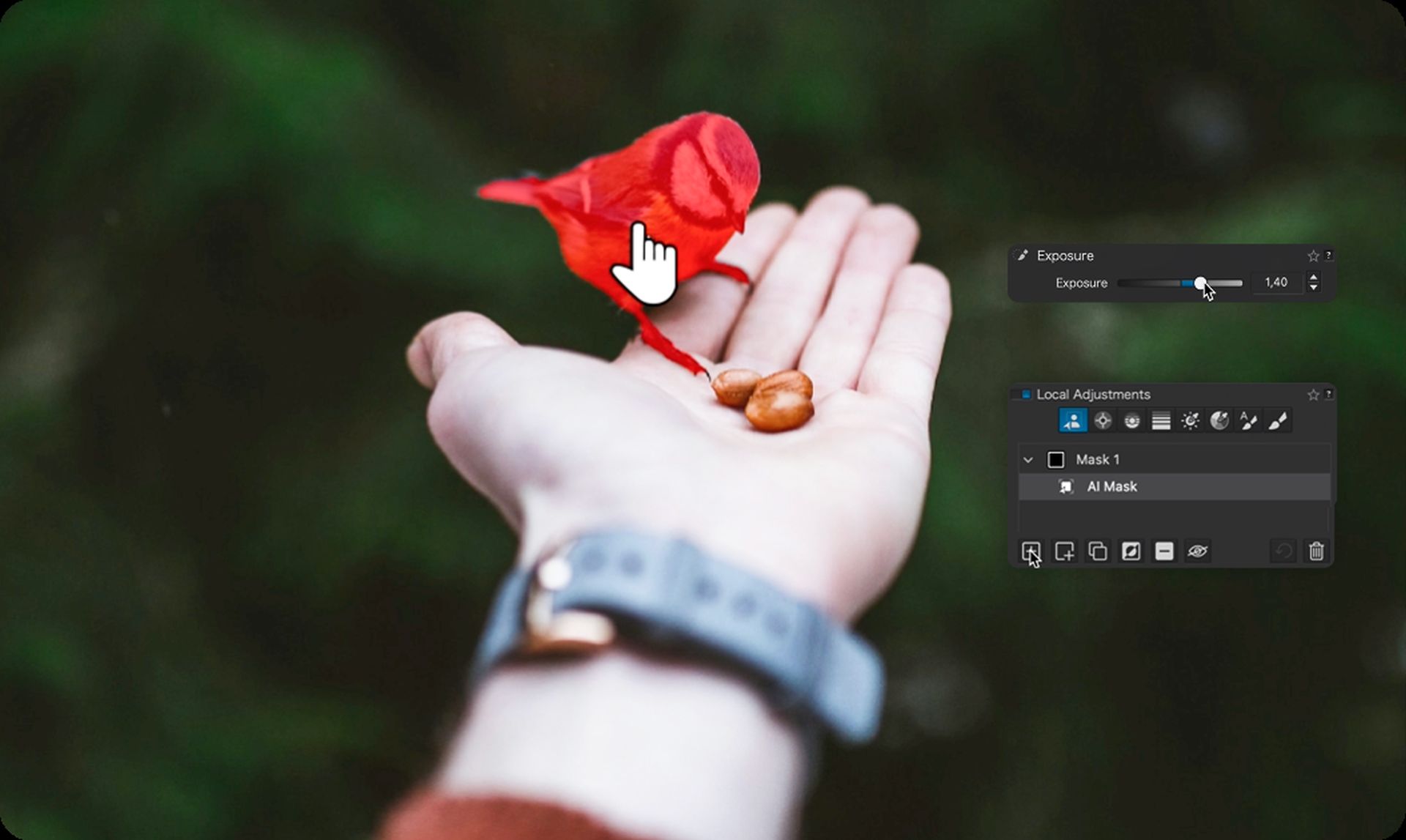
The most prominent addition in DxO PhotoLab 9 is AI Masking. This new tool uses machine learning to identify common subjects like skies, faces, and hair. It allows you to make detailed local adjustments without manually outlining each area. You can create selections by simply clicking on a subject, drawing a box, or choosing from a list of predefined object types.
What makes the system more flexible is its integration with DxO’s existing tools. You can redefine AI Masks using U Point™ technology, Control Lines, Brushes, and Graduated Filters. That combo gives you room to either let the AI take the lead, or step in when you need finer control. So, worry not – your editing is not completely dependent on AI, you can keep the level of control that you like.
Local Noise Reduction and Lens Sharpness Control
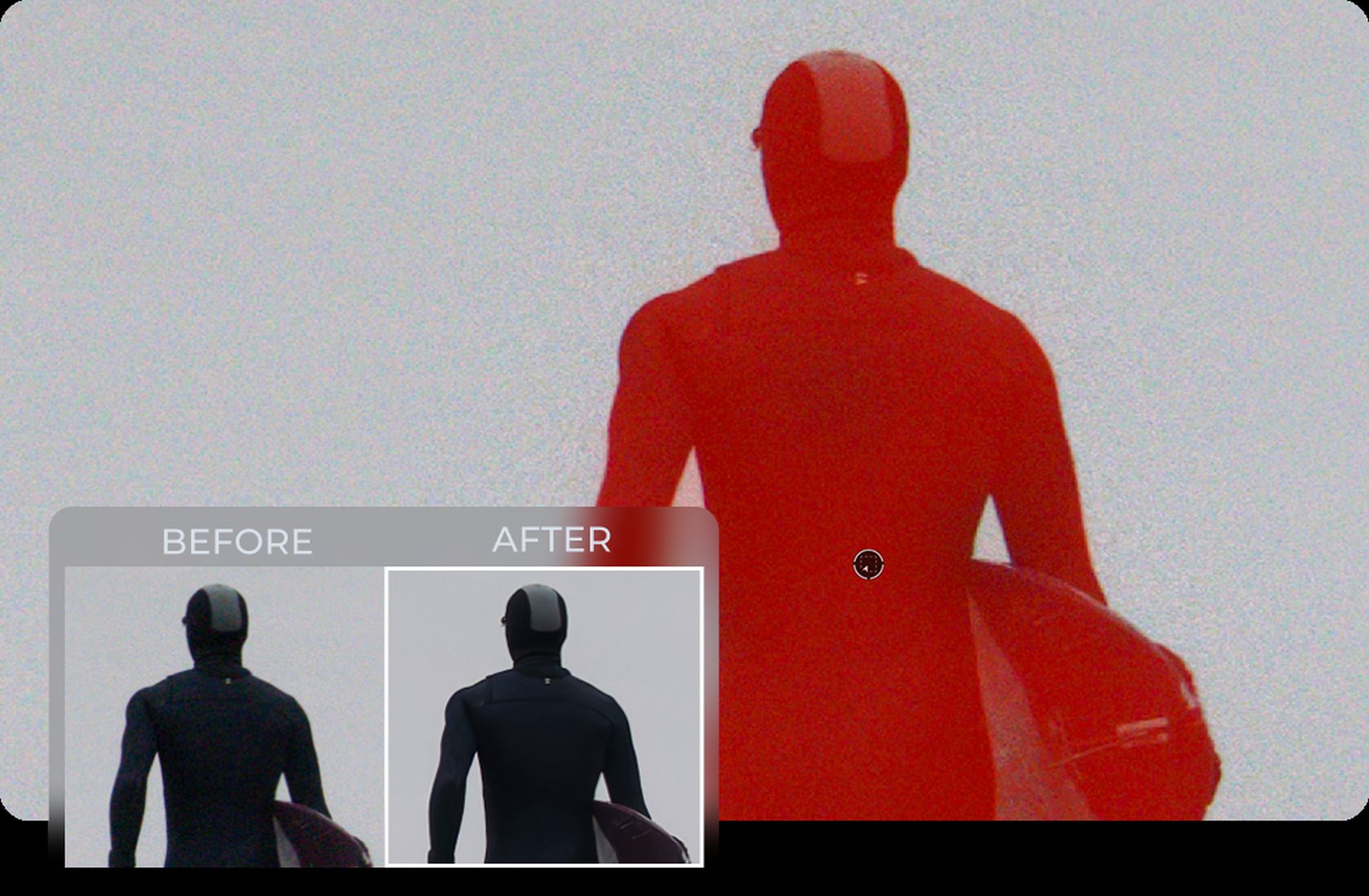
In previous versions, DxO’s DeepPRIME noise reduction and Lens Sharpness Optimization worked globally across the image. With DxO PhotoLab 9, you can now apply these tools locally. You can do this by using the new AI masks or any other selection tools. This gives you the ability to target noise reduction or sharpening precisely where you need it. This is especially helpful for high-ISO images (like concert shots), or those with varying levels of detail.
Workflow Updates: Batch Renaming, Favorites, and More
The updates in the PhotoLab 9 go beyond image adjustments. DxO also introduces a series of updates designed to improve how you manage your files:
- Batch Renaming: You can now generate filenames using metadata, EXIF data, or custom templates.
- Favorites System: Mark folders and projects for quick access.
- Image Stacking: Enables visual comparison of edits.
- Project Palettes in Customize Mode: Streamlines the user interface for better multitasking.
- Folder Relinking: Easily reconnect moved folders without losing project structure.
These workflow improvements will help you stay organized and efficient without leaving the editing interface. Personally, I really appreciate features like this because I like having everything organized to a T. Well, at least when it comes to my photos. We can’t say that about my work desk. :)
DeepPRIME XD3 Support for Fujifilm X-Trans Cameras
DxO PhotoLab 9 also marks the full integration of DeepPRIME XD3 for Fujifilm’s X-Trans sensor cameras. After its debut in DxO PureRAW 5, this version of DeepPRIME is now available natively inside PhotoLab 9. It delivers enhanced noise handling and improved detail retention. Another feature useful for low-light conditions and high-ISO photos.
iPhone ProRAW and HEIF Support in DxO PhotoLab 9
Another key update is expanded support for iPhone files, including HEIC/HEIF and Apple’s ProRAW format. If you shoot on an iPhone, even using the newer Apple RAW formats, you can now process your photos directly in DxO PhotoLab 9 with the same tools available for DSLR and mirrorless workflows.
This makes PhotoLab 9 a great option for photographers who use both traditional cameras and smartphones. It covers pretty much everything.
Pricing and Availability
DxO PhotoLab 9 is available now for macOS and Windows. New users can get a license for $239.99 / €239.99 / £219.99. If you’re upgrading from v7 or v8, you’ll pay $119.99 / €119.99 / £109.99. And you don’t have to commit right now – there’s also a 30-day free trial available if you want to test it out first. Whichever option you choose, you’ll find it at DxO’s website.
And here’s a special treat: you can use discount code LabourDay20 for 20% off any software and DIY15 for 15% off any software!
Disclaimer: This post is part of a paid partnership with the featured brand. While sponsorship supports our work, all editorial content is independently written and reflects the voice and standards of DIYP. We only cover products we believe are relevant, trustworthy, and of interest to our readers.
See more from DIYPhotography.net on Google
Add DIYPhotography.net as a trusted source. This makes
our stories more likely to appear in your Google Search results.
 Add as a preferred source on Google

Dunja Đuđić Kalinin
Dunja Djudjic is a multi-talented artist based in Novi Sad, Serbia. With 15 years of experience as a photographer, she specializes in capturing the beauty of nature, travel, concerts, and fine art. In addition to her photography, Dunja also expresses her creativity through writing, embroidery, and jewelry making.
Related Posts
 DxO PhotoLab 6.3 adds DxO Wide Gamut support for RGB images and more accurate soft proofing
 DxO releases PhotoLab 5 and FilmPack 6 with more powerful features and Fuji X-Trans RAW support
 DxO PhotoLab 8 Speeds Up Your Workflow With Hue Masks, Compare Mode, And Instant Rollover Previews
 DxO PhotoLab 4 comes with AI-powered high ISO noise reduction
Join the Discussion
DIYP Comment Policy
Be nice, be on-topic, no personal information or flames.