




























Throw out your polarizers – Reflection Removal is coming to Lightroom
Dec 12, 2024
John Aldred
John Aldred is a photographer with over 25 years of experience in the portrait and commercial worlds. He is based in Scotland and has been an early adopter – and occasional beta tester – of almost every digital imaging technology in that time. As well as his creative visual work, John uses 3D printing, electronics and programming to create his own photography and filmmaking tools and consults for a number of brands across the industry.
Share:

Adobe has introduced a new feature to Adobe Camera Raw beta that is going to make a lot of people very happy – particularly street photographers. It’s a Reflection Removal tool, and it’s now available in Adobe Camera Raw.
The new feature not only lets you cut through reflections but also lets you completely isolate the reflection and reproduce the scene reflected in the glass. It’s pretty cool (and potentially a little scary) technology, and it’s coming soon to Lightroom.
Reflection Removal – Now in ACR Beta
You might remember Adobe’s presentation from Adobe Max last October. If you don’t, it’s the video above – Adobe hasn’t made a new one for this yet. It was called Project See Through, and it demonstrated some pretty miraculous results.
While it has taken a little over a year to arrive, it’s here now – at least in Adobe Camera Raw. It’s really easy to use, too. It’s just a slider that updates your image in real-time as you bounce between the original photo and the processed version.
As with the Adobe Max demo from last year, you can also eliminate the actual scene and only see the reflections. While this might not seem all that useful to photographers, it’s an incredible feature for anyone who does any kind of compositing.
With the new tool, you can have the background as the background layer without any reflections, then your modifications, and then you can put the original reflections right on top, seamlessly blending your scene together.
How does it work?
All you need to do is load up an image that contains window reflections. Then drag the slider to reduce the reflection – or reduce everything but the reflection – and you can blend between them. So, it’s not just a straight “on or off”.
And it’s not just plain, flat shop windows it deals with, either. Adobe says – and demonstrates on their blog – that it also works with reflections in car windows, airplane windows that are often curved or have multiple layers of reflections to deal with.
Of course, it uses AI to do its thing. If it didn’t, ACR and Lightroom would’ve had this feature years ago, and most of us wouldn’t own polarising filters – I’m kidding, we’d still own them. Removing reflections is not the only thing polarising filters do.
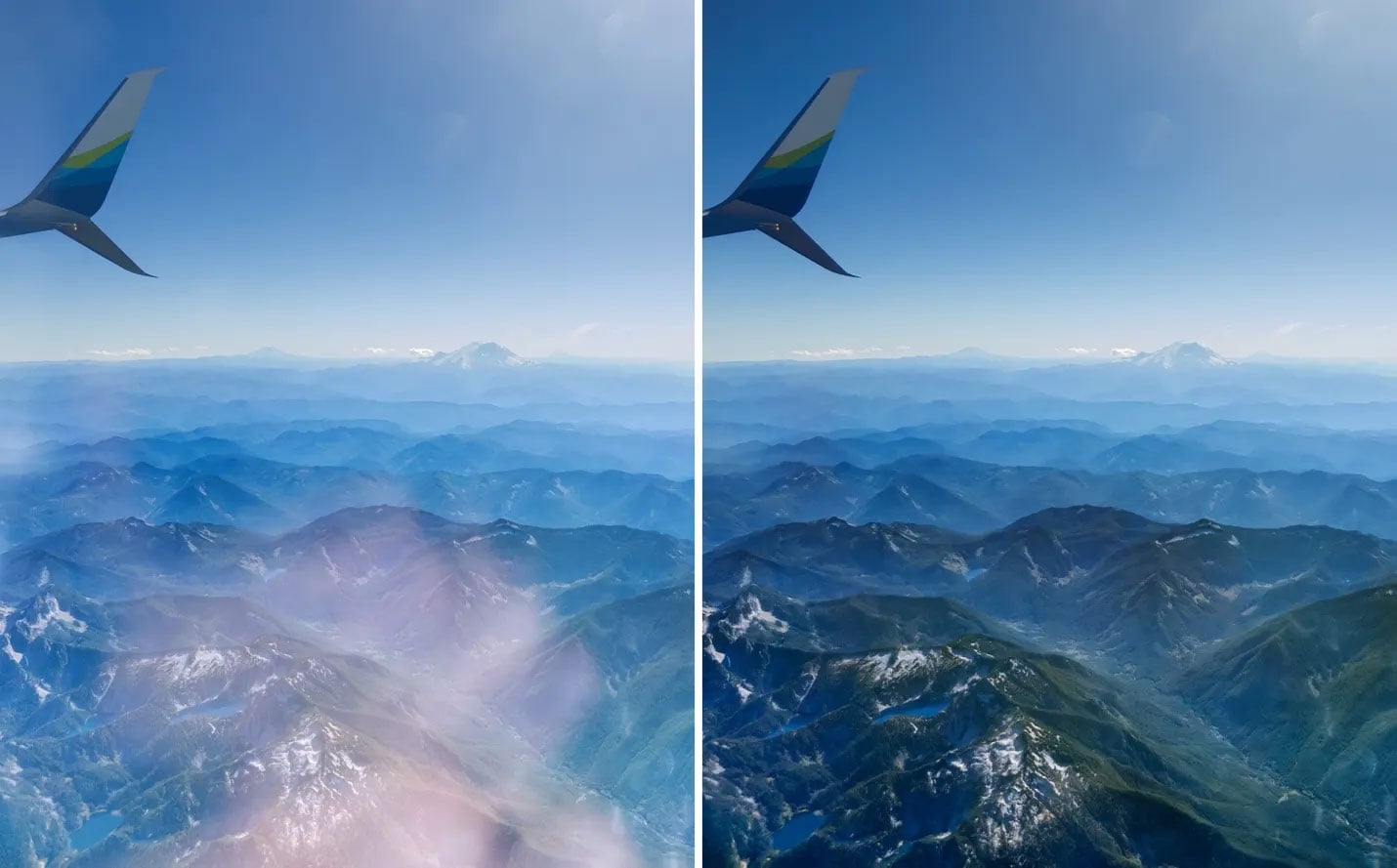
Adobe says the model was trained on simulated images. They’d take a scene and add it on top of another scene with the appearance of a window reflection. Both of the original images, along with the simulated composite are then fed into the AI.
Because it can see both constituent parts of the image – the scene and the reflection – separately, it’s able to figure out how to separate the composite back into the originals. Adobe would then “reward” or “penalize” the model based on how well it did.
Rinse and repeat several thousand times, and it brings us to now…
Only works with RAW images
At the moment, in Adobe Camera Raw, the new feature only works with raw images. You can’t load a JPG or a TIF into ACR and expect it to work. So, you’ll need your original NEFs, DNGs, CR2s, etc. If you’ve already processed your images in Photoshop and got your final result and just want to tweak it, you’re a little out of luck.
Except, perhaps, if you embedded the raw file as a smart object in your PSD. This would let you double click it, update it to the latest ACR and then use the slider on the raw smart object in your document, updating your final piece. Of course, your mileage will definitely vary, depending on what’s on the layers you’ve added above it.
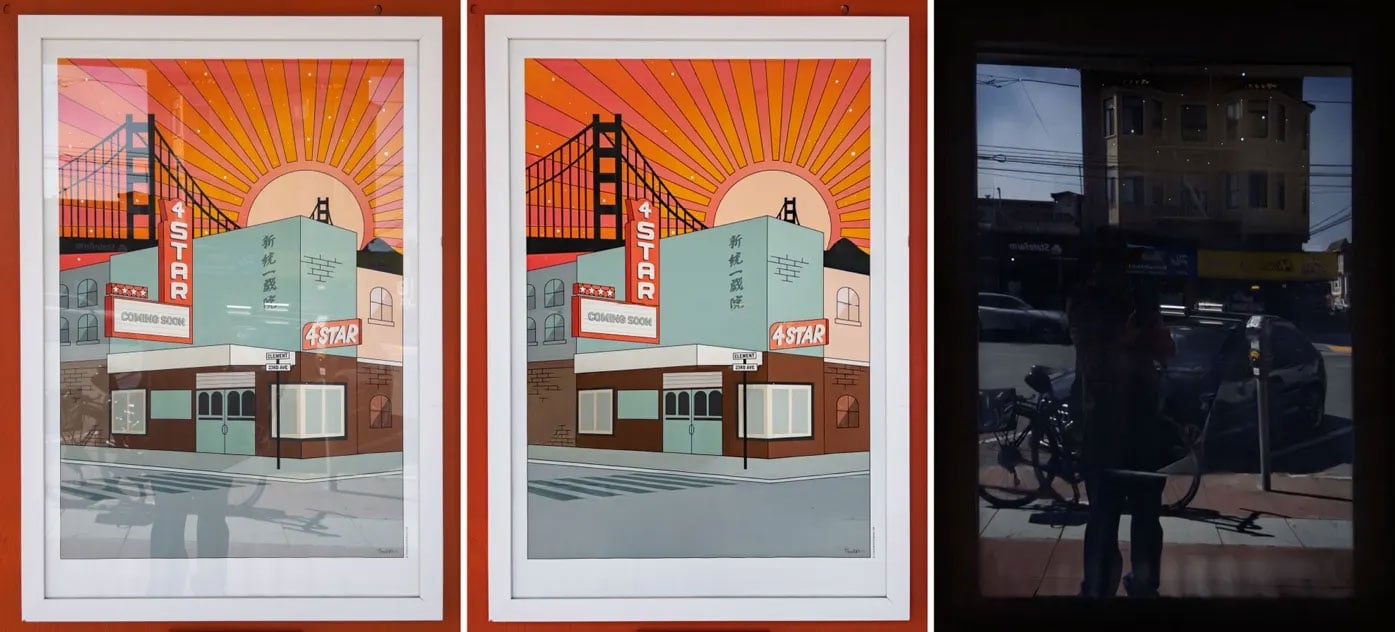
Adobe says that this ability will come to JPG, HEICs and other formats in the future. That’s when things are going to start getting really interesting. As we go through our back catalogues of images, with this new feature in hand, there’s a lot of promise.
Of course, we get to be able to clean up those old images and get the nice, clean, reflection-free shots we always wanted. But I’m more interested now in what we might see in the reflections of those images. How well did they capture the scene reflected in the window?
That’s potentially going to bring some happy memories back to a lot of people.
And for those of you who don’t know how to light people wearing glasses? Adobe has said that they’re hoping to have the feature cover this, along with scratches, rain, and other things that interact with windows. Maybe even bugs!
The Remove Reflection feature is in the current version of Adobe Camera Raw beta. You can download it today through the Creative Cloud app. It will also eventually come to Lightroom, although Adobe hasn’t said exactly when that will be.
See more from DIYPhotography.net on Google
Add DIYPhotography.net as a trusted source. This makes
our stories more likely to appear in your Google Search results.
 Add as a preferred source on Google

John Aldred
John Aldred is a photographer with over 25 years of experience in the portrait and commercial worlds. He is based in Scotland and has been an early adopter – and occasional beta tester – of almost every digital imaging technology in that time. As well as his creative visual work, John uses 3D printing, electronics and programming to create his own photography and filmmaking tools and consults for a number of brands across the industry.



Join the Discussion
DIYP Comment Policy
Be nice, be on-topic, no personal information or flames.
One response to “Throw out your polarizers – Reflection Removal is coming to Lightroom”
What the image doesn’t contain in the first place can only be hallucinated. “Hey, Dall-E, draw me a photorealistic image of a Huskie looking out of a window, golden pothos in white pot on the sill and generic hallway stuff in the back.”. Don’t even need to to get out in the streets.