






















Here is How To Get The Good Old Photoshop Version Back
Jan 28, 2016
Udi Tirosh
Udi Tirosh is an entrepreneur, photography inventor, journalist, educator, and writer based in Israel. With over 25 years of experience in the photo-video industry, Udi has built and sold several photography-related brands. Udi has a double degree in mass media communications and computer science.
Share:

Yesterday, Adobe made a fleet-wide update to its photography suit. It added boundary warp to Lightroom, updated Camera Raw and made a few fixes to Photoshop.
Now, if you are like me, you are probably going to jump on that update and hit that button as soon as you spot it on the Creative Cloud App. But some cautious users may want to hold off for a few days to see if any glitches associated with this update pop up online. I mean, it’s not like Adobe does not have a bad history when it comes to updates. In June an update nuked the healing brush and in December another update killed the Liquify tool.
If you did update and realized that you want to go back to what’s considered the stablest version ever – Photoshop 2014, photographer Chris Lambeth has a priceless tip for you: you can revert to that version of Photoshop quite easily.

Here is the procedure to add Photoshop cc 2014 to your computer.
0. Click the creative cloud app
1. Go to “All Apps”
2. Click “View Previous Version”
3. Click the little arrow near photoshop
4. Click CC (2014)
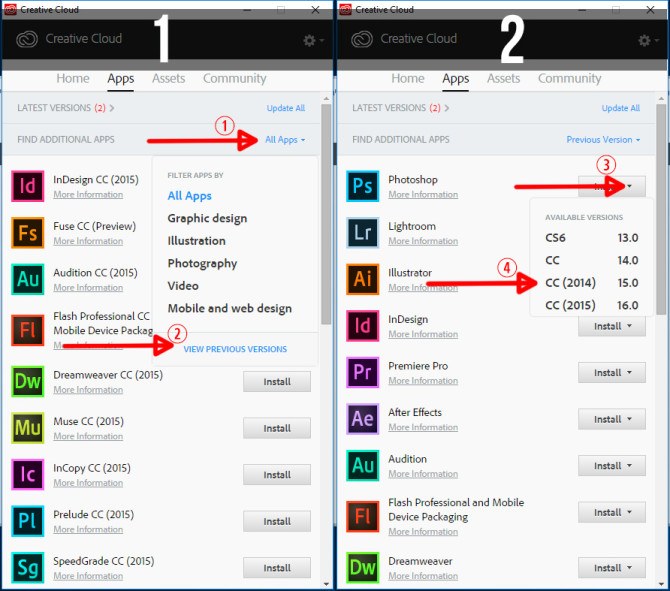
There you have it.
Did you upgrade? Was it trouble free? Share with us in the comments and let the world know if it’s safe or not.

Udi Tirosh
Udi Tirosh is an entrepreneur, photography inventor, journalist, educator, and writer based in Israel. With over 25 years of experience in the photo-video industry, Udi has built and sold several photography-related brands. Udi has a double degree in mass media communications and computer science.




Join the Discussion
DIYP Comment Policy
Be nice, be on-topic, no personal information or flames.
One response to “Here is How To Get The Good Old Photoshop Version Back”
Must of gone to the same school as Microsoft programmers!