





















Google Brings AI-Powered Photo Editing to All Android Phones
Oct 7, 2025
Alysa Gavilan
Alysa Gavilan has spent years exploring photography through photojournalism and street scenes. She enjoys working with both film and mirrorless cameras, and her fascination with the craft has grown over the decades. Inspired by Vivian Maier, she is drawn to capturing everyday moments that often go unnoticed.
Share:

Google Photos’ AI-powered photo editing feature is no longer limited to Pixel devices after the tech company rolled it out to all eligible Android smartphones, a move that gives more users a simple and intelligent way to edit images using natural language commands.
This is a major shift from traditional sliders and manual adjustments. This AI interprets what users want in plain English instead of using standard editing tools, which often rely on users’ knowledge of brightness, contrast, or saturation. It understands nuanced instructions such as “make the sky more dramatic” or “soften shadows on the face” and applies them automatically.
Before this rollout, most Android users of Google Photos had access to basic editing features like cropping, filters, and brightness adjustments. These tools required a certain level of familiarity with photo-editing principles and could be time-consuming. This new feature then removes that learning curve as it leverages Google’s Gemini AI to understand context, recognize objects and faces, and make intelligent adjustments that look natural. This allows casual photographers and experienced users alike to achieve professional-quality results with minimal effort.
How to Access Google’s AI-Powered Photo Editor
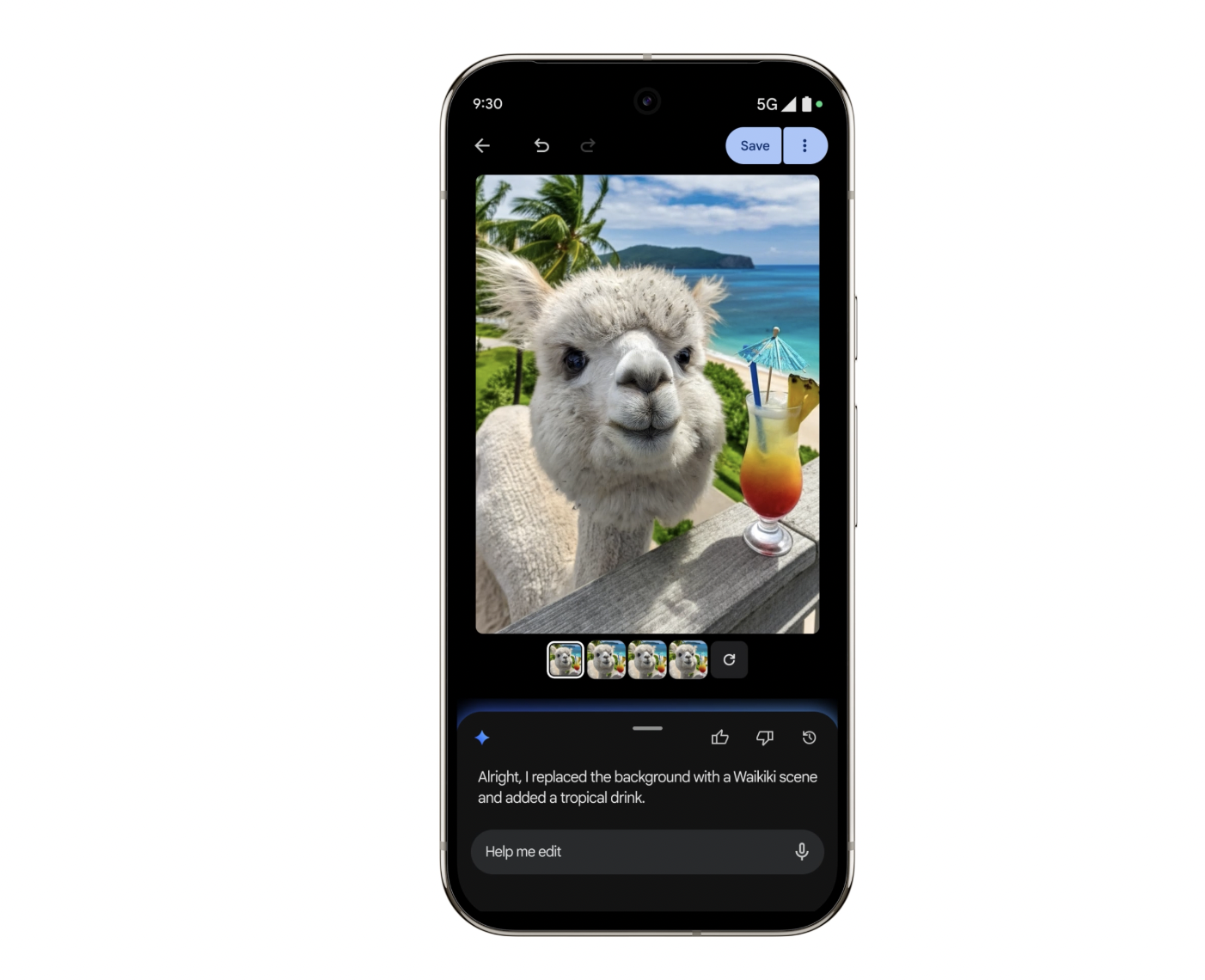
Google Photos’ AI-powered photo editing feature is now available to eligible Android users in the United States. Once these requirements are met, users can open the Google Photos app, select an image, and tap the “Help me edit” button.
From there, users can describe the edits they want using voice or text commands. Gemini AI interprets these commands and applies changes automatically. Simple instructions like “brighten the image” or “remove reflections” are enough to transform a photo in seconds.
Edits You Can Try When Using Google Photos
Google Photos’ AI-powered tool supports a wide range of edits. The conversational approach encourages experimentation, so you can try multiple variations without navigating menus or sliders!
For starters, you can brighten or darken images, tweak contrast, and adjust color balance.
The AI can also remove unwanted objects, reflections, or blemishes. You can also explore retouching features to achieve smooth skin tones, white teeth, and enhanced facial details.
Creative enhancements are possible as well. Users can change the mood of a photo, add a warm glow to sunsets, soften shadows in outdoor scenes, or enhance background details. Seasonal or thematic edits are easy.
Tips for Using Google’s AI-Powered Photo Editor
To maximize the effectiveness of Google Photos’ AI-powered editing tool, you must start with clear and concise commands. Direct requests such as “increase contrast” or “make colors more vibrant” produce the most accurate results. Users can combine multiple instructions in one go, like “brighten the image and reduce shadows on the face.”
Experimenting with phrasing is key here. Commands like “make the sky bluer” or “soften the background” often work better than vague descriptions like “improve the picture.” Combining small, iterative commands — like adjusting brightness in steps — helps achieve more precise results.
Lighting conditions impact performance when using this tool. Well-lit images allow the AI to detect details more accurately, thus producing cleaner edits. Removing reflections, adjusting skin tones, and enhancing backgrounds are most effective in balanced lighting.
Don’t forget to also review edits before saving, as AI interpretations can occasionally differ from expectations. You can take advantage of undo and redo functions, as these allow users to try multiple edits without losing the original photo.
Limitations to Google’s AI-Powered Photo Editor
Despite its capabilities, Google Photos’ AI-powered editing tool has limitations. For one, the feature currently works only for eligible Android users in the United States
Complex or abstract instructions may produce unexpected results, so some edits, such as extreme stylistic transformations, can look unnatural. It may not work well if you’re dealing with low-resolution or poorly lit photos, as AI-generated edits rely on image quality.
Privacy is another consideration when using this. The tool, after all, processes images on Google’s servers, and this means users must be comfortable with cloud-based AI editing.
The Future of AI Use in Photography
The rollout of Google Photos’ AI-powered editing feature to more Android users reflects a broader effort to integrate AI into everyday applications. The company is redefining how people interact with mobile photography tools by allowing users to edit photos through natural language commands.
The feature simplifies common edits, reduces the learning curve, and makes advanced photo enhancements accessible to a wider audience. As AI continues to evolve, tools like this offer a glimpse into a future where photo editing is as simple as speaking or typing a command.
[Image credits: Google]
See more from DIYPhotography.net on Google
Add DIYPhotography.net as a trusted source. This makes
our stories more likely to appear in your Google Search results.
 Add as a preferred source on Google

Alysa Gavilan
Alysa Gavilan has spent years exploring photography through photojournalism and street scenes. She enjoys working with both film and mirrorless cameras, and her fascination with the craft has grown over the decades. Inspired by Vivian Maier, she is drawn to capturing everyday moments that often go unnoticed.
Related Posts
 “Sorry, I just wanted a pretty photo” says photographer whose photo bricked thousands of Android phones
 Google RAISR’s upsampling brings CSI-like image enhancement to your Android device
 Finally! Adobe Lightroom Releases Mobile Version For Android Phones
 Godox finally launches Android app for the A1 – but only for some phones
Join the Discussion
DIYP Comment Policy
Be nice, be on-topic, no personal information or flames.
One response to “Google Brings AI-Powered Photo Editing to All Android Phones”
I’ve been using Google one for quite a few years now which has the photo editing with it. problem is they took the power out of photo AI. you can’t use it to its maximum strength so I’m thinking about getting up my subscription to Google one because the AI feature does not do what I needed to do. so I’m going to stay changed or philosophy or change the rules. they’re losing the customer and beware of paying for AI from Google