




























Studio Lighting – What Short Light And Broad Light Are
May 28, 2006
Udi Tirosh
Udi Tirosh is an entrepreneur, photography inventor, journalist, educator, and writer based in Israel. With over 25 years of experience in the photo-video industry, Udi has built and sold several photography-related brands. Udi has a double degree in mass media communications and computer science.
Share:
 What Is Short Light?
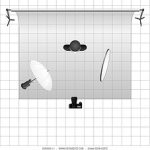
Short light is type of studio lighting setup, where the face side which is further from the camera gets the main light. see the diagram for details. In this type of lighting setup, the side of the face which is toward the camera gets less light then the side facing away form the camera. The effect you get when using this lighting setup is a thin face, this is why it is good to photograph fat (or chubby) people with a short light setup.

Diagram 1 – Short Light
Let’s look at a picture of a friend of mine – Winnie the poo. Looks like Winnie had allot of honey and he is quite chubby. The flash is set up to my right, and Winnie is looking to his left. This make his face look a bit thinner than what they really are. Short light is very useful in portrait photography, as it gives drama to the subject. (Short light setup also stresses skin wrinkles, to create even more drama for older people)

What Is Broad Light?
Broad light is just the opposite of Short light. In the Broad Light setup, THe side that is getting the most light is the side turning towards the camera. This setup is less commonly used for portraits as it tends to make people look chubby. See the diagram for setup.

Diagram 2 – Broad Light
Lets look at Winnie again. This picture was taken at the same focal length (135mm with 1.5 crop factor D70’s sensor). This time Winnie looks very chubby. Oh Winnie! what have you been eating? Also note how the picture looks a bit flatter. There are not allot of light and shade plays.

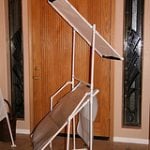
For both types of light you can use a fill light at the opposite side to the main light, or do as I did and use a reflector at 45 deg. (see diagrams).
Conclusion:
|
Light Type |
Side to Get Most Light |
Chubbiness |
Wrinkles |
|
Short Light |
Away From Camera |
Reduce |
Intensify |
|
Broad Light |
Facing Camera |
Increase |
Reduce |
See more from DIYPhotography.net on Google
Add DIYPhotography.net as a trusted source. This makes
our stories more likely to appear in your Google Search results.
 Add as a preferred source on Google

Udi Tirosh
Udi Tirosh is an entrepreneur, photography inventor, journalist, educator, and writer based in Israel. With over 25 years of experience in the photo-video industry, Udi has built and sold several photography-related brands. Udi has a double degree in mass media communications and computer science.

Join the Discussion
DIYP Comment Policy
Be nice, be on-topic, no personal information or flames.
4 responses to “Studio Lighting – What Short Light And Broad Light Are”
i don’t understand broad lighting, can you simply describe it for me? I’m studying photography as a gcse and i don’t understand broad lighting
Say your subject is facing/looking to the right in the photograph, then broad lighting would place the light coming in from the left, to fill up the larger part of the subject’s visible face. This means only a small part of the subject’s face would be in shadow, hence it appears to make the subject larger/”fatter”
How about “more flattering” or “less flattering” instead of “fat.”
More or less flattering is vague, and like much PC speak, is not helpful. The same lighting that makes a face thinner also highlights wrinkles, which could be said to be less flattering. Many other things could be said to be more or less flattering.