






















PortKeys just dropped three new camera monitors, and one’s for live streaming
Oct 30, 2024
John Aldred
John Aldred is a photographer with over 25 years of experience in the portrait and commercial worlds. He is based in Scotland and has been an early adopter – and occasional beta tester – of almost every digital imaging technology in that time. As well as his creative visual work, John uses 3D printing, electronics and programming to create his own photography and filmmaking tools and consults for a number of brands across the industry.
Share:

PortKeys has announced three new monitors. Two are updates to the company’s flagship models, the BM5 IV ($599) and BM5 IV WR ($749). These 5.5″ touchscreen field monitors offer up to DCI 4K60p HDMI in and out, with 3G SDI I/O and remote camera control.
The other is something new. It’s the PortKeys PL5 ($239), and it’s not just an on-camera monitor. It’s a streaming monitor, too. It boasts being the world’s first monitor with a built-in USB-C capture card. This means you no longer need that Elgato Cam Link ($99.99).
PortKeys BM5 IV & BM5 IV WR

The new flagships of PortKeys’ on-camera monitor range are rugged and versatile units with 5.5″ touchscreen displays. This is thanks to an aluminium alloy housing and toughened glass on the front of the display. They’re designed to be put to work on set.
The BM5 IV and BM5 IV WR both feature the company’s new Cinenorm operating system, first shown off at NAB 2024 in April. The new UI design of Cinenorm does look very interesting and a lot more intuitive than the old Movnorm OS. Hopefully, Cinenorm will start to replace Movnorm on more models soon.
Both units weigh 358g without the battery, making them fairly light, given their durability. With a brightness of 2,000 Nits, they should also be relatively easy to see even in bright outdoor sunlight. And, of course, you get all of the usual filmmaker tools, including waveform, vectorscope, zebra stripes, focus peaking, etc.
The big difference between the two, is the same as it was with its WR and non-WR predecessors. The BM5 IV features wired camera control, whereas the BM5 IV WR also features wireless camera control. Obviously, this only works with compatible cameras, but if you don’t have one of those cameras, do you really need to pay the extra for that feature?
PortKeys PL5 Streaming Monitor
This 5.4″ monitor is a little different from anything PortKeys has made in the past. Well, it’s different from anything just about anyone’s made in the past. This is a monitor with built-in USB-C capture. It has an interesting configuration, but if you can work within its limitations, it seems pretty cool.
It’ll accept 4K signals up to 30fps and 1080p signals up to 60fps through its HDMI input. It only outputs, however at up to 1080p at 60fps. So, if you want a 60fps output, you can’t feed a 4K60 signal into it and get a 1080p 60fps output. You’ll have to feed 1080p 60fps into it.
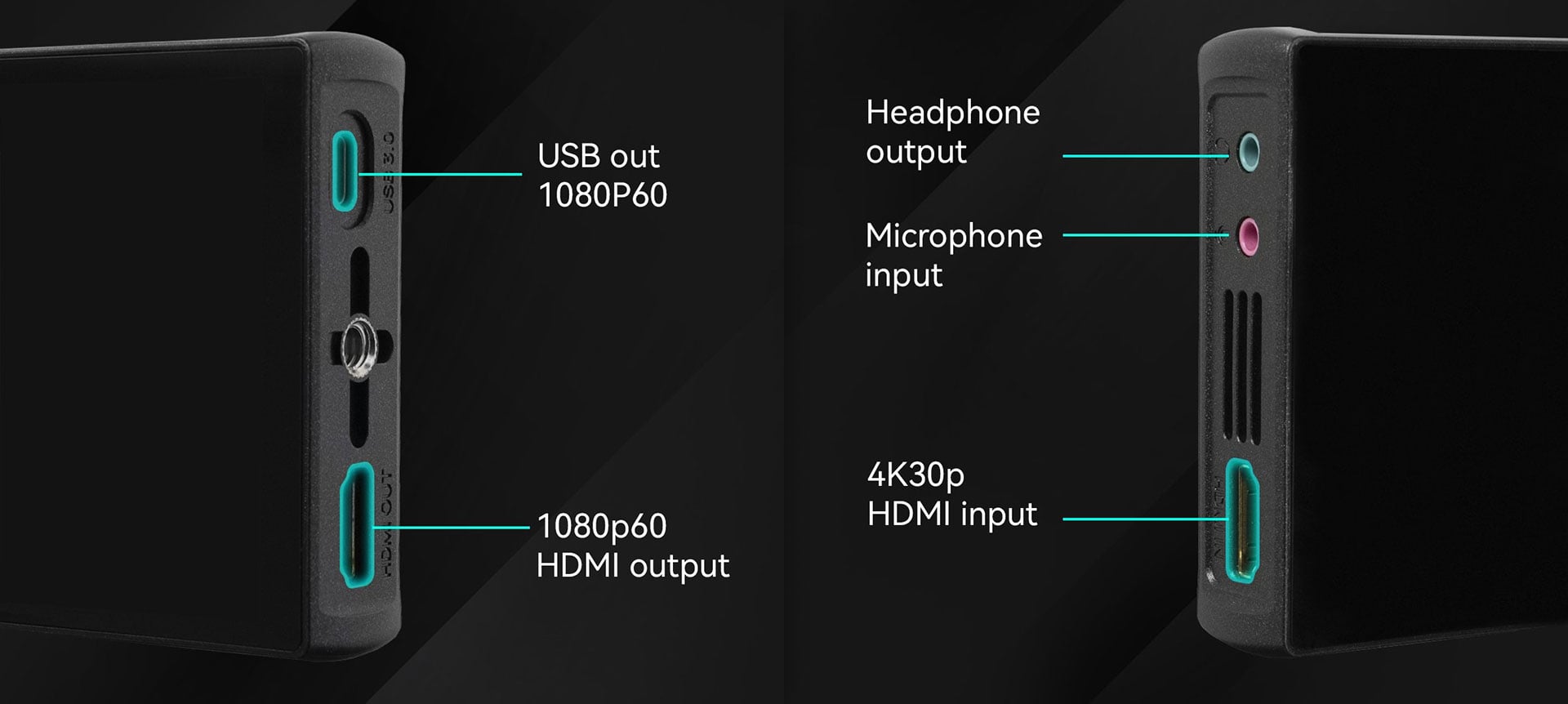
But it will output two signals simultaneously. One is the standard HDMI output, but the other is a USB-C socket. This port can simultaneously power the PL5 while also seeing it as a video capture device. So, this plugs straight into your computer’s USB port – or even video switchers like the YoloBox Pro ($998) – and access it right there in OBS, Zoom or anything else that can access a webcam.
If you wish to use it on camera as a regular field monitor, it features an array of filmmaker tools, such as waveforms, zebra stripes, focus peaking, etc. But it’s primarily targeted towards streamers. But you could use it for any video source that you want to both see and stream at the same time.
It even features microphone input and headphone output sockets. So, if you fancy doing a bit of console streaming, you can easily add your voice on top from something like the Rode Wireless ME ($145.90).
Price and Availability
The PortKeys BM5 IV and BM5 IV WR are available to pre-order now for $599 and $749, respectively. The PortKeys PL5 streaming monitor is also available to pre-order now for $239.
See more from DIYPhotography.net on Google
Add DIYPhotography.net as a trusted source. This makes
our stories more likely to appear in your Google Search results.
 Add as a preferred source on Google

John Aldred
John Aldred is a photographer with over 25 years of experience in the portrait and commercial worlds. He is based in Scotland and has been an early adopter – and occasional beta tester – of almost every digital imaging technology in that time. As well as his creative visual work, John uses 3D printing, electronics and programming to create his own photography and filmmaking tools and consults for a number of brands across the industry.
Related Posts
 The Loupedeck Live is half a Loupedeck CT geared towards live streaming
 YoloLiv’s VertiCam is a vertical PTZ USB/HDMI camera for live streaming to social media
 Blackmagic Studio Camera 6K Pro features a Super 35mm sensor, EF mount and live streaming
 Darktable just dropped 3.4.0 with improved tethering and live histogram, and color calibration
Join the Discussion
DIYP Comment Policy
Be nice, be on-topic, no personal information or flames.