




























Godox finally launches Android app for the A1 – but only for some phones
Jul 29, 2018
John Aldred
John Aldred is a photographer with over 25 years of experience in the portrait and commercial worlds. He is based in Scotland and has been an early adopter – and occasional beta tester – of almost every digital imaging technology in that time. As well as his creative visual work, John uses 3D printing, electronics and programming to create his own photography and filmmaking tools and consults for a number of brands across the industry.
Share:

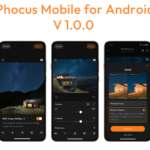
Almost a year later than originally scheduled, Godox has finally released an Android app for the Godox A1 mobile flash trigger. The A1 was launched in August last year. Originally it came with just an iOS app, and an Android app was to come in September 2017. Well, only 2 days away from August 2018, the Godox A1 finally works with Android.
There’s also a new firmware available for the Godox A1 to go along with it. But, there’s a catch. It only works on select Huawei and Samsung phones. Or at least, you only get complete functionality with some phones. Let me explain.
There are two basic ways in which you can use the app.
- As a controller for your lights when using your “real camera”. You set your power levels and adjust your lights using the app, and then the Godox XPro or X1T trigger sits on your hotshoe in “App” mode. This tells your lights to fire using whatever settings the A1 has told them to be at.
- To allow you to shoot photos with your phone’s camera incorporating flash.
The first in that short list was my primary use for the Godox A1 when I was still using iPhones. But since I switched over to the ASUS ZenFone 4 at the end of last year, I’ve not been able to use my Godox A1 at all. Now, though, with the GodoxPhoto app installed on my new ASUS ZenFone 5, I’m good to go. The app installs just fine and fires my Godox TT600, AD200, AD360II and AD600Pro lights.
I just can’t do that second thing. And it’s that second option is that’s currently limited to specific phones. The devices supported at the moment are…
- HUAWEI Mate9 Pro
- HUAWEI mate9
- HUAWEI p10
- HUAWEI p10plus
- SAMSUNG S8
- SAMSUNG S8+
- SAMSUNG Note 8
- SAMSUNG s9
- SAMSUNG s9+
I’ve been told by Pixapro, the main Godox distributor in the UK, that other devices and manufacturers will be added in the future, but they haven’t said yet when that support might arrive.
So, if you’re an Android user who bought a Godox A1 a year ago, you can now finally use it.
Download the app from the Google Play Store and get the new Godox A1 firmware from the Godox website.
See more from DIYPhotography.net on Google
Add DIYPhotography.net as a trusted source. This makes
our stories more likely to appear in your Google Search results.
 Add as a preferred source on Google

John Aldred
John Aldred is a photographer with over 25 years of experience in the portrait and commercial worlds. He is based in Scotland and has been an early adopter – and occasional beta tester – of almost every digital imaging technology in that time. As well as his creative visual work, John uses 3D printing, electronics and programming to create his own photography and filmmaking tools and consults for a number of brands across the industry.


Join the Discussion
DIYP Comment Policy
Be nice, be on-topic, no personal information or flames.
28 responses to “Godox finally launches Android app for the A1 – but only for some phones”
LG V20 soon ?
Just able to install it on my Samsung Galaxy S7, will find my A1 and try it out.
Still can’t get it to work on my Note 8 and S9 after trying to update the firmware on http://www.godox.com/EN/Download.html.
Using G2 (instead of G1, since it’s stated that to update A1, should use G2 instead).
Will try using G1 now, see if it works (or brick it further)
Hi! how did it went?
Only G2 can be used, no luck with that… And I went to the Google play store to read reviews, seems like mostly 1 star due to this problem.
Try updating the firmware from the app over Bluetooth. That’s what I did. :)
I tried that before too, and it’s still not in sync…. Thanks for suggesting! :)
Same old, I think Godox gave up supporting this. 1 star review overwhelms the Android Playstore.
at the end did it work with the A1?
anyother experience with other Android phone not officially supported?
Any phone that’s not officially supported, you can still control the power of the strobes when you’re firing with a trigger on the camera. The only thing that’s not supported is actually shooting photos with the phone itself.
It literally comes up with a warning telling you the phone isn’t supported, so you can’t even try to take a photo.
thanks. I was precisly referring to the photo mode taking, because I need to change my phone and was looking which device could take photo with that, among the officially supported list… also which device will be supported in the near future. May be P20/P20 light/P20 Pro series…
They haven’t said what phone compatibility may be coming in the future. Which is a little frustrating. But whatever they add, you’re probably going to be limited to shutter speeds of around 1/30th of a second or slower anyway.
thanks :-)
I’ve been waiting for this for so long since I stopped using iphone. But my android phone is still not supported . :(
Not if you want to use the phone’s camera. Personally, though, that never interested me. It’s not something I’d be doing regularly. Maybe once just to play with it, but that’s about it.
For me, being able to control the power from my phone… That’s the big draw. That bit works with all Android phones and I’ve found it to be very useful for things like product photography and composite shoots where you want to trigger the camera remotely. I can fire my camera with one trigger, control the power of the lights with my phone, and I never have to touch the camera or risk moving it between shots.
That being said, Godox are lucky they made this thing magnetic. It’s been stuck to the side of my PC case for the last year. If it wasn’t, I probably would’ve lost it by now. ;)
galaxy note 8 ???
note 8 works, it does not flash when the photo is taken (:
So Godox A1 can use in Asus Zenfone 5 ?
Yup, it just can’t use its camera. But you can still remote control your lights with it for firing with a camera & X1T or XPro trigger.
i can’t wait to use my 685f and 860f. I can use with my s10 (not supported) for trigger?
Any idea when will the camera app support be open for other models(which do not fall in the above list)
I own a Huawei P20 Pro, which has a killer camera. But unfortunately the Godox app also doesn’t support this phone at all; Everything works, except the camera function inside the app (message: Your camera phone does not support this function temporarily) .
Well, this temporarily message is not that temporarily any more… ?
Such a great product with bad support is not what i did expect from Godox.
@Godox, please update your app! ?
i can’t wait to use my 685f and 860f. No solution for you with other android app? i need only a trigger for my s10
I’m still waiting for Godox to add the Samsung’s s10 lineup of phones, it only makes sense since they are Samsung’s current phone offerings.
same problem.. i can’t wait to use my 685f and 860f. No solution for you with other android app?
How can you disable the shutter sound?
Wow, No support for any of the Pixel phones….. bummer!