

















Lightroom’s New Prompt to Edit Lets You Unblur and Restore Photos by Describing the Change
Oct 5, 2026
Dunja Đuđić Kalinin
Dunja Djudjic is a multi-talented artist based in Novi Sad, Serbia. With 15 years of experience as a photographer, she specializes in capturing the beauty of nature, travel, concerts, and fine art. In addition to her photography, Dunja also expresses her creativity through writing, embroidery, and jewelry making.
Share:
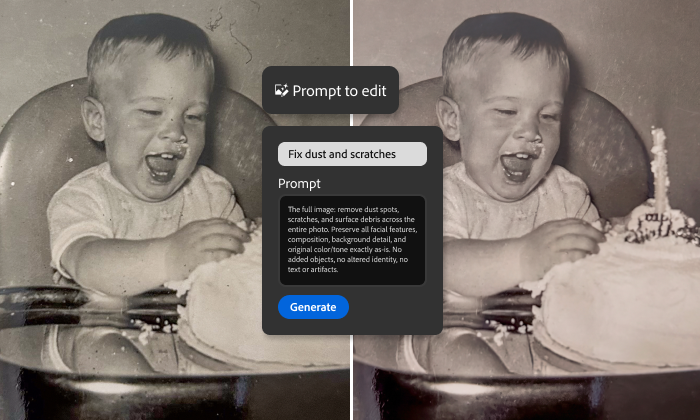
Lightroom desktop now lets you restore, retouch, or transform a photo by typing what you want it to do. The new feature is called Prompt to Edit, it’s available in early access, and yes, it’s generative AI. But before you close the tab, let’s see what it does, because some of it is pretty useful.
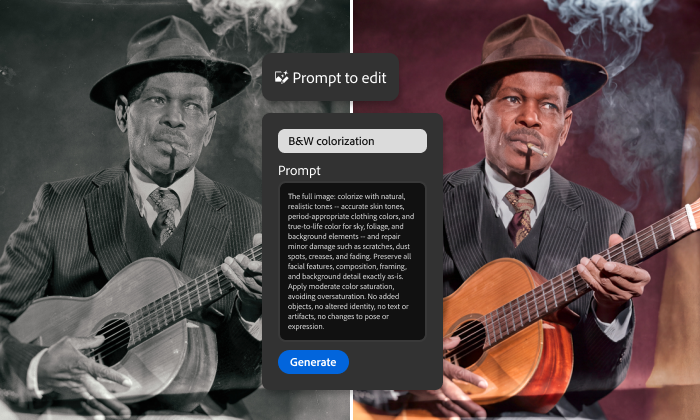
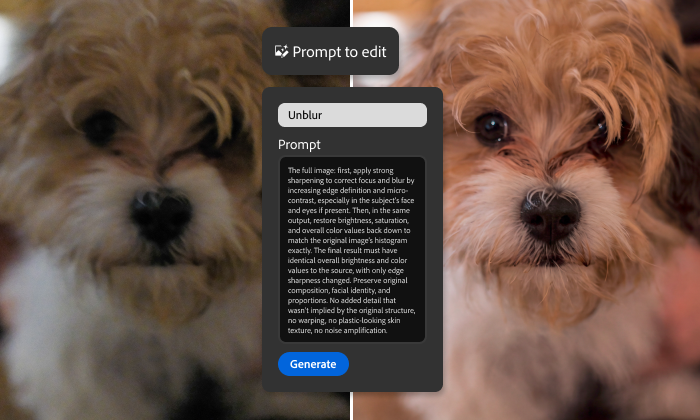
Adobe rolled out Prompt to Edit on September 29, pitching it as a way to rescue the shots that might be the keepers and they are just… Almost there. Think of an old family photo covered in scratches and dust, or a favorite frame that missed focus by a hair (that sounds way too familiar). Instead of giving up on these images or spending an afternoon with the healing brush, you can now try fixing them directly in Lightroom with a few prompts.
How “Prompt to Edit” Works
In this first early access release, there are two ways to use it:
- Pick a ready-made prompt. Adobe has built six prompts around common photography needs, including unblurring and colorizing black and white photos.
- Write your own. There’s a natural-language prompt box where you describe the edit in your own words, then refine the prompt to steer the result.
To access the feature, you need to open your photo in the detail view, and then select Prompt to Edit from the left panel. You can also access Prompt to Edit from the View menu.
Under the hood, Prompt to Edit runs on Google’s Nano Banana model during early access. So when you’re “editing in Lightroom,” you’re partly editing with Google.
Your Original Stays Untouched
Here’s the part I like. Adobe’s Prompt to Edit saves every edit as a new DNG file, and the original image stays exactly as you captured it. In other words, there are no destructive surprises. The new file also works with Lightroom’s existing tools, so you can keep tweaking it with the sliders and masks you already use.
There’s one limitation to keep in mind for now: all the exports top out at 4K resolution during early access.
Watch Out for the AI Label
Before you run your next Instagram post through Prompt to Edit, keep in mind that generative edits can come back to bite you. Back in 2024, we reported that Instagram was slapping a “Made with AI” label on photos where photographers had only used Photoshop’s Generative Fill to remove small distractions. Meta has never fully explained how its detection works, but the logic is easy to guess. Generative tools leave a trail in the file’s metadata, and platforms read it. A photo you “only” unblurred or colorized with Prompt to Edit could very well get flagged as AI content. If that label matters to you (and for photographers, it often does), save the generative tools for the photos that need them, and stick to the classic tools for small cleanups.
Should You Try It?
I’m not thrilled about prompt-based editing creeping into every corner of photography. Still, restoring a scanned photo of your grandparents or saving a slightly soft shot from a once-in-a-lifetime moment is a pretty decent use case for it. The non-destructive DNG approach is the right call, too. I think I might even give it a chance.
Will you be giving Prompt to Edit a go, or are you sticking with sliders and patience? Let us know in the comments.
See more from DIYPhotography.net on Google
Add DIYPhotography.net as a trusted source. This makes
our stories more likely to appear in your Google Search results.
 Add as a preferred source on Google

Dunja Đuđić Kalinin
Dunja Djudjic is a multi-talented artist based in Novi Sad, Serbia. With 15 years of experience as a photographer, she specializes in capturing the beauty of nature, travel, concerts, and fine art. In addition to her photography, Dunja also expresses her creativity through writing, embroidery, and jewelry making.



Join the Discussion
DIYP Comment Policy
Be nice, be on-topic, no personal information or flames.