

























Introduction To High Dynamic Range (HDR) Photography
Sep 20, 2009
Udi Tirosh
Udi Tirosh is an entrepreneur, photography inventor, journalist, educator, and writer based in Israel. With over 25 years of experience in the photo-video industry, Udi has built and sold several photography-related brands. Udi has a double degree in mass media communications and computer science.
Share:
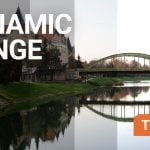
 High Dynamic Range Photography (HDR) is a creative technique in which you combine 3, 5 or 7 images shot at different exposures, which are then merged into a single image.
The advantages are far more detail, vibrant color and control of lighting than you could ever achieve by manipulating a single JPG or RAW image in Photoshop.
In the following post Gavin Phillips will cover some of the main (yet often overlooked) aspects of HDR Photography.
(Roll your mouse over any of the images and linger for a second to see how it looked like before HDRing it).
Taking an HDR image

You need at least 3-shots to create an HDR image. With three shots you would have 1 shot regularly exposed, 1-shot 2-stops overexposed and 1- shot 2 stops underexposed.
Most point and shoot cameras allow you to change exposure settings. Advanced point and shoots and DSLR’s have a bracketing mode. This makes it easier to take sets of HDR images.
Bracketing
With bracketing, you can set-up sets of shots to be taken at different exposure levels automatically. Once set-up, all you do is hold down the ‘fire’ button and it will automatically run through the 3-5-7 shots at the exposure levels you set-up.
For most of your HDR, you will require a tripod to eliminate any camera movement between the shots. You can take HDR sets hand-held, but you must be leaning against a railing or wall in order to keep the camera perfectly still during the shots.
JPG or RAW?
You can work with JPG or RAW images. It’s preferable to shoot RAW if your camera supports that format. Shooting in RAW gives you more editing flexibility. And Photoshop’s Camera RAW filter is constantly being updated to support different cameras manufacturers RAW settings.
Merging your images with Photomatix
Although Photoshop does have a ‘merge to hdr’ feature, there is a better way to go for the merging and tone-mapping of your HDR sets. Photomatix is the program I use to merge my sets of HDR. It is easy and intuitive to use, and gives you great control over your image. (Photomatix also provides a trial version that you can download here).
Photomatix Work flow
After opening Photomatix you click on the ‘Generate HDR Image’ and a familiar dialogue box pops up in which you browse to your set of 3,5 or 7 overexposed and underexposed images. Then click ‘OK’ and the next dialogue box ‘generate HDR options’ appears.
This allows you to check mark how you want Photomatix to align your images and reduce the ‘ghosting’ of people/objects/trees moving. It will not be able to perfectly align all movement. For alignment I check ‘by matching features’ and for ghosting, check mark what is appropriate in your photograph. Click ‘OK.’

Photomatix will now convert your RAW images, then align them and merge them into a 32 bit image. The 32 bit image will not look good on your 24 bit monitor. (Don’t worry, you’ll fix this in a few steps).
At this point you can save the 32 bit image as a separate file in case you want to try tone-mapping it in a different program to see how the results compare to Photomatix.
Now click ‘Tone Mapping’ and several sliders and two tabs will appear on your left. The two tabs are ‘Details Enhancer‘ and ‘Tone Compressor.
I always stay in the ‘Details Enhancer’ tab, except for nighttime HDR, because you have far more control and creative ways to go. With night shots you get a load of colored digital noise in the ‘Details Enhancer’ tab.

General Slider Settings
The ‘Strength’ slider and ‘Light Smoothing’ check circles are the main components of creating the surreal HDR. I keep the strength slider in the 50-60 range. ‘Color saturation’ I usually also keep in the 50-60 range. The ‘luminosity’ slider in the 2-5 range, ‘light smoothing’ I generally use the middle circle or the one just to the right of the middle.
Every photo is unique of course and you will soon see how each slider affects your photo. You can save settings as a custom preset for you. This is often a good starting point with a new HDR set.
Problem Areas-Halos

When applying the tone-mapping settings to your images pay particular attention to where the sky meets buildings, trees or any object in daytime shots. A ‘Halo’ is an area of bright white that is in-between the sky and buildings or other objects, and it should be avoided.
It usually only shows up when people get too extreme with the sliders in Photomatix or other HDR software. Work the sliders to either eliminate it or reduce it as much as possible. Sometimes you may have to ‘mask’ in the sky from one of your original bracketed shots in Photoshop.
Photographing people with HDR

You can photograph people with HDR selectively. This expands the ways in which you can utilize the benefits of HDR. For weddings, I take some HDR at the church. This captures the occasion in a way I could never achieve otherwise.
Avoiding over saturation or surreal HDR

It’s important to remember that you have complete control over your image. It is easy to stay within a regular color range but still gain a significant advantage by using HDR. You have to watch you do not overdo it with skies in particular.
The same is true for the overly processed ‘look’ that I often see on Flickr. There is a place for going in a different direction creatively with certain images. But you do not want all your images processed this way. On the other hand, you do not want to be so conservative with your HDR that it looks virtually the same as a regular image.
Finishing Touches in Photoshop
Although ‘Photomatix’ is great for the merging and tone-mapping stage of your HDR sets, there is no substitute for the final finessing of your image in Photoshop. I usually always use a custom ‘curves’ adjustment. You can use the brush tool on the ‘curves’ mask to adjust how much of that curves is used in your image, and where it is used.
Another excellent but often overlooked adjustment layer is the ‘Shadow/Highlight’. There maybe areas of the image that require careful cloning out. Don’t forget that sometimes you can use the ‘spot healing brush‘ to blend away something small in your image instead of always using the clone tool.
The last thing you do is selective sharpening. I use high pass sharpening for all my images that do not have people in the image. You find this under ‘Filter’, ‘Other’, ‘High Pass’. When people are in the image I use ‘unsharp mask‘ or ‘smart sharpening.
Creative Freedom
There are no limits on your creativity. I use a full range of Photoshop adjustment layers, filters, masking and plugins to go in many different directions with certain photographs. We have so many amazing creative tools to work with today; I’m not going to limit myself to staying within a regular photograph all the time. As the late famous photographer Fred Picker stated, ‘Photographers owe nothing to reality.’
I offer my clients both types of images. This increase sales and gives them more creative and marketing ideas. It also allows you to sell these unique images at art fairs and online.
Gavin Phillips is a professional photographer who specializes in ‘High Dynamic Range Imaging’, which is often referred to as HDR.
Gavin also runs great HDR live webinars and develops Photoshop ‘actions’ & Lightroom Presets that create elegant imagery with a mouse click.
See more from DIYPhotography.net on Google
Add DIYPhotography.net as a trusted source. This makes
our stories more likely to appear in your Google Search results.
 Add as a preferred source on Google

Udi Tirosh
Udi Tirosh is an entrepreneur, photography inventor, journalist, educator, and writer based in Israel. With over 25 years of experience in the photo-video industry, Udi has built and sold several photography-related brands. Udi has a double degree in mass media communications and computer science.


Join the Discussion
DIYP Comment Policy
Be nice, be on-topic, no personal information or flames.