






















What’s the Difference Between Srgb and Adobe Rgb for Photo Color Management?
Sep 30, 2025
Darlene Lleno
Darlene Lleno brings a unique perspective to DIY Photography as someone who grew up surrounded by camera gear but chose words over lenses. With five years of writing experience, she specializes in photography content that’s both technically informed and genuinely passionate. Growing up with a photographer twin brother meant camera talk was everyday conversation in her household. While he mastered capturing moments, Darlene discovered she preferred being the subject and the storyteller behind the scenes. As a travel enthusiast and mother of two, she understands the importance of preserving life’s precious moments. When not exploring new destinations or writing for DIY Photography, you’ll find her reading or tending to her garden. Her approach to photography writing is refreshingly authentic, she may not be behind the camera, but she knows exactly what it takes to help others capture the shots that matter most.
Share:
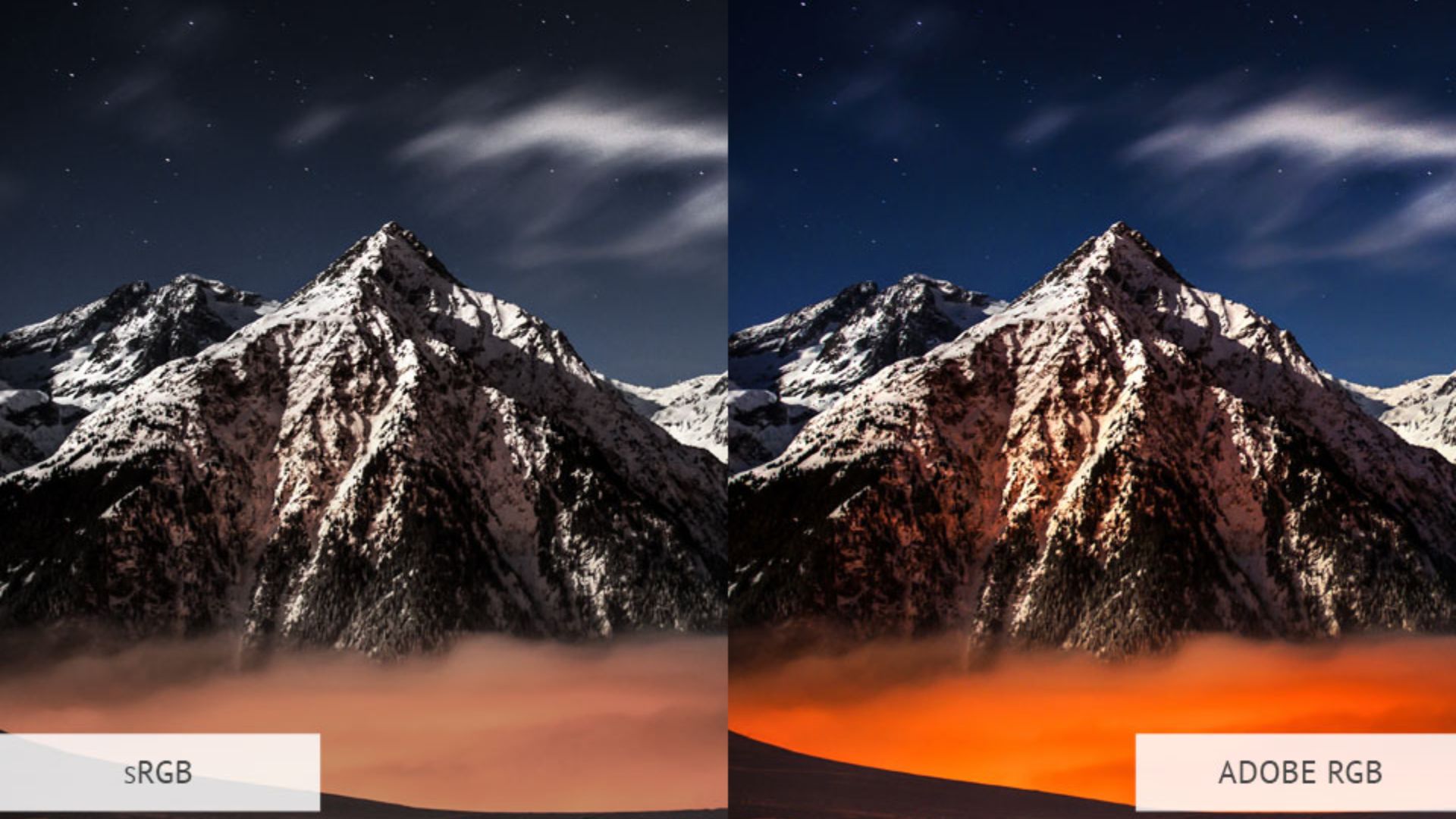
Photo color management affects every image you capture, edit, and share. Most photographers never fully understand how color spaces impact their work. The choice between sRGB and Adobe RGB shapes your entire photography workflow. This includes camera settings through final output. Understanding these differences helps you make better decisions about color accuracy and file compatibility.
Most photographers encounter color space decisions without realizing their importance. Your camera offers both options. Your editing software switches between them. Your monitor displays colors differently depending on which space you choose. Making the wrong choice leads to dull prints and inconsistent web images. Frustrated clients see different colors than you intended.
Read more: What’s the Difference Between Srgb and Adobe Rgb for Photo Color Management?Understanding Color Space Basics
Color spaces define the range of colors your camera can capture. Think of them as containers that hold different amounts of color information. A larger container holds more colors. That doesn’t always mean better results for every situation.
The visible spectrum contains millions of colors that human eyes can detect. No camera, monitor, or printer can reproduce all these colors. Color spaces help manage this limitation. They define which colors get priority and how devices should handle color information.
Each color space uses math formulas to translate between different devices. Your camera captures colors in one space. Your monitor displays them in another. Your printer reproduces them in yet another. Proper photo color management keeps these translations accurate across all devices.
How Color Spaces Work Together
Both sRGB and Adobe RGB use RGB color models. They define different boundaries for color reproduction. These boundaries are called gamuts. They determine which colors can be accurately represented within each color space.
sRGB was created in 1996 as a standard color space for computer monitors. It covers about 35% of all visible colors. The focus stays on colors that typical consumer devices can display reliably. This makes sRGB the safest choice for consistent color reproduction.
Adobe RGB arrived in 1998 with a wider gamut. It covers about 50% of visible colors. Adobe designed this space for professional photographers who needed more color range for high-quality printing. The expanded gamut includes more vivid cyans and greens. Printers can reproduce these colors but sRGB cannot capture them.
Camera Color Space Settings Impact
Camera manufacturers typically set sRGB as the default color space. It works reliably for most users. This setting captures images that display correctly on phones and computers. Social media platforms also work without additional processing. Switching to Adobe RGB in your camera unlocks additional color information. This might benefit certain types of photography.
Understanding exposure becomes more important when working with wider color spaces.
How Photo Color Management Affects Your Workflow
Your color space choice affects every stage of your photography process. From camera capture through final output, each step must account for color space limitations.
Photo editing software handles color spaces differently depending on your choices. Adobe Lightroom and Photoshop work with both spaces but require proper setup. Other editing programs may not support Adobe RGB fully. This leads to unexpected color shifts or reduced functionality.

File Size and Storage Impact
Adobe RGB files contain more color information. This results in larger file sizes compared to equivalent sRGB images. The difference becomes significant when shooting high volumes or managing long-term storage. A typical Adobe RGB RAW file might be 10-15% larger than its sRGB equivalent.
Storage costs multiply across your entire workflow. Memory cards need more space. Hard drives fill up faster. Cloud backup services cost more. File transfer times increase with larger Adobe RGB files. Calculate these costs against the potential benefits for your specific photography needs.
Processing time also increases with wider gamut color spaces. Your computer works harder to handle the additional color information. This affects editing speed and preview generation. Modern computers handle this difference well. Older systems might show noticeable performance impacts.
Dynamic range photography techniques work differently depending on your chosen color space.
Print vs Web Output Considerations
Different output methods favor different color spaces. Understanding these preferences helps you choose the optimal space for your primary photography goals.
Online platforms and social media sites expect sRGB color space. Instagram, Facebook, Twitter, and most websites automatically convert images to sRGB. They do this regardless of the original color space. Uploading Adobe RGB images to these platforms often results in flat colors. The conversion process discards color information.
Modern web browsers support sRGB by default with limited Adobe RGB compatibility. Some browsers now handle DCI-P3 color space for HDR content. Most users still view content on sRGB devices in 2025. This creates a mismatch between your intended colors and what audiences actually see.
Professional Printing Requirements
Professional printing environments often benefit from Adobe RGB’s expanded color range. Commercial labs and fine art printers can reproduce colors outside sRGB’s gamut. High-end inkjet systems also handle these additional colors. These extra colors become valuable for landscapes and vibrant portrait photography.
Desktop inkjet printers in 2025 offer improved Adobe RGB support compared to earlier models. Entry-level printers still work better with sRGB. Professional models now commonly support wider gamuts including DCI-P3. Check your printer’s specifications before committing to Adobe RGB workflows.
Print-on-demand services like online photo labs usually prefer sRGB submissions. These services optimize their workflows for consumer photography. This makes sRGB the safer choice for consistent results. Some professional labs accept Adobe RGB but require specific color profiles.
Color Management for Different Photography Styles
Various photography genres benefit differently from sRGB and Adobe RGB color spaces. Understanding these differences helps you choose the optimal space for your primary work.
Portrait photography often works well with either color space. Skin tone accuracy becomes the priority. sRGB provides reliable skin tone reproduction across different viewing devices. This makes it ideal for photographers who share portraits online. Adobe RGB offers more flexibility for creative color grading. It requires careful handling to maintain natural skin tones.
Landscape and Nature Photography
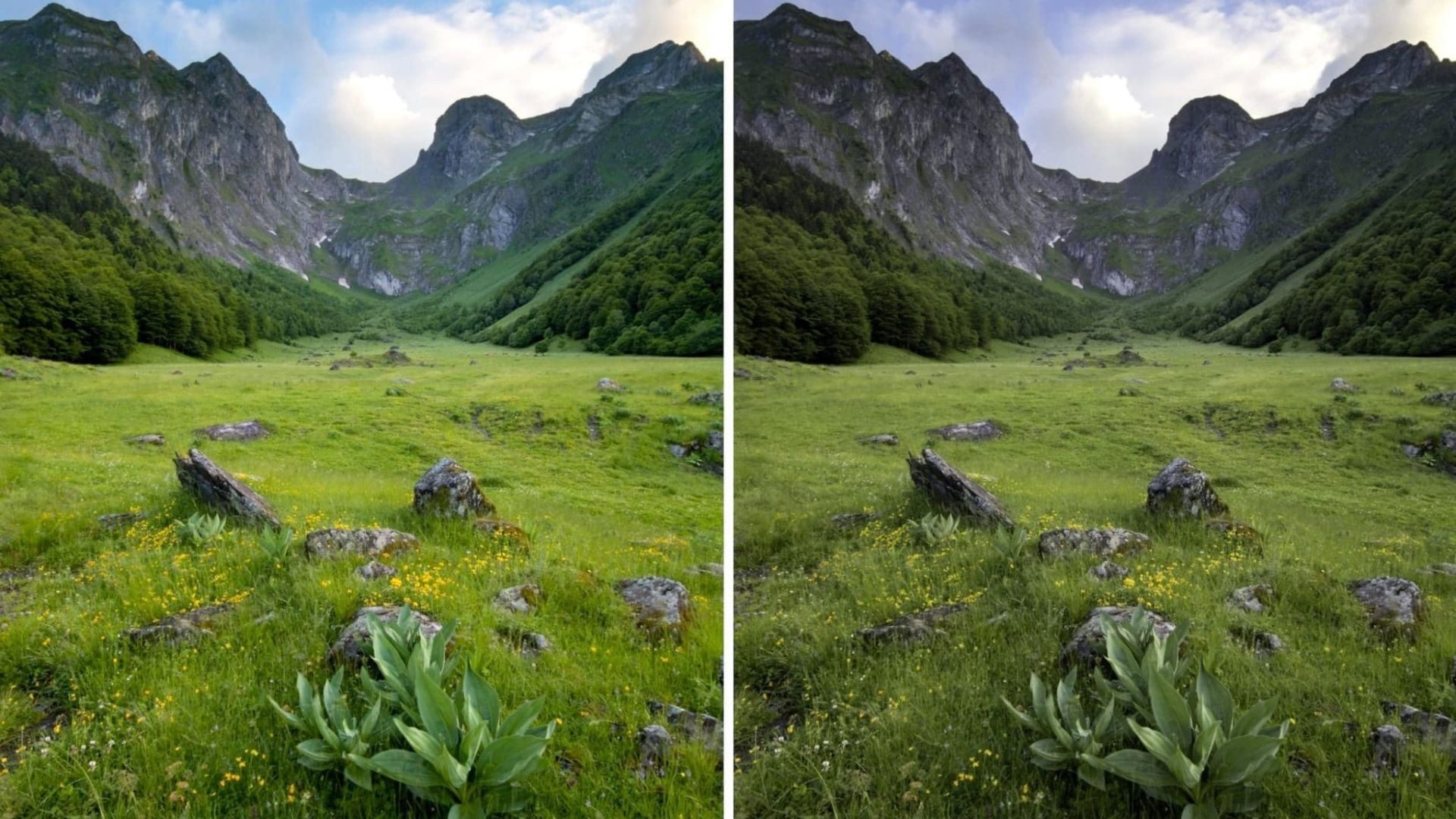
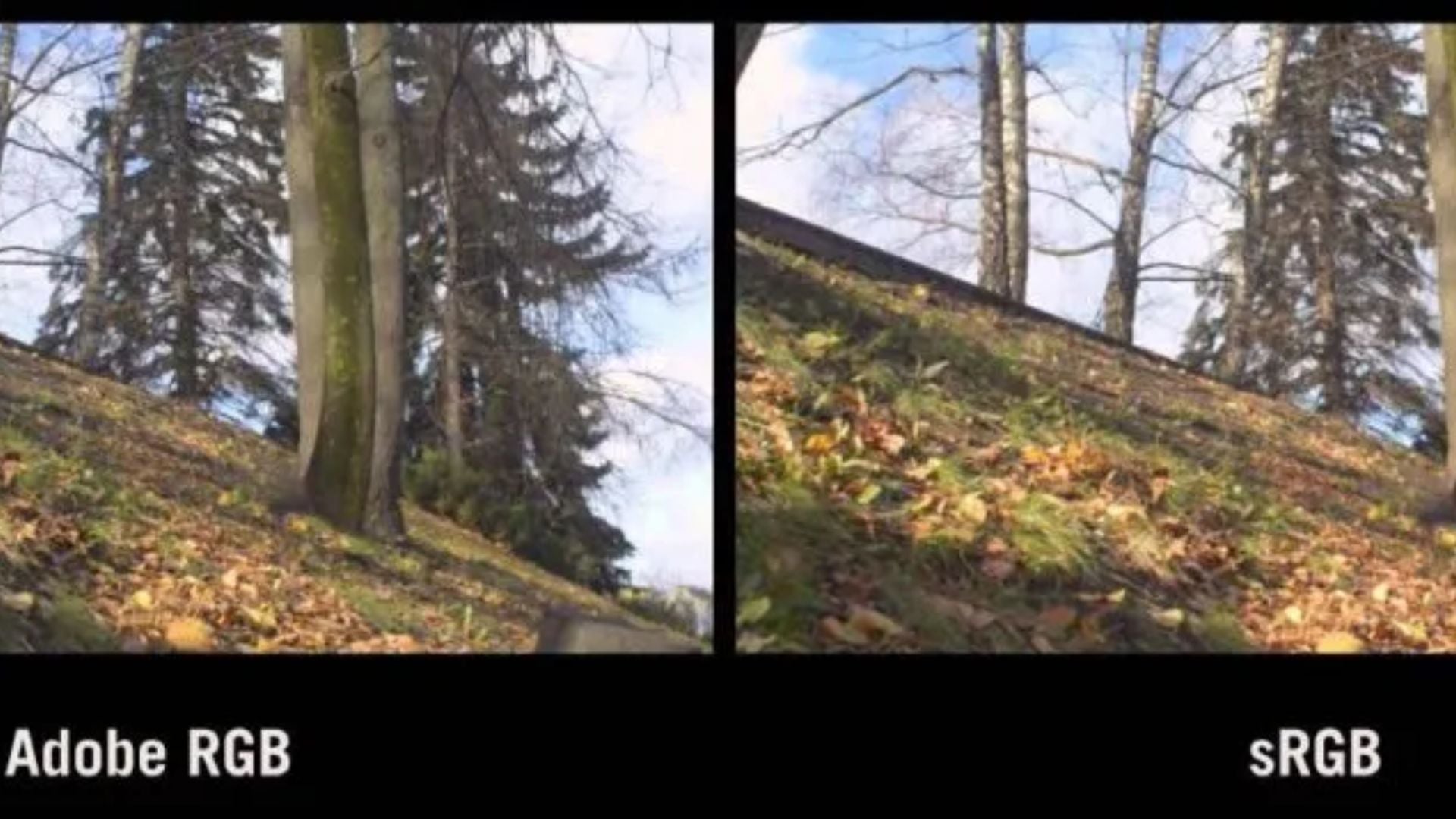
Landscape photography frequently showcases Adobe RGB’s advantages. Natural scenes often contain vivid greens and deep blues. These saturated colors fall outside sRGB’s range. Mountain lakes and forest canopies can appear more vibrant when captured in Adobe RGB.
The benefits only matter if your output method can reproduce these colors. Landscape photographers who primarily share images online might not see significant advantages. Those who sell prints or display work in galleries often prefer the expanded color range.
Blue hour photography techniques particularly benefit from wider color spaces that capture subtle color gradations.
Commercial and Product Photography
Commercial photography often demands Adobe RGB for accurate brand color reproduction. Product shots need precise color matching for catalogs and advertisements. The expanded gamut helps capture subtle color differences that matter for product differentiation.
Fashion and jewelry photography particularly benefits from wider color spaces. Fabric colors and gemstone hues often exceed sRGB’s limitations. Adobe RGB provides the color accuracy needed for professional commercial applications.
Product photography requires careful attention to color accuracy across different output methods.
Monitor Setup and Color Accuracy
Your monitor serves as the foundation for accurate photo color management. Without proper calibration, color space decisions become meaningless. You cannot see accurate colors during editing without a properly calibrated display.
Consumer monitors in 2025 typically display sRGB accurately and many now include DCI-P3 support. Professional monitors designed for photography commonly support Adobe RGB as standard. Many gaming monitors also feature DCI-P3 coverage for wider color reproduction. Investing in a quality monitor becomes essential when working with wider color spaces.
Hardware calibration devices create custom color profiles for your specific monitor. Tools like Datacolor’s SpyderExpress make monitor calibration accessible to all photographers. These profiles tell your editing software how to display colors accurately. Regular calibration maintains color accuracy as monitors change over time.
Software Color Management Setup
Photo editing software requires proper color management settings to handle different color spaces correctly. Adobe Lightroom and Photoshop offer comprehensive color management tools. They need correct configuration for optimal results.
Color profile mismatches create common problems in photo workflows. Your camera might capture in Adobe RGB. Your monitor displays sRGB. Your printer expects a different profile entirely. Understanding how to manage these transitions prevents color accuracy problems.
Color grading techniques work differently depending on your chosen color space and software setup.
Camera Settings and RAW File Benefits
RAW files capture color information regardless of your camera’s color space setting. The color space choice affects JPEG previews and embedded thumbnails. It doesn’t affect the actual RAW data. This gives you flexibility to change color space decisions during post-processing.
Camera color space settings influence your in-camera LCD preview and histogram display. Adobe RGB may show more accurate previews for certain scenes. This helps you make better exposure decisions. The histogram also reflects the chosen color space. It affects your assessment of color channel clipping.
Professional cameras often default to Adobe RGB. Consumer models typically use sRGB. Understanding your camera’s behavior helps you make informed decisions about color space settings.
JPEG Output Considerations
Shooting JPEG files directly commits you to your chosen color space. Unlike RAW files, JPEGs cannot be converted between color spaces without quality loss. This makes your initial color space choice more important when shooting JPEG.
Many photographers use a hybrid approach. They shoot RAW for important work and JPEG for casual photography. This strategy provides flexibility when needed. It maintains workflow simplicity for everyday shooting.
Tutorial content often covers file format decisions and their impact on workflow efficiency.
Professional Workflow Integration
Professional photography businesses must consider color space decisions within broader workflow requirements. Client expectations and delivery methods influence optimal color space choices. Output devices also play a role in these decisions.
Many professional photographers establish separate workflows for different types of work. Wedding photographers might use sRGB for online galleries and social media. They maintain Adobe RGB versions for album printing. This approach provides optimal results for each output method.
Client communication becomes important for color management success. Most clients don’t understand color space implications. They notice when colors don’t match their expectations. Professional photographers often educate clients about viewing conditions and device limitations.
Building Consistent Workflows
Consistency matters more than perfection in photo color management. Choose one color space and stick with it throughout your workflow. Mixed color space workflows create confusion and potential accuracy problems.
Document your color management procedures to maintain consistency. Written procedures help you remember settings and troubleshoot problems. They also help train assistants. Consistency beats perfection when it comes to color management.
Create test images for different output methods. These reference images help you verify that your color management system works correctly. Regular testing prevents color accuracy problems before they affect client work.
Making Smart Photo Color Management Choices
The decision between sRGB and Adobe RGB depends more on your specific needs than theoretical advantages. Most photographers benefit from starting with sRGB. They switch to Adobe RGB only when they have clear reasons for needing the expanded color range.
Consider your primary output methods when choosing color spaces. Photographers who primarily share work online rarely benefit from Adobe RGB’s expanded gamut. Those who sell prints or work with commercial clients may find the wider color range valuable.
Workflow complexity increases significantly with Adobe RGB. Every device and software application must be properly color-managed. Every output method needs attention to maintain accuracy. This complexity may not be justified unless you specifically need the additional colors.
Storage and processing requirements also factor into color space decisions. Adobe RGB files require more disk space and longer transfer times. They need increased processing power. These costs accumulate over time and may impact your overall workflow efficiency.
Future Technology Considerations
Display technology in 2025 continues moving toward wider color gamuts with mainstream adoption. OLED displays, mini-LED technology, and HDR support now appear in consumer devices. New iPhones and iPads support DCI-P3, while Android device support varies by manufacturer. This trend suggests that Adobe RGB capture provides better future-proofing for advancing display technology.
Practical adoption of wider color spaces remains limited. Most content consumption still occurs on sRGB devices. This situation will likely persist for several years. Making color space decisions based on future possibilities rather than current needs may not be practical.
Photography trends often influence optimal color management strategies as technology evolves.
Archive considerations become important for long-term photo storage. Images captured in Adobe RGB retain more color information for future editing. This provides flexibility as display and printing technology continues advancing.
Practical Implementation Steps
Successfully implementing photo color management requires a systematic approach. Start by testing your equipment’s color space support before making decisions. Capture the same scene in both sRGB and Adobe RGB. View the results on your normal devices. This comparison reveals whether theoretical advantages translate into practical benefits.
Most photographers discover that their specific workflow determines which color space works best. Marketing strategies often influence color space decisions based on client delivery requirements.
Test different output methods to understand how color spaces affect your final results. Print the same image from both sRGB and Adobe RGB files. Share versions online and compare how they appear on different devices. This hands-on approach provides real-world insights into color space performance.
Create reference files that help you evaluate color accuracy across your workflow. These test images should include skin tones, landscape colors, and product shots relevant to your photography style. Regular testing with these references helps maintain consistent color management.
Your Color Management Decision
Photo color management success depends on understanding your specific needs rather than following general recommendations. Both sRGB and Adobe RGB can produce excellent results when properly implemented.
sRGB provides reliable compatibility and simpler workflow management for most photographers. The universal device support and smaller file sizes make it an excellent choice. Most online sharing and consumer printing work better with sRGB. Client communication also becomes easier with this standard color space.
Adobe RGB offers expanded creative possibilities but requires more careful handling. The wider color gamut becomes valuable for photographers who work with vivid colors. Professional printing and commercial applications often benefit from the expanded range. However, the benefits only show when your entire workflow supports wide gamut color management.
Understanding both color spaces helps you make informed decisions. Many successful photographers work exclusively in one color space. Others maintain separate workflows for different types of projects. The key lies in choosing consciously rather than by default.
Your photo color management success depends more on properly implementing your chosen color space. Both sRGB and Adobe RGB can produce outstanding results when used appropriately. Focus on building consistent workflows that match your specific photography goals and output requirements.
See more from DIYPhotography.net on Google
Add DIYPhotography.net as a trusted source. This makes
our stories more likely to appear in your Google Search results.
 Add as a preferred source on Google

Darlene Lleno
Darlene Lleno brings a unique perspective to DIY Photography as someone who grew up surrounded by camera gear but chose words over lenses. With five years of writing experience, she specializes in photography content that’s both technically informed and genuinely passionate. Growing up with a photographer twin brother meant camera talk was everyday conversation in her household. While he mastered capturing moments, Darlene discovered she preferred being the subject and the storyteller behind the scenes. As a travel enthusiast and mother of two, she understands the importance of preserving life’s precious moments. When not exploring new destinations or writing for DIY Photography, you’ll find her reading or tending to her garden. Her approach to photography writing is refreshingly authentic, she may not be behind the camera, but she knows exactly what it takes to help others capture the shots that matter most.


Join the Discussion
DIYP Comment Policy
Be nice, be on-topic, no personal information or flames.