








New Preset Converter lets you use your Lightroom presets in Capture One
Nov 28, 2018
John Aldred
John Aldred is a photographer with over 25 years of experience in the portrait and commercial worlds. He is based in Scotland and has been an early adopter – and occasional beta tester – of almost every digital imaging technology in that time. As well as his creative visual work, John uses 3D printing, electronics and programming to create his own photography and filmmaking tools and consults for a number of brands across the industry.
Share:

One of the big draws of Lightroom for many users is its ability to use presets. And there are a million of them out there. Free and paid Lightroom preset packs are everywhere you look these days. But there are very few available for Capture One.
It’s those purchased presets that put a lot of photographers off switching away from Lightroom. They don’t want to feel they’ve wasted their money by no longer using them. But now, a new Lightroom to Capture One preset converter, the imaginatively titled Preset Converter, might make your choice a little bit easier.
Preset Converter is available for both Windows and Mac, and offers various options to convert your Lightroom presets into Capture One’s “Styles” using a simple drag and drop interface. You can either do them individually or organise them into “stylepacks” – These are how Capture One essentially organises styles into categories.
The software attempts to match up the Capture One style as close to the Lightroom Preset’s settings as possible. As they are two completely different RAW engines, with very different ways of doing things, this is quite impressive.
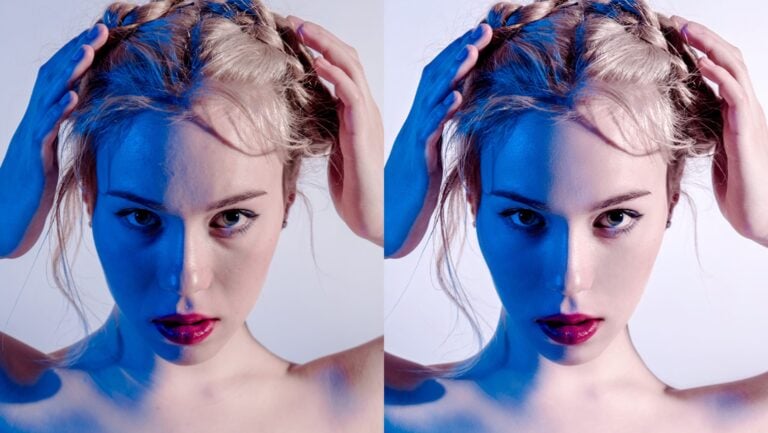
Picture Instruments, the creators of Preset Converter posted some samples to their website showing how closely the Capture One style matches the Lightroom preset on which it was based. First up, the Lightroom conversion…


And now, the Capture One conversion…


As you can see, they’re pretty close.
But, as mentioned, they’re two completely different RAW engines. So there are some slight differences between the two which you should easily be able to adjust quite quickly manually. Although, there are one or two things that don’t translate over at all. There’s no equivalent to Dehaze in Capture One, for example.
If you want to find out more about Preset Converter, head on over to their website. You can try it before you buy, and if you want to purchase it costs $47.
So, if you’ve been thinking about switching to Capture One, but held off due to the 3 million Lightroom presets you’ve bought or downloaded, now you’ve no excuse.

John Aldred
John Aldred is a photographer with over 25 years of experience in the portrait and commercial worlds. He is based in Scotland and has been an early adopter – and occasional beta tester – of almost every digital imaging technology in that time. As well as his creative visual work, John uses 3D printing, electronics and programming to create his own photography and filmmaking tools and consults for a number of brands across the industry.
Related Posts
 PresetPanda lets you convert your Lightroom Presets over to Adobe Camera RAW (and back!)
 The ultimate Lightroom film look presets comparison
 Visual Flow launches Lightroom and ACR presets based on lighting conditions
 Photos and presets “Not Recoverable” says Adobe as Lightroom update deletes customer images
Join the Discussion
DIYP Comment Policy
Be nice, be on-topic, no personal information or flames.
3 responses to “New Preset Converter lets you use your Lightroom presets in Capture One”
Wich is the diferent insted pay and try mode????
You can only convert 3 presets in trial mode.
Now it is possible to convert 6 presets in trial mode.