

























Adobe Photoshop Elements and Premiere Elements unveil new AI features and much more
Oct 1, 2024
Dunja Đuđić Kalinin
Dunja Djudjic is a multi-talented artist based in Novi Sad, Serbia. With 15 years of experience as a photographer, she specializes in capturing the beauty of nature, travel, concerts, and fine art. In addition to her photography, Dunja also expresses her creativity through writing, embroidery, and jewelry making.
Share:

Adobe has just released Photoshop Elements 2025 and Premiere Elements 2025. As probably expected, there are new AI-powered features that aim to make editing faster and simpler. You get new ways to combine photos and remove objects, create depth, change colors in your photos, and more. So, let’s dive in and see what Adobe has to offer.
Adobe Photoshop Elements 2025
Sine AI is all the rage in every editing software ever, lets start with Adobes AI-powered features in Photoshop Elements:
- Simply brush to remove objects: Make anything disappear with the new AI-powered Remove tool and the Object Removal.
- Choose your focal point, and the new AI-powered Depth Blur filter automatically adds blur just where it’s needed. Or where AI thinks it’s needed. From here, you can adjust details like blur strength, focal distance, and focal range.


As for non-AI features, you get plenty of those too:
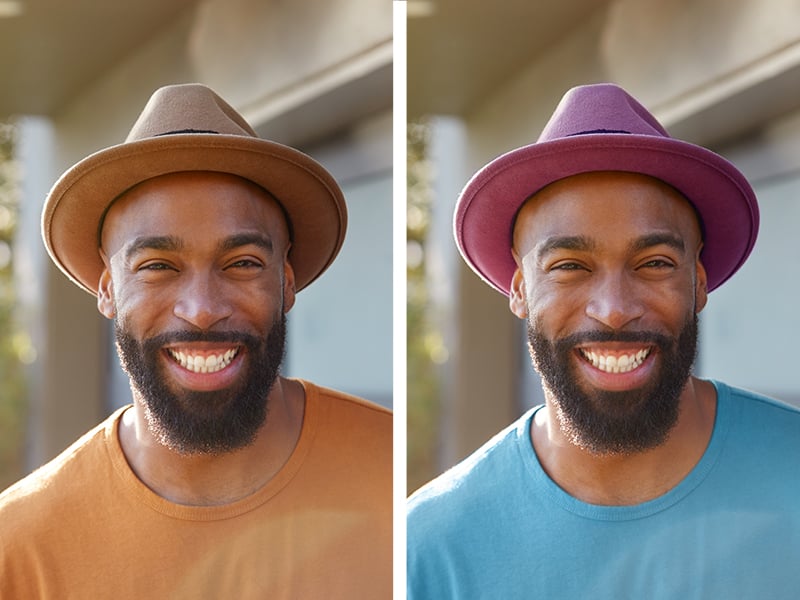
- Change the color of any object: Use the automatic selection tools to choose what you want to change, pick your new color, and refine to suit your style.
- Seamlessly combine multiple images: blend the subject from one, the background from another, and elements from many more to create a new image with the new Combine Photos Guided Edit.
- Create motion effects with four new Quick Actions: create a sense of camera motion or add animated sparkles, a blinking heart, or an animated frame.
- New textures and graphics: add a designer’s touch with new textured photo backgrounds and embellish creations, social images, and graphics.
- Guided Edits: make simple adjustments, custom creations, or eye-catching effects with 59 step-by-step Guided Edits.

Adobe Premiere Elements 2025
Moving on to video enthusiasts among you. Adobe Premiere Elements 2025 offers some new features, and unlike Photoshop Elements, none of these are AI-based. Here’s what you can expect:
- Create dynamic titles with more text controls: choose from templates and style your text to match your story with new controls for alignment, size, direction, color, spacing, and more.
- Get your colors just right: ensure that clouds, snow, and other white details look truly white using the new White Balance tool, and make precise color and brightness adjustments to your whole scene or specific areas using new color correction Curves.
- Adjust footage color with LUTs: automatically transform your color scheme with available presets, or import and apply your own.
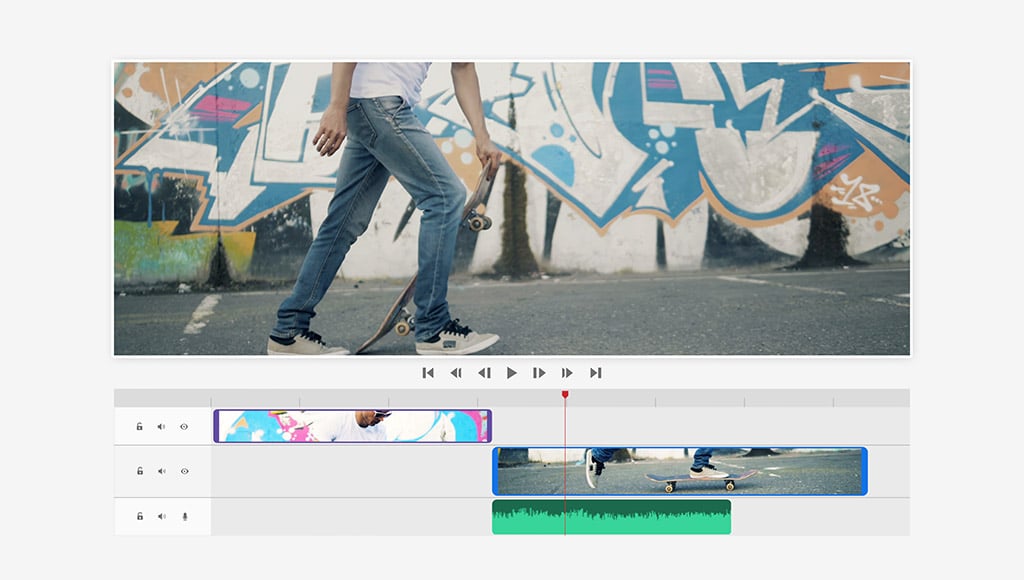
- Edit faster with a simplified Timeline: see video tracks grouped together and audio tracks grouped together for easier navigation, find the editing options you use most in the new Quick Tools menu, lock individual tracks to prevent accidental changes, and more.
- Access free Adobe Stock title templates: choose from lots of free, professionally designed templates thanks to new Adobe Stock integration right inside Premiere Elements.
- Easily build your skills with a redesigned Guided Edit experience: Choose from one of many Guided Edits for your videos, and then just follow along to make quick fixes or add creative effects, smooth transitions, or animations.


Both Photoshop Elements and Premiere Elements feature Apple M3 chip support. This means that you’ll now enjoy faster performance on Mac computers.
Web and mobile companion apps
Adobe has also introduced new features for a web companion app and a mobile companion app. They’re still in beta though, available in English, French, German and Japanese. Here’s what the latest edition gets:
- Add creative flair to photos in the web companion app
- Add overlays that move or frame your subject to create depth.
- Change backgrounds automatically
- Enhance your image with patterns
- Adjust your photos’ looks
- Make collages and slideshows.
- Access and view your edited Elements photos and videos from any browser, and share the way you like.
- Do one-click photo fixes and more in the mobile companion app
- Add fun pattern overlays, and use sliders to adjust light, color, and effects.
- Crop, straighten, remove backgrounds, improve tone, and more with one-click Quick Actions. Bring in images from a wide range of files and folders on your phone, and view creations from Elements Web.
- Auto-sync your photos and videos to enjoy them anywhere
- Sync across the Elements Organizer and the web and mobile companion apps making it easy to access your mobile media on all of your devices.
Availability
Photoshop Elements 2025, Premiere Elements 2025, and a discounted bundle of the two are available on Adobe’s website, Amazon, Best Buy, and other retailers.
See more from DIYPhotography.net on Google
Add DIYPhotography.net as a trusted source. This makes
our stories more likely to appear in your Google Search results.
 Add as a preferred source on Google

Dunja Đuđić Kalinin
Dunja Djudjic is a multi-talented artist based in Novi Sad, Serbia. With 15 years of experience as a photographer, she specializes in capturing the beauty of nature, travel, concerts, and fine art. In addition to her photography, Dunja also expresses her creativity through writing, embroidery, and jewelry making.
Related Posts
 No Skills? No Problem. Adobe Photoshop Elements 2026 and Premiere Elements 2026 Do the Editing for You
 Adobe Photoshop Elements 2021 packs a bunch of powerful AI features
 Adobe enhances AI text-based editing features with latest Premiere Pro beta
 Adobe Photography Plan users to get Photoshop Express and Premiere Rush for free from next week
Join the Discussion
DIYP Comment Policy
Be nice, be on-topic, no personal information or flames.