





















Nik Collection 8 Reinvents Your Photoshop Workflow with Smarter Masks and Layer Control
Aug 21, 2025
Dunja Đuđić Kalinin
Dunja Djudjic is a multi-talented artist based in Novi Sad, Serbia. With 15 years of experience as a photographer, she specializes in capturing the beauty of nature, travel, concerts, and fine art. In addition to her photography, Dunja also expresses her creativity through writing, embroidery, and jewelry making.
Share:
Nik Collection 8, the latest version of DxO’s plugin suite, brings some much-needed updates to your Photoshop workflow. While the suite has long offered powerful effects and creative tools, version 8 focuses more on workflow. It puts a particular emphasis on masking, layer control, and plugin navigation.
A Cleaner, More Practical Photoshop Panel
The Nik Collection 8 brings a new dockable panel. It replaces the floating Nik Selective Tool which was once the only way into the suite from Photoshop. It’s fully customizable, so you can show only the plugins you actually use. From there, each plugin launches with a click, and the panel offers quick access to masking and export controls.
It’s a small change, but for anyone regularly moving between tools, having that integration right in the workspace can help cut down on interruptions.
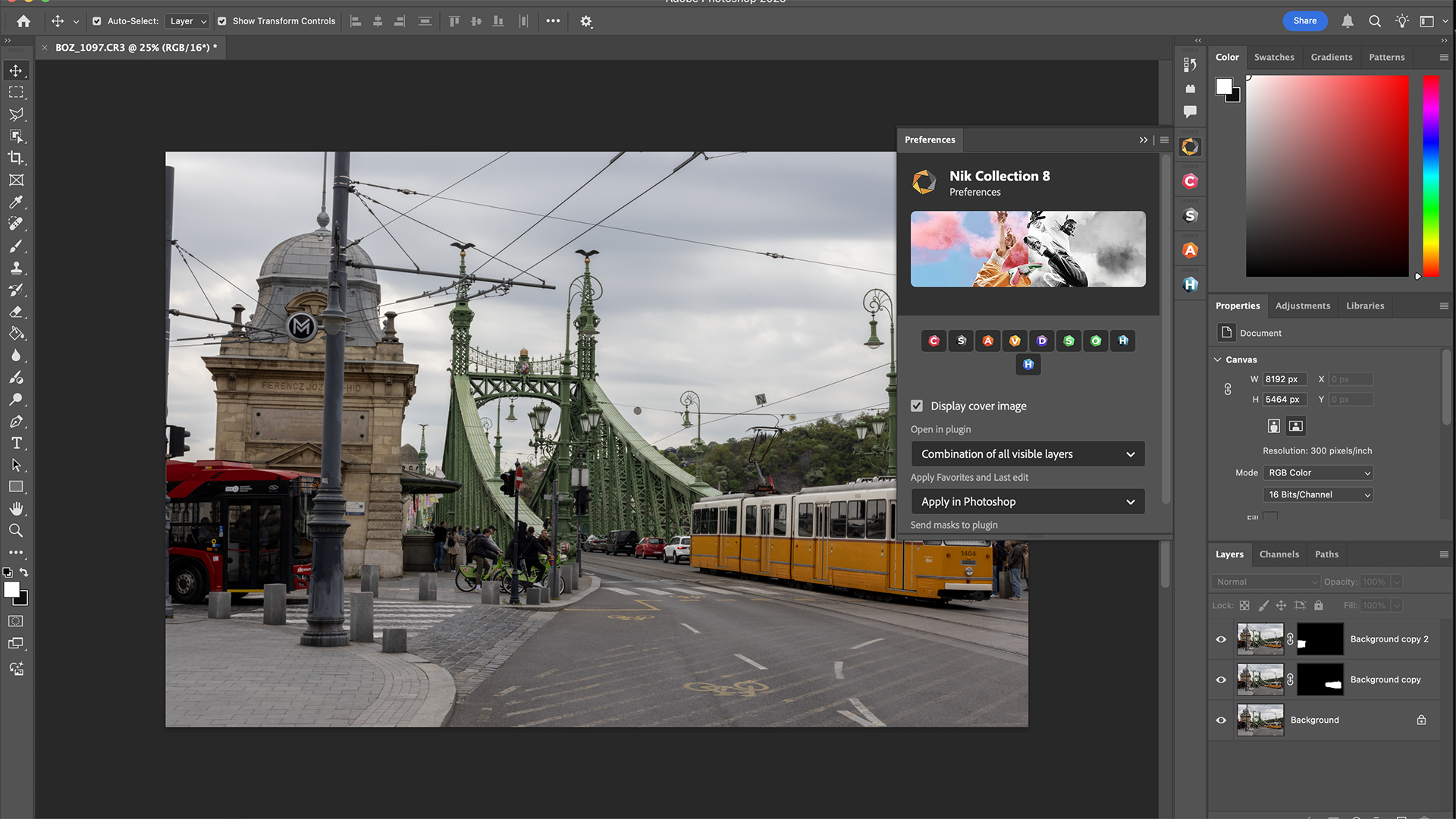
Better Mask Handling, In Both Directions
One of the more significant improvements in Nik Collection 8 is how it handles masks. You can now bring masks created in Photoshop into any Nik plugin – and just as importantly, send them back out again. That means selections, luminance masks, or adjustment masks you’ve built outside Nik stay usable throughout your edit.
There’s also support for transferring masks between plugins, so if you’ve created something in Silver Efex and want to keep refining it in Color Efex, you don’t have to start from scratch. This kind of continuity wasn’t possible in previous versions, and it makes local adjustment workflows feel much less fragmented.
Nick Collection 8 Gives You More Control
Previously, edits made in a Nik plugin would often return to Photoshop as a flattened layer. Nik Collection 8 changes that. You now have several options: apply the edit to the current layer, create a new one (with or without a mask), or send it back wrapped in a Smart Object for non-destructive editing.
You can also send plugin edits directly as new Photoshop layers while continuing to work in Nik Collection. It’s a useful option for testing different looks or stacking adjustments without committing everything immediately.
“With Nik Collection 8, we wanted to enhance both creativity and efficiency,” said Boris Oliviero, Product Director. “We’ve reimagined the Photoshop workflow, making it easier than ever to apply powerful effects, refine local adjustments, and move seamlessly between plugins.”
Nik Collection 8 Pricing And Availability
Nik Collection 8 is available now for Windows and macOS. A new license costs $159.99 / €159.99 / £145.99, while upgrades from version 6 or 7 are priced at $89.99 / €89.99 / £79.99. A free 30-day trial is also available on the DxO website. If you decide to go for it, make sure to enter our promo code DIY15 at checkout and get 15% off.
Disclaimer: This post is part of a paid partnership with the featured brand. While sponsorship supports our work, all editorial content is independently written and reflects the voice and standards of DIYP. We only cover products we believe are relevant, trustworthy, and of interest to our readers.
See more from DIYPhotography.net on Google
Add DIYPhotography.net as a trusted source. This makes
our stories more likely to appear in your Google Search results.
 Add as a preferred source on Google

Dunja Đuđić Kalinin
Dunja Djudjic is a multi-talented artist based in Novi Sad, Serbia. With 15 years of experience as a photographer, she specializes in capturing the beauty of nature, travel, concerts, and fine art. In addition to her photography, Dunja also expresses her creativity through writing, embroidery, and jewelry making.
Related Posts
 Nik Collection 8 Brings Smarter Photoshop Integration, Better Masks, and Big Upgrades to Silver and Color Efex
 Nik Silver Efex and Color Efex Get Practical Upgrades in Nik Collection 8
 Check out this beginner’s guide to layer masks in Photoshop
 DxO PhotoLab 8 Speeds Up Your Workflow With Hue Masks, Compare Mode, And Instant Rollover Previews
Join the Discussion
DIYP Comment Policy
Be nice, be on-topic, no personal information or flames.