


























Adobe Firefly AI Video Creation Gets New Tools, Partner Models, and Unlimited Generations
Dec 16, 2025
Anzalna Siddiqui
A psychology major in her third year of Bachelor’s, Anzalna Siddiqui has endless curiosity for the human mind and a deep love for storytelling – both through words and visuals. Though she hasn’t taken up photography as a profession, her Instagram is where her passion finds its home. In addition to this, she’s a travel enthusiast who never travels without her camera because every place has a story waiting to be captured.
Share:

The newest update to Adobe Firefly shifts focus from merely creating content to actively directing it, making Adobe Firefly AI Video Creation a central element. They are integrating models from partners such as Runway, Topaz, and Black Forest Labs directly into the Firefly platform. The idea is for Adobe to be your all-in-one resource where you can choose the best AI tool for each task without leaving your browser.
I think this is a smart move for Adobe and the future of Adobe Firefly AI Video Creation. They understand that no AI model is flawless, so why not allow users to access all of them in one place? Here’s a look at what you can do with these new features.
Master Your Scenes with Firefly Prompt to Edit
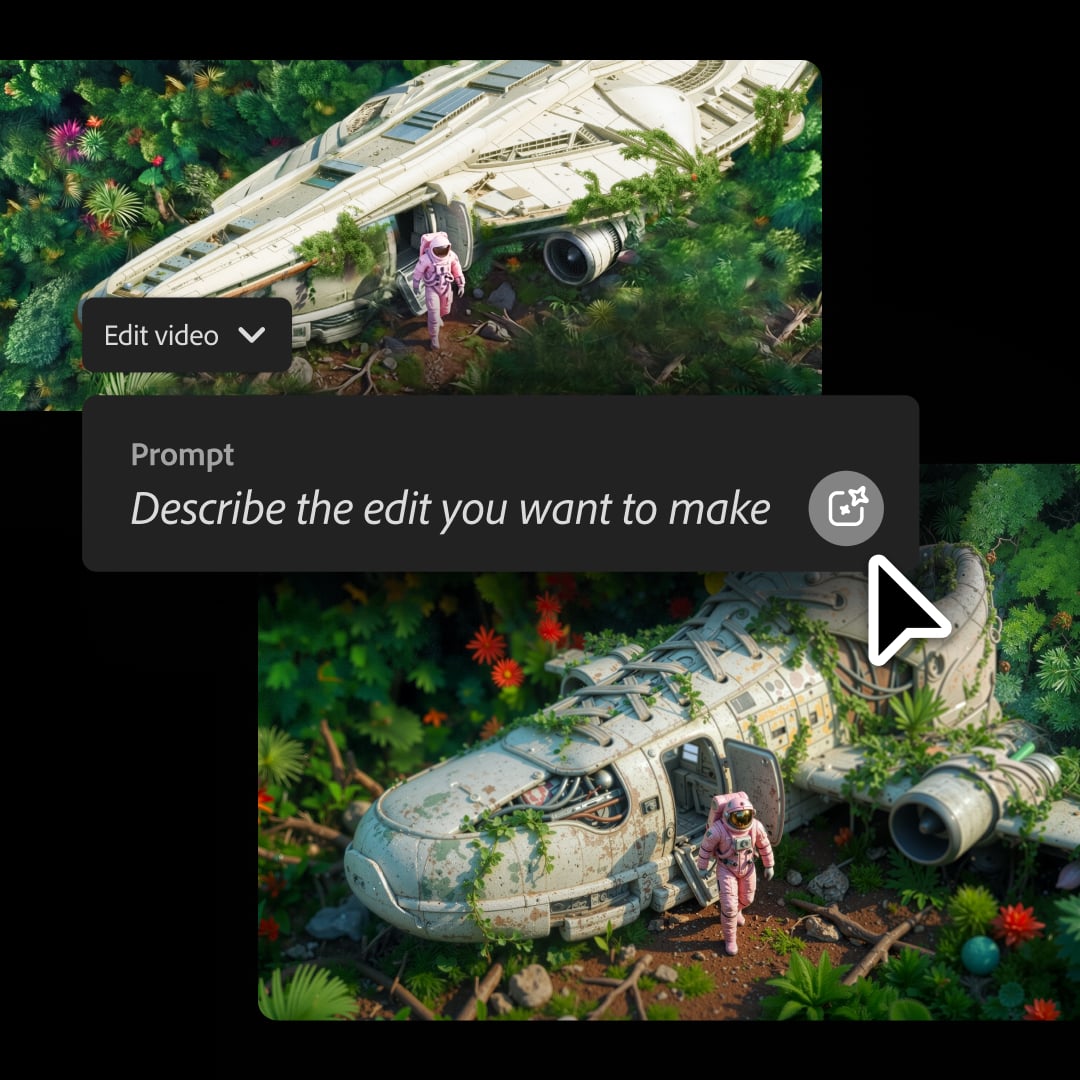
The most significant update for your workflow is the new ‘Prompt to Edit’ feature. Adobe says this allows you to make precise, natural-language edits to clips you’ve already created. Instead of discarding a 10-second clip because the sky is too bright, you can ask Firefly to “reduce the contrast and make the sky look cloudy.”
With a collaboration with Runway’s Aleph model, you can now give clear instructions like:
“Remove the person on the left.”
Change the background to a clean studio.”
“Zoom in a little on the subject.”
It appears that Adobe wants to move away from random AI changes and give you genuine creative control. If it works as well as they claim, you won’t have to settle for anything less than your exact vision. You can refine a shot until it looks exactly how you imagined it.
Control the Action with Camera Motion Reference
If you’ve worked with AI video tools like Adobe Firefly AI Video Creation, you know that achieving specific camera movements, such as a slow dolly zoom or a complex pan, can be quite challenging. Adobe is introducing a new Camera Motion Reference workflow to address this challenge.
Now, you can upload a starting frame image and provide a reference video to show the exact camera movement you want. Firefly will then apply that movement to your image. This represents a significant improvement in consistency. You can keep your cinematic movements exactly where you want, which will save you a lot of time and effort.
Make it Sharp with Topaz Astra Video Upscaling
AI-generated videos often appear somewhat unclear. They’re fine for social media, but not for larger screens. Adobe is tackling this issue by integrating Topaz Astra into Firefly Boards for enhanced AI video creation.
Topaz is renowned for its high-quality sharpening and upscaling capabilities, and Adobe now enables you to enhance your videos up to 1080p or 4 K resolution. You can use it to:
- Improve low-resolution clips for YouTube.
- Restore old, grainy footage.
- Add clarity to soft AI-generated videos.
It seems that Adobe recognizes that professional creators require more than just 720p. Plus, you can queue multiple videos to be upscaled in the background while you work on other things, which helps you stay productive.
FLUX.2 and the Quest for Photorealism
Firefly is excited to introduce FLUX.2 from Black Forest Labs. If you haven’t been following the latest developments in AI image technology, FLUX is currently a top choice for creating photorealistic images and, significantly, rendering clear text that appears realistic.
According to Adobe, you can access FLUX.2 through the Firefly web app, Photoshop, and soon in Adobe Express. It allows the use of up to four reference images, so you can input your brand assets or style guides to ensure consistency. Personally, I think adding this to the Photoshop Generative Fill feature could significantly enhance high-end retouching.
Meet the New Firefly Video Editor (Public Beta)
You have your clips ready, enhanced, and the background edited. Now, instead of heading straight to Premiere Pro, consider using the new Firefly video editor for your Adobe Firefly AI Video Creation needs. It’s a simple, browser-based platform for assembling your project.
Here, you can combine your generated clips, personal footage, and audio. There are two main ways to edit:
- Timeline Editing: Ideal for those who prefer traditional control over layers and cuts.
- Text-Based Editing: Great for interview or “talking head” videos, allowing you to cut by simply deleting sentences in the transcript.
Adobe appears to be targeting creators who need to quickly produce high-quality Reels or TikToks in approximately twenty minutes, rather than the two days it typically takes.
The Best Part: Unlimited Generations (For Now)
Adobe is being generous, or maybe they want to keep you interested. From now until January 15, 2025, anyone with a Firefly plan can create an unlimited number of images and videos.
This offer includes everything: the main Firefly models, FLUX.2, and even the new “Nano Banana” model. If you’ve been hesitant to click “generate” because you’re worried about using up your monthly credits, now’s the perfect chance to go for it.
Tip: Use this time to try out those tricky camera moves and higher-resolution upscaling, which usually require a lot of credits. You really have nothing to lose until mid-January.
Adobe seems to be investing heavily in the idea that AI should be an integral part of creativity, rather than an additional task. By allowing competitors like Runway and Topaz to integrate with their platform, Firefly has become much more robust than it was just six months ago.
I’m curious to see if the Prompt to Edit feature can really handle the challenges. If it allows you to remove objects and adjust lighting through text commands without affecting the rest of the image, that would mark a significant shift in post-production for Adobe Firefly AI Video Creation.
What do you think? Are you open to integrating Runway and Topaz into your Adobe tools, or would you prefer to keep them separate?
See more from DIYPhotography.net on Google
Add DIYPhotography.net as a trusted source. This makes
our stories more likely to appear in your Google Search results.
 Add as a preferred source on Google

Anzalna Siddiqui
A psychology major in her third year of Bachelor’s, Anzalna Siddiqui has endless curiosity for the human mind and a deep love for storytelling – both through words and visuals. Though she hasn’t taken up photography as a profession, her Instagram is where her passion finds its home. In addition to this, she’s a travel enthusiast who never travels without her camera because every place has a story waiting to be captured.
Related Posts
 Get Unlimited Generations in Adobe Firefly Using Google Gemini 3 (Nano Banana Pro)
 Adobe Firefly unveils insane AI tools for text-to-video and audio creation
 Adobe Firefly Video Model Brings AI-generated Video Into The Real World
 Adobe shows off powerful new masking tools coming to Lightroom and Adobe Camera Raw
Join the Discussion
DIYP Comment Policy
Be nice, be on-topic, no personal information or flames.
One response to “Adobe Firefly AI Video Creation Gets New Tools, Partner Models, and Unlimited Generations”
Hey there, unless you’re referring to some special US only offer, the free generation promotion ended actually on Dec 15th not Jan 15th 2026..