The Strobist Corner - Extending Your TTL Flash Cord

TTL Cable Extender
When I first got this hack in the mail I immediately thought, hey this looks like something Strobist would do. After all he did it with a PC-Sync cord. This great mod from Mario Giambanco takes it one step further. Instead of using a PC-Sync and a home power cable, Mario used a TTL cable with a network cable. Simple? Kinda. Genius? Surly.

One of the things I really like about it is the extended rage you get, up to 50 feet. Maybe more. Radio Poppers, right behind you :)

A couple of weeks ago, I bought an Off Camera TTL Cable for my Nikon D50 - Nice cable, but for $60 at a local retailer, it wasn't quite long enough for what I wanted to do. I wanted to relocate my Nikon SB-800 to a tripod and use it as an off camera flash.

I was paranoid about cutting into the cable (it wasn't cheap after all), but I finally decided to cut into it and I'd like to share how I did it with everyone.

Being a systems administrator / network engineer, I started looking around for spare parts / connectors to use. The TTL cable had 6 wires in it, all the same gauge, stranded wires.

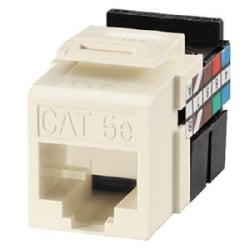
So I cut the TTL cable in half, stripped back the rubber shielding and I used 2 Cat5e network wall jacks, 1 for each end. Cat5e cabling and jacks consist of 8 wires, so it was a perfect match for this. The other aspect of those cables is that they are shielded - after all, they transfer high amounts of traffic.

Making sure to use the same wiring pattern on both jacks, I punched the TTL cable down as I would any other network cable. Put the cover on and used a little electrical tape to ensure the cable wouldn't rip out of the jack should it receive any tension from being connected.

TTL Cable Extender

It worked perfectly fine. I've tested the cable with both a 5 foot patch cable and a 50 foot network cable (both Cat5e). From what I can tell, there is no delay in the flash being triggered.

The Cat5e jacks were a good choice in my opinion because a: their relatively cheap from Home Depot or Lowes, (10 for $35 or so) b: reliable as they normally would be caring data and c: easily replaceable.
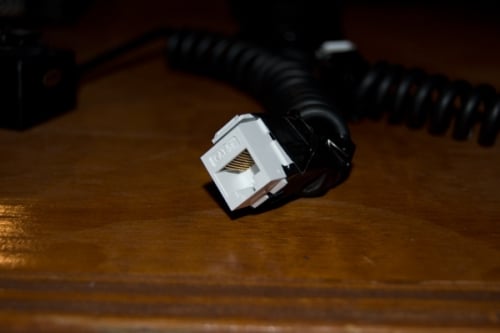
TTL Cable Extender

The following are the steps and some tips to repeat the hack.

1. Cut the cable in half - I tried to cut the cable in the middle - that way if I screwed up, I'd have cable left over on either side to repair it.

2. With a utility knife or razor blade, strip back the rubber shielding on one of the 2 pieces of cable to expose the wires and trim off the excess rubber shielding leaving a nice transition from the rubber to the wire. You should strip back the rubber shielding about 1.5 to 2 inches to expose enough wire to work with. You do not want to strip the shielding on the actual colored wires, just the rubber shielding that keeps all the wires together. Cleanliness is the key in the following steps.

3. Working with 1 of the pieces of cable, spread out the wires, moving 3 to the left side and 3 to the right side. The order doesn't matter so long that they match on both cables.

4. Place the cable into the Cat5e jack. Looking at the jack, there are teeth on the jack. Each of these teeth is 1 wire. There are 4 teeth on each side. Looking at the jack with the teeth side closest to you, I skipped the first row of teeth. This left me room to fit the rubber from the cable into the grove of the jack. When we put the cover on the jack, this will allow it to grip the rubber a bit and make it a bit more secure.

5. With your finger nails, press the wires into the notches of the teeth. You just need to line them up to the point where their not falling out. We'll punch them down in a bit. Keep the wires tight and try to route the wires as neatly as possible.

6. Once all the wires are placed into the notches, take note of the colors. On the side of the jack you'll see 2 sets of colors, 1 marked B and 1 marked A. If we were using these jacks for networking, using B on both cables would produce a strait cable (what we want). Using 1 B and 1 A would produce a crossover cable, which we DO NOT want for this. For our purposes, we'll use B. You want to note which color wire matches to which color tooth. We need to repeat this wiring pattern exactly on the other half of the sync cable. They must be the same. DISCLAIMER: crossing the wires (i.e. not using the same color pattern on both sides) will probably destroy your flash, and or camera. PLEASE BE CAREFUL)

7. If you happen to know a network engineer or happen to have a punch down tool, continue on and punch down the wires like any other network cable. If you do not, your Cat5e jacks should have come with a small plastic punch down tool. This tool should be gray in color, be a few inches long and have a grove in 1 end of it. Put the grooved end into the notch of the jack. Place the jack on a sturdy surface and push the wire into the grove fully. Push down strait as to not to break the jack. Not a lot of force is needed, but enough to get the wire into the jack.

8. Do this to the rest of the wires for this jack. Once you're done, you should have excess wire on the side of the jacks. Simply cut the excess wire off with scissors. If you used a punch down tool, such as a Fluke or others, the blade on the tool should have cut off this wire for you. Repeat steps 2 through 8 for the other piece of Sync Cable.

9. Once both jacks are punched down and you're sure all the colors match up, place the black cover that came with your jack, onto the jack. This cover should just snap on and not require a lot of force. This will protect the teeth, wires and keep everything secure. Once the cover is on, as an additional precaution, I wrapped the jack and the first half inch of sync cable with electrical tape to ensure the sync cable would not rip out of the jack. As these jacks are not in a wall but could be exposed during travel or roughed up in a camera bag, I wanted to make sure the wires were secure.

10. Once everything is covered and finished, simply connect a Strait Cat5e cable to the 2 jack ends. DO NOT USE A CROSSOVER CABLE. The word crossover, and as such, the purpose of a crossover cable is to connect 2 PC's together without a hub or switch. To accomplish this, 2 of the wires have to be crossed. In the networking world, this is perfectly fine. Since we are not dealing with data but electricity, all be it a small pulse, we need to make sure the wires are strait so that the pulse is only produced on the wire that should transmit it. Unless the cable was custom made, crossover cables are inherently red in color. Stay away from red cables for this project :)

Here is an image taken with youthis extended TTL. 

TTL Cable Extender

Since this is a Strobist Corner post, Strobist: SB800 attached to this cable is on the left to light her face, Alien Bees 400 on the right to light her hair. Shot with a 50mm Nikon prime lens. Model is sitting in front of a 5 in 1 reflector with the black side showing.

Make sure you don't miss out on the next article - Register to the RSS feed or the newsletter.

Comments

switch

I wonder what would happen of you plugged multiple flashes into a switch?

re: Switch

I think a better question is, would a hub let you string together a whole mess of flashes? Switches require properly formed packets and MAC addresses to forward data to a specific destination, hubs are dumb and forward everything everywhere and so MIGHT be able to pass on the TTL data without much in the way of signal degradation over a decent distance.

Might be issues with the voltages on the line or perhaps with what the camera does when it's talking to or perhaps receiving from 5 different flashes! Can't imagine they're made to handle that well...

It would be cool if someone had the spare materials to actually try this. Don't know if it's a lot of use, but it would be neat to know if it works.

Hub/Switch = Bad Idea

Don't EVER plug ever plug a modified flash cable like that into a hub or switch, unless you want to fry the network device and possibly your flash in the process. Switches and hubs are designed for low voltage IP traffic. Just because they use the came cable doesn't make them compatible in the least.

Hot Shoe Extension

There's a similar thread over on the POTN forums about extending the ridiculously expensive Canon off-shoe cord. They used a 6-pin DIN/PS2 connectors in most cases rather than RJ45, but the idea is basically the same (except yours gets the benefit of a semi-locking connection). Good stuff!

I have made that to, but

I have made that to, but it's not really great the conector are not the best, and the ttl dont always work..

i was searching something else to make safer shoe cord, i have found now ^^

(sorry for my bad english, im french (sorry for that to ^^))

Strobist Hack

Cool hack, using a CAT5 network cable has been the 'ol standby for extending range. My guitar uses it from my foot pedal to amplifier. Love it.

Perfect timing!

Back in August I came up with the same solution to the problem of getting ETTL flash off camera without having a separate master flash on the camera (gotta hand it to Nikon, they have the upper hand over Canon with CLS). I bought all of the parts to build it but haven't gotten around to putting it together... just haven't had a need yet. Glad I waited, now I have instructions :)

Nice Hack

Would seriously love to give this a try very soon - if those radio poppers don't come out this month i'm going this route and making my own extenders.

Thanks for this

I was worried about buying a TTL extension cable as I thought they would be a bit short but this article definitely gives me the confidence to extend one if I need to.

BTW crossover cables are not always red, not even bought ones. You need to be sure of your own particular cables.

Considered doing it but ....

Couple of weeks ago, I was researching exactly the same thing for my Canon Off-Shoe Cord.
I came across a thread in DPReview.com that had 2 or 3 guys extend their cords using cat-5 or cat-6 with DIN or RJ-45 connectors and plugs.

I don't have the DPReview link anymore but here are the other links:
http://www.moo.co.za/OffShoeCord/Flash_Cable_Mod.htm
http://www.flickr.com/groups/strobist/discuss/72157594546073354/
http://www.hackphoto.com/2005/12/20/extending-the-canon-off-camera-shoe-...

I've actually gathered the materials from Fry's and I opted for the RJ-45 connectors since I have the necessary crimping tools. I also bought some DIN-8 connectors just in case.

But before I started hacking my cord, I came across this 10-ft E-TTL cord at eBay while shopping for other lighting equipments.
http://cgi.ebay.com/ws/eBayISAPI.dll?ViewItem&ssPageName=STRK:MEWAX:IT&i...

So I bought it and now I'm just waiting for it to arrive. I don't know how effective it but I will try to post an update as soon as I actually get to try it. I only need 10ft for now but I might try to customize if I need a longer cord later.

Considered doing it but ... (more)

I found the DPReview link. Here it is and I hope it helps although it is for a Canon Off-Shoe cord.

http://forums.dpreview.com/forums/readflat.asp?forum=1025&message=107830...

TTL extension

What is stopping us from just cutting the wire near the hot shoe and just splicing in a longer cable. Eg Do we have to use a Cat 5e box?

RE: Why use CAT5e mod -

I think the big reason to use this versus any other TTL extension mod is the fact that you can buy different length cat5 cables so easily. So if you need a short extension just use a 3ft patch cable. If you need it longer use a 10ft one or a 25ft one or 50ft one even. It's the flexibility this mod gives you that makes it worth doing.

50mm srsly?

To illustrate the strenght of 50ft cable, you use a 50mm lens for portrait? I would have expected at least 200mm ;-)

lenght

A hungarian guy makes something like this. I got 2 of his sets for pentax, and the maximum length of cable seems to be 7m for the PTTL system, at least on a traight (phone, not LAN) cable.

http://fotobarkacs.uw.hu/pentax.html

How did you purchase this?

I've looked at this page (using Google Translate), and it looks great for a home set up.

However, what wasn't clear is how to purchase these components from him.

Could you please tell me how you got your hands on his products.

Many thanks,

Kevin

you can try amazon

here.

Or your local computer store

?

What question where you answering?

I was asking how Szoboti purchased products from http://fotobarkacs.uw.hu as I cannot speak Hungarian.

Regards,

Kevin

Oh my

answered the wrong question :)

I tohught it was where to get them in general.

Thanks anyway

Thanks anyway. If I can't get an answer to my original question, then I might just bite the bullet and go for the DIY job.

Does anyone know what the chance of killing my camera and/or flash is?

Regards,

Kevin

Would telephone cable work?

I have Konica Minolta 7D and 2 5400HS flashes. The off-shoe cable for these only has 4 wires. Is there any reason that regular phone cable would not work as well as the CAT5? If there would be no difference in performance the phone cable would probably be better for me because it is cheaper. Plus I could try using a splitter and possibly trigger both flashes this way.

The reason I chose to cut

The reason I chose to cut the cable and not just solder a new cable in was cause of the length options. That, and once I unscrewed the covers to the actual connections, it proved to difficult to unsolder the old cable and solder in a new one. The area was to tight. I knew cutting the cable, atleast I had a way to repair it - If the soldering went bad, I'd be left with nothing.

If your cable is 4 wires, a regular telephone jack would be fine I would think. I chose the Cat5 because mine was 6 and I had them on hand from some side work.

The photo was taken in my basement (where I have a little studio setup) so that's the reason for the 50mm prime (not to mention it's the best lens i have) - Once a month we have an assembly at my day job and I take pictures of it for the newsletter, at which time I'm going to use this cable with my 200mm lens. That, I usually shot around 135mm to 150mm. This will come in handy as I can put my flash closer to light it better without using the Alien Bees and turning it into a whole production. The simpler the setup the better in my opinion. I also have to control wireless music and mind the video camera. To much going on and I need 2 people, which won't happen.

I've thought about building a splitter box - 1 cat5 in and multiple cat5 out but I don't have a use for it just yet - the next step for me would be to see which wires on a pc sync cable match up to which wires on this 6 wire cable and make a box to connect my alien bees to this cable. Right now I connect 1 Alien Bee 400 to the SB800 and the other one is ir triggered.

-Mario

Tried this

Just today tried this for my Canon, and with a 40ft extension I'm getting an FE lock error. With a shorter cable (about 15ft) it works fine.

Any ideas what the problem would be? the extra length would be pretty useful.

SC-17 note

I bought an SC-17 on eBay (for less than $20) for just this purpose (saw it on Strobist), but my chicken feathers sprouted when I opened it up and saw the configuration -- too small for my fat fingers to do any soldering. So, I looked around for a connection solution. Good karma! The next week I saw this post.
Anyway, here's a tip for those doing this to an SC-17 cord. The SC-17 has one wire, the white one, that is wrapped in bare copper wire. The first time I tried this, I assumed it was shielding and didn't connect it in its own notch. Bad shutterbug! Obviously, there was no flash. When I twisted the real outer shielding and this bare copper wire and put them in their own notches, voilia!, it worked. (Sometimes I amaze myself...)

SC-17

Do each of the bare copper wires have their own notch (6 lines) or do you twist them together and end up with 5 lines? I tried the 6 line route, but it is hard not to have the bare strands touch. The flash worked but then started to wigout and flipping through various icons.

Thanks for your help.

Eric

Wow. Great hack, man. I'm

Wow. Great hack, man. I'm just starting to beef up my stuff for some amateur photography endeavor. This is a great help for me. Thanks!

Works Great

My old pc sync cable only had two (one white and one black) internal wires. They were pretty thick and I needed to help the CAT5e adapter out a little bit by exposing a little copper where the wire meets the adapter teeth, but it worked on the first try and seems super sturdy.

This was very simple (15min) and cheap ($10), and now I have what could be hundreds of dollars worth of cable length.

Thanks so much for posting this!

If you could make it work

If you could make it work with old, cheap, flashes, a splitter box would be awesome. Canon 430EX is expensive. Much better to hook up two or three $20 flashes from, like, 1985.

Point of the CAT5 is TTL data

For simple triggers on manual flashes you don't need CAT5 cable, you can use phono cable or any 2 strand cable and split that with cheap splitters from Radio Shack or similar.

The only reason you need multi stranded cable like CAT5 is to carry the TTL data for a TTL flash.

Are you custom-building your

Are you custom-building your patch cables? It's very rare to find Cat5/Ethernet cables that have any shielding in them.

You need to be looking for STP

Or Shielded Twisted Pair to give it its full title. You should be able to find them in most computer hardware stores and online.

Watch out for x over cables

One thing to be cautious of is the different cables that are out there. There is a chance you could fry your flash if you use a rollover or crossover cable and put oower to the wrong pins.

It's a great tool since you can vary the length of the cables. You can also turn it into a dumb sync cable with an easily made adapter and loose all that TTL functionality.

I did this mod about 2.5

I did this mod about 2.5 years ago... it works great.

WARNING - don't use solid wire......

WARNING, be sure to use / buy only stranded wire in your different lengths of extension cable. Don't use the solid core wired cables. They are made to install in walls / permanent instalations where they will never have to bend or flex again. If you use these, after a little while, the constant bending & flexing (even just loosely coiling them up to put away,) one or more of the solid core wires will break!!!!!! No difference in cost, and they look the same on the outside, so check the package / label or the outside covering on the cable itself to make sure you get the right cable.... I have three different lengths for my CANON 430EX & they work great for manual or of course ETTL when I need that mode. Curt H. Townsville, Australia

Genius indeed!!

I'm going to mod a Quantum D cable to get rid of the stupid - get in the way - curly cable. While I'm at it I might mod an SC-29 and any other control cables I have around. As long as the wiring at each end of the cut is matched up the ONE extension cat-5 cable could be used for all sorts of uses *not* on just the one cable :)

Almost Genius

:( the Quantum D adapter cable has 8 wires :( Looks like I might need something that can handle this greater amount of wires..

RJ-45 is 8 wires

RJ-45 is 8 wires

I just saw!! and came back to say!!

Thanks for that - I should have come back sooner !
I plan to fix a straight cable to a flash bracket to avoid the curly's getting in the way.

Splendid post!

Thanks for the post - I would indeed be interested in knowing whether you can put several flashes in a serial or parallel setting with this!

For Canon Off-Camera Shoe Cord 2

Thank you for posting this mod, saved me a lot of $$$ vs. radiopoppers. I just did it to my Canon ETTL cord. Its a little different then the Nikon. If you are a canon user and want to go this route I posted photos here:

http://www.flickr.com/photos/33581387@N05/sets/

SC-28 ?

Would this work for an SC-28? How many wires does it have?

SC-28

I just did it, it does work. It has 4 wires and also some loose copper strands. Don't know if the copper strands (ground I guess) need to be put in the jacks but I did. Works fine with a 50foot cable. Email me at jeremiah dot towe at gmail dot com if you want screen shots of the copper strands.

THANKS!!

Wanted to drop a line to say thanks for this post. Two years later and still completely relevant. Just finished my hack and things work perfectly. Went from a 1 foot range to a 25 foot range with thirty bucks and fifteen minutes. Aside from a small cut on my thumb (OUCH!), things went perfectly. This was a piece of cake.

I appreciate the help.

Jacob wessler

re: thanks

Hi Jacob,

If this will bring more Shovel, Snow and Abby videos  to the site, it is worth it!

SC-29?

SC-29? I just tried this on a Nikon SC-29. No luck though. I'm going to cut back a little bit more of the rubber outside to expose more wire and try again.

There is also the copper shielding that goes around these wires. Not sure if that's making it not work.

Great Mod

Worked perfectly, took about 15 mins start to finish.

I've finally taken the plunge

OK, after several weeks of thinking about this mod, I finally picked up the courage to do it.

I did make one change however, and that was to use a better in line socket from Videk (http://www.videkonline.co.uk/pages/ProductDetails.aspx?Code=1350&Stk_pic...). This made the whole thing more expensive, but I feel it gives me a higher quality cable, that should last for years. The whole project cost around €35.

I photographed the steps, and took test shots afterward.
http://www.flickr.com/photos/macuistin/sets/72157618739762434/

I hope this encourages more people to do this mod, and not pay the extortionate charges for long TTL cables.

Cheers,

Kev

About to try this.

After seeing several of these hacks - some using DIN cables and the like - I'm about to try this with my Sony off-camera cable. I chose this (cat5) method because with the Sony/Minolta flash system there's only four pins as mentioned in another comment. So if you use cat5 sockets, you can also use phone cables if you wire just the 4 center pins of the socket. Has anyone attempted using phone cables over a long range?

CAT5e jack outlet - where to find?

this looks like brilliant mod and i definitely want to give it a go. however after a long and hard search these CAT5e jacks seem impossible to get a hold of here in the UK.

the big electronic chain store Maplins has failed me, both at two large branches and online. i did find a couple of online retailers (comms-express.com + videk.co.uk) but they had extortionate shipping charges... and annoyingly they wouldnt let me collect either. comms-express even told me i wouldnt find them in any store... but maybe they would say that.

anyone in the uk know where i can find these parts?

david, I bought my jacks

david, I bought my jacks here in Australia online without a problem. I did a uk search and there are a few places that sell them there. Here's one. There are also some on the uk ebay site. Try searching for 'rj45 jack' as well. There are also Cat-6 jacks which are back compatible but probably a little more expensive.

Done it....

I did it too. Wasnt that easy though.
I had a SC-28 (Yong Nuo version) cable. Ordered some of the jacks from online (with termination caps)

Unfortunately the termination caps didnt "cut" the wires so well when punching it in and so wasnt in contact with the wires.
I had to remove the cap, scrap the end bits out so that there is direct contact. This process was a real pain as it took a fair bit of concentration to not cut through the wires. I had fat fingers... took me abt 3 hrs and a fair chunk of the wires. THANKS for alerting to cut in the middle and have some spare bits to work with!.

working pretty well now.. only tested with a 3 foot cable though... will try a 25m one soon.

No other options?

Why extend it with that cable? Can't we just use other cable? No other options?

Post new comment

The content of this field is kept private and will not be shown publicly.
  • Allowed HTML tags: <a> <em> <strong> <cite> <code> <ul> <ol> <li> <dl> <dt> <dd> <img> <a>
  • Lines and paragraphs break automatically.
  • Web page addresses and e-mail addresses turn into links automatically.

More information about formatting options