



















How Imagen’s AI Culling Studio is Revolutionizing Photo Culling
Aug 22, 2025
Darlene Lleno
Darlene Lleno brings a unique perspective to DIY Photography as someone who grew up surrounded by camera gear but chose words over lenses. With five years of writing experience, she specializes in photography content that’s both technically informed and genuinely passionate. Growing up with a photographer twin brother meant camera talk was everyday conversation in her household. While he mastered capturing moments, Darlene discovered she preferred being the subject and the storyteller behind the scenes. As a travel enthusiast and mother of two, she understands the importance of preserving life’s precious moments. When not exploring new destinations or writing for DIY Photography, you’ll find her reading or tending to her garden. Her approach to photography writing is refreshingly authentic, she may not be behind the camera, but she knows exactly what it takes to help others capture the shots that matter most.
Share:
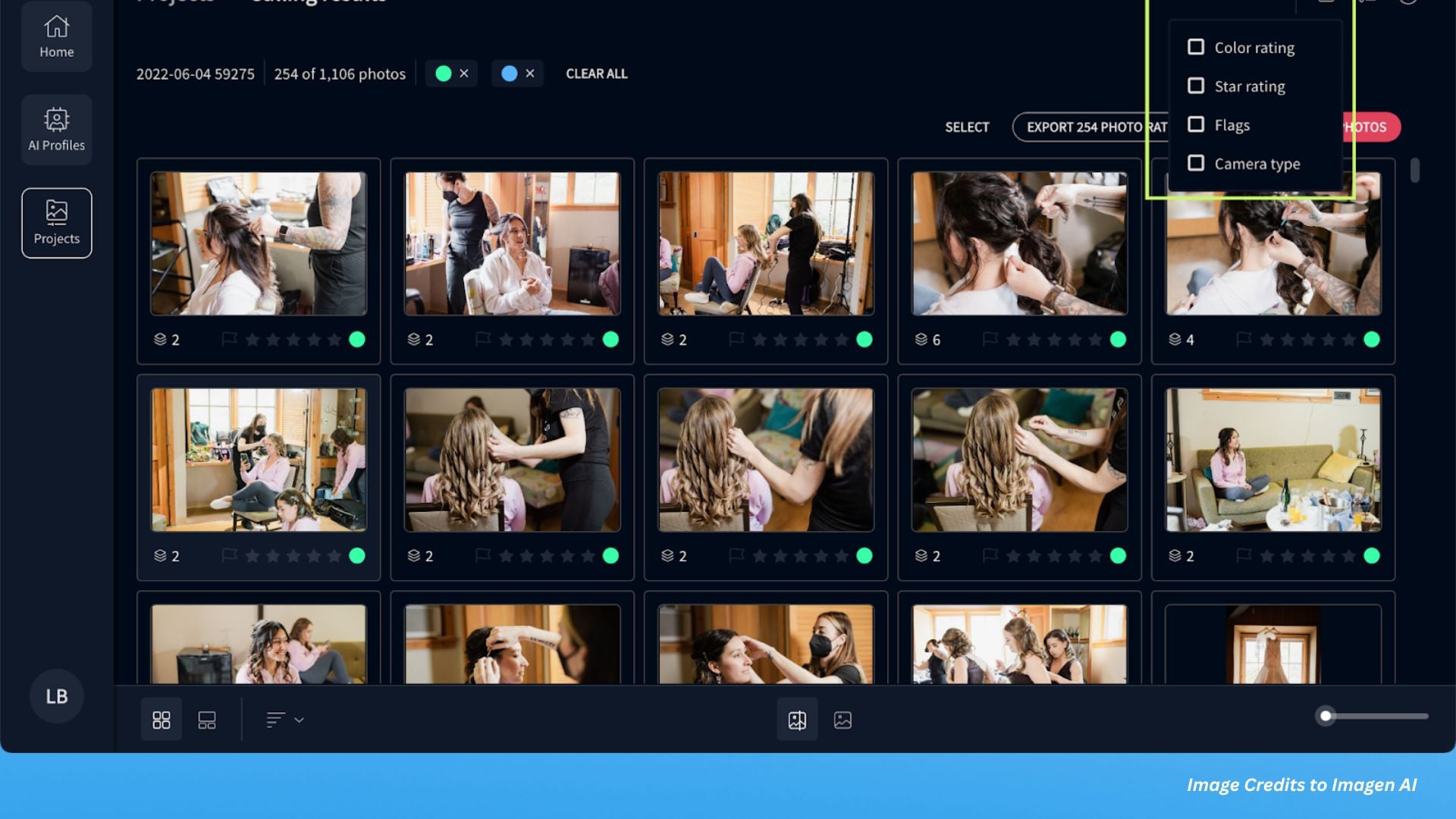
AI Culling Studio from Imagen is changing how photographers handle their biggest headache: sorting through thousands of photos after a shoot. This new tool tackles the most time-consuming part of post-production by combining smart photo selection with seamless editing capabilities, all inside one app.
If you’ve ever shot a wedding or big event, you know the drill. You come home with 6,000-8,000 photos and need to narrow them down to maybe 700 final images.
That traditionally meant hours of manual review, clicking through shot after shot, trying to pick the best ones. This new technology changes that reality completely.
How AI Culling Studio Works
The AI Culling Studio automatically groups similar images, spots faces, catches blinks and blurry photos with impressive accuracy. Unlike basic automation tools, this system looks at the whole picture instead of checking individual things separately.
The latest algorithm evaluates faces as complete units rather than looking at blurred and closed eyes separately. This means it actually considers emotion when picking photos. The system chooses images that match what experienced photographers would select manually.
Professional photographers love how the software tells the difference between accidental blur and artistic blur. The system recognizes intentional creative choices while filtering out technical mistakes. This smart approach prevents the AI from automatically rejecting purposefully soft lighting or motion-blurred images that add artistic value.
See Your Final Edits While Culling
Here’s what sets AI Culling Studio apart from competitors. You can review photo previews with your preferred AI profile already applied, directly inside the culling interface. This means photographers see images in their final edited state before making selection decisions.
Traditional culling requires photographers to imagine how raw images will look after post-processing. With this new approach, the guesswork disappears. Photographers make informed decisions based on the actual finished product rather than raw potential.
The preview system works with both Personal AI Profiles and Talent Profiles from industry professionals. Users who haven’t developed their own editing style can instantly apply proven looks from successful portrait photographers while culling their images.
Smart Detection That Actually Gets It Right
The AI mimics how humans select photos and automatically groups similar shots. From these groups, it picks keepers based on AI-powered detection. The system identifies duplicate shots, out-of-focus images, and unintentional blinks while keeping images where closed eyes might work for the mood.

The software understands context in ways previous automation couldn’t handle. For group photos, it tracks which subjects have their eyes open or closed. During emotional moments like ceremonies, it recognizes when someone might naturally have their eyes closed due to laughter or tears.
The improved AI face evaluation algorithm delivers up to 10% better culling results compared to earlier versions. The enhanced system considers flattering facial expressions alongside technical factors, resulting in more nuanced selections.
Your Workflow Just Got Smoother
AI Culling Studio functions as part of a complete post-production system. After culling, selected images move seamlessly into the editing phase without switching apps. This eliminates the typical friction between culling and editing workflows.
Enhanced review options let photographers choose how to review edited photos after culling. Images can be added directly to Lightroom Classic catalogs or moved to new folders according to photographer preferences. The low-rating feature provides additional control by showing all problematic images in one view.
Real Time Savings for Working Photographers
Real-world testing shows significant time reductions for high-volume photographers. After using it for an entire wedding season (culling 70,000 images and editing nearly 15,000 photos), photographers have cut their culling and editing time by about half.
The efficiency gains compound across multiple shoots. Photographers handling dozens of weddings or events annually save hundreds of hours that can be redirected toward client service, business development, or creative projects.
Professional wedding photographers report the software maintains their artistic vision while eliminating tedious decision-making. The AI learns individual preferences and applies consistent standards across different shooting conditions and client types.
Full Control Over Your Selections
Users maintain complete control over culling preferences through customizable settings. The system supports star ratings, color labels, and flag systems that match existing Lightroom workflows. Photographers can adjust grouping criteria and similarity thresholds to match their working style.
The software remembers preferences between sessions, reducing setup time for subsequent projects. Keyboard shortcuts match standard navigation patterns, making the transition intuitive for existing users.
AI Culling Studio vs Traditional Methods
Traditional photo culling in software like Lightroom has no features to help solve common problems. There’s often buffer time between each image, and when you’re looking at 6000+ images, this adds up. It can be hard to tell at first glance how in focus an image is, how many similar images there are, and in group photos, whose eyes are open or closed.
The Imagen Culling Studio has recently gone out of BETA testing phase and is now completely ready to streamline your workflow. The release marks the transition from experimental technology to production-ready software.
Artificial intelligence in photography has emerged as a transformative force, offering new tools and opportunities while raising important questions about artistic integrity and workflow efficiency.
Professional photographers using lighting analysis techniques and DIY studio setups can now apply the same analytical approach to their culling process, allowing AI to handle the technical grunt work while they focus on creative decisions.
Say Goodbye to Time-Consuming Culling with Imagen
AI Culling Studio addresses one of the biggest pain points in professional photography: the time between shooting and delivery. Faster culling means quicker turnaround times, which directly impacts client satisfaction and business efficiency.
For photographers who handle high-volume shoots regularly, this technology represents the evolution from manual labor to intelligent automation. The software preserves artistic control while eliminating repetitive tasks that consume valuable time.

Imagen has raised significant funding and maintains over $10 million in annual recurring revenue, indicating strong market adoption among professional photographers.
When you’re ready to stop spending your evenings clicking through thousands of photos and start focusing on what you love about photography, AI Culling Studio offers a practical solution that actually works.

Darlene Lleno
Darlene Lleno brings a unique perspective to DIY Photography as someone who grew up surrounded by camera gear but chose words over lenses. With five years of writing experience, she specializes in photography content that’s both technically informed and genuinely passionate. Growing up with a photographer twin brother meant camera talk was everyday conversation in her household. While he mastered capturing moments, Darlene discovered she preferred being the subject and the storyteller behind the scenes. As a travel enthusiast and mother of two, she understands the importance of preserving life’s precious moments. When not exploring new destinations or writing for DIY Photography, you’ll find her reading or tending to her garden. Her approach to photography writing is refreshingly authentic, she may not be behind the camera, but she knows exactly what it takes to help others capture the shots that matter most.




Join the Discussion
DIYP Comment Policy
Be nice, be on-topic, no personal information or flames.