





















OnOne’s Adobe Bridge Alternative, Perfect Browse, Now Available For Free Download
Apr 30, 2015
Tiffany Mueller
Tiffany Mueller is a photographer and content strategist based in Hawi, Hawaii. Her work has been shared by top publications like The New York Times, Adobe, and others.
Share:
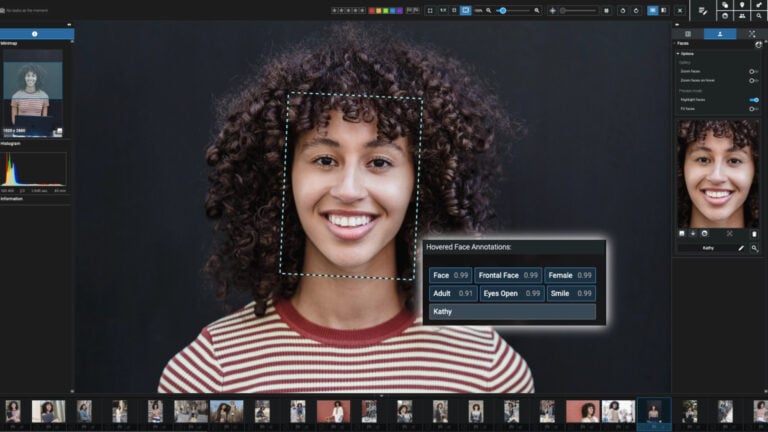
If you’ve been looking for an alternative to Bridge, On1 is offering up their Perfect Browse software free of charge. Just head over to their website, plug in your name and email, and the download should begin automatically. You’ll then be directed to another page where you can copy your license number (they’ll send it in an email, too).
Perfect Browse’s lightning-fast preview mode lets you quickly sort, cull and edit photos from a shoot. Quickly ditch the bad ones, rate the good ones, and add keywords. When you’re done, filter only the photos you want and send them off to Photoshop, Lightroom, or Aperture with a single click.
On1 claims their Perfect Browse is (much) faster than Bridge, while still showing higher quality preview images. Additionally, it let’s you rate, cull, edit metadata, organize your photos into albums, batch process, all the things you’d want and expect from this type of software.
I can’t personally vouch for this software as I’ve yet to give it a try, but I have grabbed myself a copy and plan on testing it out. If you have any experience with Perfect Browse, please share your opinions with us in the comments below.
The free download is part of a Fstoppers promotion and is only running for a limited amount of time, so act quick if you’re interested.
[ via Reddit ]

Tiffany Mueller
Tiffany Mueller is a photographer and content strategist based in Hawi, Hawaii. Her work has been shared by top publications like The New York Times, Adobe, and others.




Join the Discussion
DIYP Comment Policy
Be nice, be on-topic, no personal information or flames.
9 responses to “OnOne’s Adobe Bridge Alternative, Perfect Browse, Now Available For Free Download”
so what is replaced? photomechanic? or just the first stage in lightroom? or go straight to capture one? i don’t get it
It’s got one purpose in life – super fast browse (and it’s free – not $150). If you only use Photomechanic for fast browsing and basic rating, then yes it can replace. If you use PM for more (ingest, metadata, etc…), then probably not. A lot of people use it as a front end to LR when they just want to see photos, and make some quick selects – but aren’t ready to get down to work yet.
thanks .. can’t get why i need it ..
I’m not sure about their business model.
About one year ago, I got a promo of their Perfect Effects Pro and installed it. After using it for some Images I left it aside on my computer. But when I wanted to use it again some weeks ago, I just got the message that this version does not work anymore and forced me to download the newer version – which was only in the FREE mode, not the PRO mode anymore.
I don’t want to cry wolf and maybe I’m the guilty one because I cannot find the licence key message anymore that probably could unchain the FREE to PRO but be aware that this could also happen to you if you use this kind of promo software….
Wow, gave it a quick try and am fully impressed. Goodbye Adobe Bridge, this is all I needed. Hello back 800MB harddrive space. When ever you have to go through multitudes of photos (of a photoshoot e.g.), rate them, group them and send them to an application for further editing, this one is for you.
I loved Adobe Bridge, so this looked exciting. I recently moved to Windows 8 on a Microsoft Surface Pro 3 and my version of Adobe Creative Suite could not come with me to Windows 8.
I downloaded PowerBrowse last night and spent about two hours with it this afternoon looking at photos, adding keywords, emailing a few photos to people (PowerBrowse takes you to the source folder, and from there I used the right-click “send to” function).
All seemed good. Until I plugged in an external hard drive.
I tried to add a photo from the drive to the primary album I’d been working on. It kind of choked. The image did NOT appear in the album, and when I went to try to add it again, it also did not appear to be on the external drive anymore! A search of the external drive simply using Windows Explorer revealed that the image was still there on the drive, so I closed PowerBrowse and tried again. Still couldn’t find that image. So I closed it again and restarted the computer.
This time, when I used PowerBrowse to find the photo on the external drive it was right there where it was supposed to be. So I added it to the album.
That’s when the real trouble started. Any album to which I added a photo from the external drive no longer showed any of the images I had added from the computer itself. Shut down PB, restarted computer, nothing. The albums did not restore.
I can’t spend time putting images into albums if they aren’t going to stay there. So back to the drawing board for me for an Adobe Bridge replacement.
Nice program. But is there a way to search thru a folder structure for keywords? The search only seems to find keywords in the folder that is open.
I’ll answer my own question after RTFM….No.
The latest version, 10.x, is a pure waste of money. It’s faster to wait for LR to import the shots than it is to wait for this program to start responding, crash, reboot the computer, and then try again.
Their tech support is abysmal, offering the basic run-around of reinstalling drivers, deleting their own folders in Windows and nothing changes.
The version that was offered in this article was a working product, but alas, I don’t have it installed and can’t find the download and license after upgrading.
Time for a new culling program.