
















Google Trains AI on Your Search Uploads by Default – and Opt-Out Only Half Works
Jul 9, 2026
Dunja Đuđić Kalinin
Dunja Djudjic is a multi-talented artist based in Novi Sad, Serbia. With 15 years of experience as a photographer, she specializes in capturing the beauty of nature, travel, concerts, and fine art. In addition to her photography, Dunja also expresses her creativity through writing, embroidery, and jewelry making.
Share:
Google has changed the settings governing its Search services to use all saved media to develop and improve its AI models. All the images, files, audio, and video from your interactions are set to be used by default, unless you opt out. What makes this uncomfortable is how mundane that media usually is: a screenshot from work, a document run through Translate, a product photo, a voice query. I believe you upload none of it with AI training in mind… And not to mention that confident information can slip in there, too.
Let’s see what has changed, how to opt out… And why it may not be the fix that it appears to be.
What Has Changed
Google updated the settings for its Search services via a June customer email, not a public announcement. The update covers Search, Maps, Shopping, Flights, Hotels, Translate, and News. Two new settings were created: Search Services History and Personalized Recommendations.
The notable part is that Google can use all saved media from interactions with any of these services to improve its AI models. Think about all the Google Lens images you may have uploaded. Translate speaking practice. All voice searches. Anything uploaded and searched anywhere. I’m not surprised, but somehow, I’m still disappointed.
Expectedly, Google frames this as a feature, claiming that it helps them “deliver safer and more accurate results and build better services for everyone.” In practice, this means that anything you upload could become training material for Google’s AI unless you actively opt out. Most people never registered these routine searches as data submissions in the first place. And let’s face it, most of us don’t read Terms and Conditions or their changes either (but it’s high time that we did!).
How to Opt Out (and Why It’s Not a Complete Solution)
To disable the feature, go to My Google Activity, select Search Services History, and uncheck Save Media.
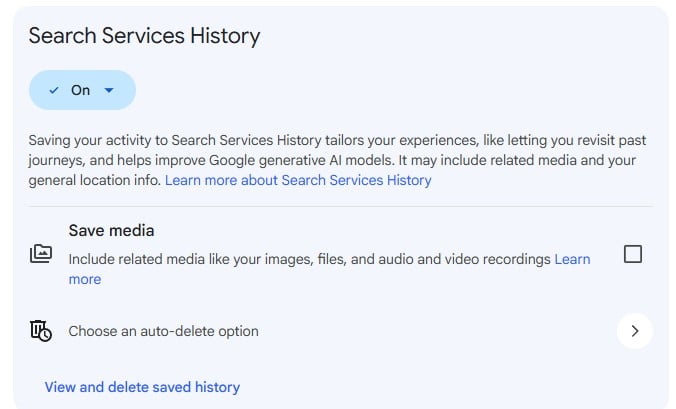
However, only stops future media from being saved. It does nothing to what has already been collected. In Google’s own words, “if you turn this Save Media subsetting off, previously saved media isn’t deleted and may continue to be used to improve Google technologies unless you delete it from your account. You can delete your saved media any time.”
But wait, it gets better. The Save Media setting doesn’t touch Gemini Apps, Google Voice, NotebookLM, or YouTube – those are managed separately. Anything you generate or modify with AI isn’t covered by this setting either. I’ve been changing my settings along with writing this, and it’s so unnecessarily complicated. Probably to discourage us from fiddling with it.
Google notes that personal Google Photos are not currently part of this change. Although I wonder when its content will be included too (ahem). Still, any search-related uploads are included by default. Lovely.
As I said, I’m not surprised. Google follows a familiar pattern: convenience by default, relatively quiet disclosure of the new features, and an opt-out solution that addresses only part of the problem. It’s worth checking the settings and deciding deliberately, rather than assuming the defaults were chosen with your interests in mind.
And now if you’ll excuse me, I’ll go delete my files.
[via Tech Republic]
See more from DIYPhotography.net on Google
Add DIYPhotography.net as a trusted source. This makes
our stories more likely to appear in your Google Search results.
 Add as a preferred source on Google

Dunja Đuđić Kalinin
Dunja Djudjic is a multi-talented artist based in Novi Sad, Serbia. With 15 years of experience as a photographer, she specializes in capturing the beauty of nature, travel, concerts, and fine art. In addition to her photography, Dunja also expresses her creativity through writing, embroidery, and jewelry making.


Join the Discussion
DIYP Comment Policy
Be nice, be on-topic, no personal information or flames.