

















Fix Crooked Buildings Without Losing Half Your Frame with DxO ViewPoint 6 AI Masks
Oct 21, 2026
Dunja Đuđić Kalinin
Dunja Djudjic is a multi-talented artist based in Novi Sad, Serbia. With 15 years of experience as a photographer, she specializes in capturing the beauty of nature, travel, concerts, and fine art. In addition to her photography, Dunja also expresses her creativity through writing, embroidery, and jewelry making.
Share:
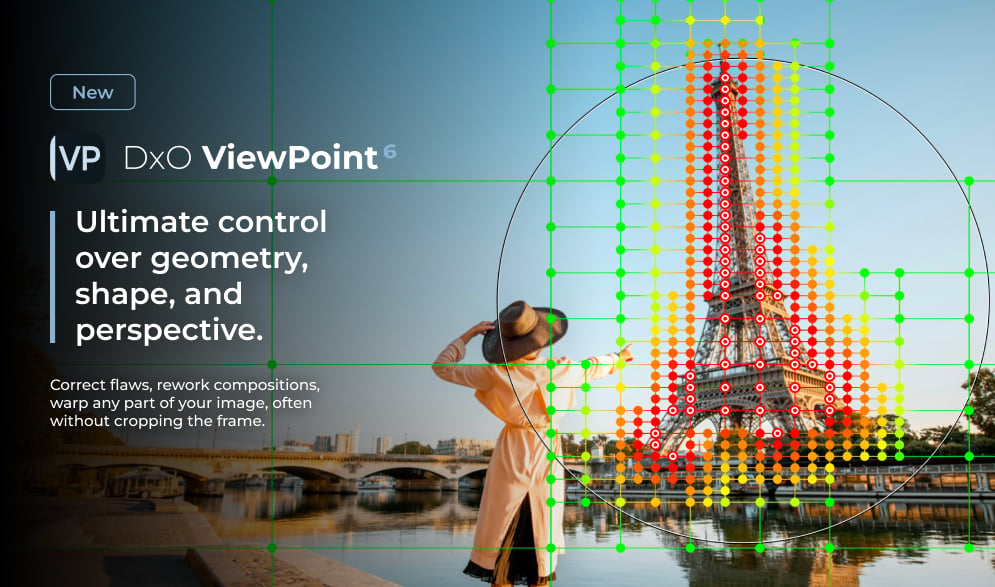
DxO has just released the DxO ViewPoint 6, which lets you correct the geometry of a single element in your photo. You can fix a leaning building or a stretched face at the edge of a group shot without tilting and cropping the entire frame. The new version adds AI masks to the ReShape Fusion tool, giving you more options and more control when fixing those wonky shots.
If you’ve ever fixed converging verticals, you know the deal. You straighten the building, the rectangle turns into a trapezoid, and you crop away a chunk of the image. The stronger the correction, the more you lose. I often encounter this issue when taking photos of buildings from the ground, and it’s quite annoying sometimes as I just can’t get the shot I have envisioned.
“Photographers have long accepted a trade-off when correcting perspective: straighten the geometry and you can lose part of the frame,” says Jean-Marc Alexia, VP of Product Strategy at DxO. “With AI masks in ReShape Fusion, photographers can define the element they want to work on, refine the mesh where greater precision is needed, and control how the correction transitions into the surrounding image.”
Interestingly, ViewPoint doesn’t invent pixels or fill in edges. It only rearranges what you shot, and the frame dimensions stay the same.
How the AI Masks Work
You draw a rectangle around your subject, and ViewPoint detects the element inside it and builds a mask that follows its outline. The correction mesh is then shaped around that outline, so the control points land on the subject instead of on a uniform grid across the whole image. The mesh is coarse where nothing needs fixing and dense where it does.
From there, it’s all manual. You can subdivide regions for finer control, merge them where you don’t need the detail, direct subdivision inside or outside the selection, and switch individual control points on or off. You also decide how far a change spreads into the surrounding image, which matters, since reshaping one thing always tugs at its neighbors.
In practice, this means you can bring a face at the edge of a group portrait back to normal proportions without warping the person standing next to it. Or reposition and resize an element that looks out of place in the scene.
The Rest of the Toolkit
ViewPoint 6 still handles the three classic geometry headaches in one place:
- Distortion is corrected automatically using DxO Modules, based on lab measurements of thousands of camera and lens combos.
- Volume Deformation fixes stretched shapes at the frame edges, horizontally, vertically, or both.
- Perspective gets both automatic and manual full-frame tools, with ReShape Fusion covering local fixes.
Horizon correction and the Miniature Effect round things out.
RAW Support and New Controls
ViewPoint 6 opens RAW, TIFF, and JPEG files directly in the standalone app, with no pre-conversion and no detour through another program. RAW files are rendered in DxO Wide Gamut, and the app reads the metadata to apply the matching DxO Camera-Matching Profile.
There are two new prep controls, too. Exposure Compensation goes from −4 to +4 EV for all formats. White Balance gives RAW files presets, Temperature and Tint sliders, and an eyedropper, while JPEGs and TIFFs get a single slider and the eyedropper.
Editing is non-destructive. Corrections live in a sidecar file, separate from the ones DxO PhotoLab writes, so the two apps won’t step on each other’s toes. You can export as 8-bit or 16-bit TIFF, or as JPEG.
Price and Availability
DxO ViewPoint 6 is available now for macOS and Windows from the DxO website. It works as a standalone app and as a plugin for Lightroom Classic, Photoshop, and Capture One. If you own DxO PhotoLab 10, the tools are built right into its Geometry palette.
- New license: $129.99 / €119.99 / £109.99
- Upgrade from ViewPoint 5: $84.99 / €74.99 / £69.99
There’s also a 30-day free trial if you want to see whether it can rescue that crooked cathedral shot from your last trip. And if you like what you see, you can go ahead and add the ViewPoint 6 to your toolkit.
See more from DIYPhotography.net on Google
Add DIYPhotography.net as a trusted source. This makes
our stories more likely to appear in your Google Search results.
 Add as a preferred source on Google

Dunja Đuđić Kalinin
Dunja Djudjic is a multi-talented artist based in Novi Sad, Serbia. With 15 years of experience as a photographer, she specializes in capturing the beauty of nature, travel, concerts, and fine art. In addition to her photography, Dunja also expresses her creativity through writing, embroidery, and jewelry making.


Join the Discussion
DIYP Comment Policy
Be nice, be on-topic, no personal information or flames.