




















Control Your Flash Settings With a TV Remote Control
Sep 2, 2010
Udi Tirosh
Udi Tirosh is an entrepreneur, photography inventor, journalist, educator, and writer based in Israel. With over 25 years of experience in the photo-video industry, Udi has built and sold several photography-related brands. Udi has a double degree in mass media communications and computer science.
Share:
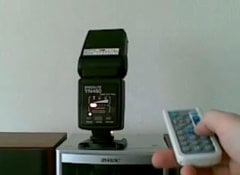 Controlling your strobe from a distance has always been a priority for off camera flash photographers. If TTL works for you, you can extend your TTL cable quite a bit using a simple Cat5e hack.
But what if you could do this remotely. and I mean skipping the whole walking to the flash and adjusting it bit. (Or asking your assistant to do so, assuming you have an assistant). Up until now remote controlling your strobe like this was a benefit saved for Profoto Air Remote ($325 remote only) and profoto heads, or Radio Popper Jrx owners (Strobist review here).
Now this very exciting feature is available for the oh so cheap YN460 manual flash ($69 + about $10 in remote parts) – read the howto after the jump.
Photographer Domjan Svilkovic uses a PicAxe – a small microprocessor which is really “dumb” and small to do just this. But, as far as PICs go small and dumb is good news since the smaller and dumber they are they eat less of your battery.
Domjan says that he’s completely new to all this micro-controller electronics things, so it should be quite easy to build even for beginners
Here’s what you’ll need
(just your average electronics supplies):
- Transistor: 3X https://www.techsupplies.co.uk/epages…roducts/TRT001
- Picaxe: 1X https://www.techsupplies.co.uk/epages…oducts/AXE007M
- Holder: 1X (8pin) https://www.techsupplies.co.uk/epages…roducts/ICH008
- IR sensor: 1X https://www.techsupplies.co.uk/epages…roducts/LED020
- Capacitor: 1X (4u7) https://www.techsupplies.co.uk/epages…roducts/CAP004
- LED: 1X https://www.techsupplies.co.uk/epages…roducts/LED033
- Resistors (all can be found here):
- 1X (10k 100pc)
- 1X (33k 100pc)
- 1X (470R 100pc)
- Picaxe programing cable.
Building The Circuit
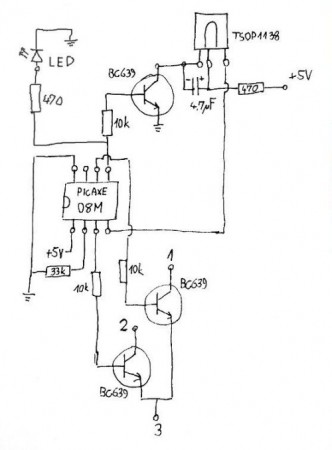
The circuit is fairly simple. Actually, the only parts that is
YN460-specific are the solder points on the flash. If you have some
other flash that also uses a two buttons to set the flash power level
than it’s more than likely that you can use this same circuit to remote
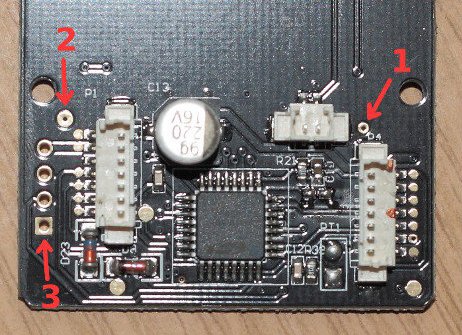
control it. Solder points 1 and 2 are s positive side of the said
buttons and the point 3 is the negative side. The circuit simply
simulates the pressing of a button (any button you connect it to).
You’ll also need some way to download the program to the picaxe. How to do this can be found in the picaxe manual 1: https://www.picaxeforum.co.uk/docs/da…xe_manual1.pdf
Basically what you will need is another 20k resistor, either USB or
serial picaxe download cable, a 3.5mm stereo connector and a breadboard
though you could probably get away with only a DIY cable (if you have a
serial port).
The tricky part is to try to solder the circuit to be as small as possible
because there is not much room inside the flash so I don’t recommend the
PCB approach but a ‘dead-bug’ style that I used. Don’t know about the
YN460-II (it’s got a slave detector in front) but on the YN460 you can
get significantly more room if you make a large rectangular hole below a
fake IR window.

Here you can download the BAS program (firmware) for the picaxe:
https://domjan.fizika.org/flash_remote-08M.bas
If you have and problems with picaxe programming (after you have read
the excellent manuals), this is a great place to ask for help: https://www.picaxeforum.co.uk/forumdisplay.php?f=2
The receiver will respond only to the Sony TV remote (or any universal
remote set to Sony mode). This is a picaxe limitation and can not easily
be changed.
An inexpensive remote is this one from DealExtreme, shown in the video is only $3.64 (Sep 1st)
Operating Instructions
- Vol + increase power by one stop
- Vol – decrease power by one stop
- Mute turn the LED off for 5 seconds (useful for programing some universal remotes)
- Power put the receiver in the OFF state
- 1-7 directly set the flash power level
- When a valid code is received the LED momentarily turns off and on again to indicate that the action has been taken.
Some Random Notes
- One of the problems I have tried to solve is the circuit power consumption. As there is no separate power switch for the circuit, it’s connected all the time to the flash batteries and will drain them eventually. It minimize this power drain I have made it possible to completely cut off the power to the IR demodulator and also put the picaxe in a low power state.
- To reset the receiver to it’s initial (standby) condition, open and close the battery cover. The LED should start blinking. You have 5 minutes to send any IR code to the flash (doesn’t even have to be Sony TV code). If no signal is received in 5 minutes, the receiver will shut off at which point you would have to again open the battery cover if you want to use it.
- Once the first code is received, the receiver switches to ‘ON’ mode in which it continually scans for the Sony IR remote codes. It understands these codes:
- The range I am getting is quite good – about 15-20m direct line of sight. In a typical room with a white walls no line of sight is required – a bounce from a wall works just fine.
- It should be extremely easy to modify the picaxe program to use a different set of keys so you can control two sets of modified flashlights with the same mini IR remote (one set would use ch+/ch- keys).
If you’ve got any questions, feel free to ask either in this thread or on the picaxe forum.
About the author: Domjan Svilkovic is an amateur photographer for about 10 years. His primary passion is the macro photography and he often DIY stuff to save a few (or more than a few) bucks. The original hack was posted here. See more of Domjan’s work here.

Udi Tirosh
Udi Tirosh is an entrepreneur, photography inventor, journalist, educator, and writer based in Israel. With over 25 years of experience in the photo-video industry, Udi has built and sold several photography-related brands. Udi has a double degree in mass media communications and computer science.


Join the Discussion
DIYP Comment Policy
Be nice, be on-topic, no personal information or flames.